Azure 2022: A Year in Review – Major Service Launches and Features

Introduction

2022 has been an incredible year for Microsoft Azure as the company released several game-changing services and feature upgrades. Let’s take a walk through some major launches that transformed capabilities for cloud computing.

1. Azure Container Apps

A fully managed serverless container service introducing:

Key Features:

  • Scale based on HTTP traffic, events, or KEDA scalers
  • Built-in Dapr integration
  • Microservices architectures support
  • Automatic scaling to zero
  • Native DevOps tooling integration

Implementation Example:


resources:
  container-app:
    type: Microsoft.App/containerApps
    properties:
      configuration:
        ingress:
          external: true
          targetPort: 80
        dapr:
          enabled: true
      template:
        containers:
          - image: myapp:latest
            name: mycontainer

2. Azure Chaos Studio

New service for resilience testing:

Capabilities:

  • Controlled fault injection
  • Managed disaster scenarios
  • Application resilience testing
  • Service-specific faults
  • Custom experiment design

3. Azure Managed Grafana

Enterprise-grade observability platform:

Features:

  • Fully managed Grafana service
  • Azure Monitor integration
  • Built-in high availability
  • Enterprise security features
  • Automated updates

4. Azure Cognitive Services Updates

Enhanced AI capabilities including:

New Features:

  • Custom neural voice
  • Document intelligence
  • Improved language understanding
  • Enhanced speech recognition
  • Multilingual capabilities

5. Azure Cosmos DB Improvements

Significant database enhancements:

Updates:

  • Integrated cache
  • Role-based access control
  • Serverless container improvements
  • Enhanced backup features
  • Cost optimization tools

6. Azure Arc Enabled SQL Managed Instance

Hybrid database management advancement:

Key Features:

  • On-premises SQL management
  • Consistent cloud experience
  • Automated updates
  • Built-in high availability
  • Elastic scaling

7. Microsoft Purview (formerly Azure Purview)

Enhanced data governance platform:

Capabilities:

  • Unified data governance
  • Automated data discovery
  • Sensitive data classification
  • Data lineage tracking
  • Compliance management

8. Azure Spring Cloud Enterprise

Enterprise Java development platform:

Features:

  • VMware Tanzu integration
  • Advanced monitoring
  • Auto-scaling
  • Blue-green deployments
  • Enhanced security

Security Enhancements

Azure Defender Updates:

  1. Enhanced threat protection
  2. Container security improvements
  3. IoT security features
  4. Extended detection capabilities
  5. Automated response options

Example Security Configuration:

{
    "properties": {
        "securitySettings": {
            "enabledForStorage": true,
            "enabledForContainers": true,
            "enabledForKeyVaults": true
        }
    }
}

Cost Management Features

New Capabilities:

  • Enhanced cost analysis
  • Budget alerts improvements
  • Resource optimization recommendations
  • Reservation management tools
  • Cost allocation features

Performance Improvements

Azure Virtual Machines:

  1. New instance types
  2. Enhanced networking
  3. Improved storage performance
  4. Better CPU optimization
  5. GPU instances updates

Industry Solutions

Healthcare:

  • HIPAA/HITRUST compliance
  • Medical imaging support
  • Healthcare APIs
  • Patient data analytics
  • Telehealth capabilities

Financial Services:

  • Enhanced security
  • Blockchain integration
  • Payment processing
  • Fraud detection
  • Regulatory compliance

Developer Tools

Azure DevOps Updates:

  • Pipeline improvements
  • Enhanced testing tools
  • Better artifact management
  • Improved security scanning
  • Collaboration features

Code Example – DevOps Pipeline:

trigger:
- main

pool:
  vmImage: 'ubuntu-latest'

steps:
- task: AzureWebApp@1
  inputs:
    azureSubscription: 'Azure subscription'
    appName: 'myWebApp'
    package: '$(System.DefaultWorkingDirectory)/**/*.zip'

Networking Advancements

Azure Virtual Network Updates:

  • Enhanced DDoS protection
  • Improved load balancing
  • Network security features
  • Private link enhancements
  • Virtual WAN improvements

Storage Innovations

Azure Storage Updates:

  • Enhanced performance tiers
  • Improved redundancy options
  • Better lifecycle management
  • Cost optimization features
  • Enhanced security controls

Best Practices for Implementation

  1. Planning:
    • Assessment of requirements
    • Resource planning
    • Cost estimation
    • Security evaluation
    • Performance benchmarking
  2. Migration Strategy:
    • Phased approach
    • Testing procedures
    • Rollback plans
    • Monitoring setup
    • User training
  3. Optimization:
    • Performance tuning
    • Cost management
    • Security hardening
    • Automation implementation
    • Regular reviews

Future Outlook

Anticipated developments:

  1. Enhanced AI/ML capabilities
  2. Improved hybrid solutions
  3. Advanced security features
  4. Better cost optimization
  5. Enhanced developer experience

Conclusion

2022 was a transformative year for Azure, with significant advancements across compute, storage, networking, and security. These new features and services demonstrate Microsoft’s commitment to innovation while maintaining enterprise-grade reliability and security.
Organisations should carefully analyze these new services and features in order to get a good leverage from their cloud strategy. Always keep yourself updated with the best practices and latest documentation of Azure as these services are constantly being evolved.
Always keep in mind that cloud services change really fast. One has to periodically check his implementations for updates regarding Azure features and improvements in functionality that could be useful and leverage new things available on it.

Hope you enjoyed the post.

Cheers

Ramasankar Molleti

LinkedIn

AWS 2022: A Year in Review – Major Service Launches and Features

Introduction

2022 was a transformative year for AWS, with many significant launches and feature enhancements. Let’s dive into the most impactful AWS services and features that were introduced during this period.

1. Amazon Inspector for Container Images


AWS significantly expanded its security capabilities with the launch of Amazon Inspector support for container images. This brought in the following features:

  • Automated vulnerability scanning for container images
  • Integration with Amazon ECR
  • Continuous monitoring and assessment
  • Detailed severity scoring and remediation guidance

2. AWS Private 5G
A revolutionary service that allows enterprises to deploy and manage their own private 5G networks:

Key Features:

  • Simplified deployment of private mobile networks
  • Pay-as-you-go pricing model
  • Automated network management
  • Integration with AWS services
  • Enterprise-grade security

3. Amazon SageMaker Canvas
A major step forward in no-code machine learning: Capabilities:


Capabilities:

Business insights generation without coding

Visual interface for building ML models

Quick data import and preparation

Automated model building

Integration with existing SageMaker workflows

4. AWS Lake Formation Cross-Account Access

Enhanced data lake management with:

  • Simplified cross-account access
  • Centralized permission management
  • Fine-grained access controls
  • Automated data discovery
  • Enhanced security compliance

5. Amazon CloudWatch RUM (Real-User Monitoring)
A major addition to application monitoring:

Features:

  • Real-time user experience monitoring
  • Client-side performance tracking
  • User behavior analytics
  • Error tracking and debugging
  • Custom metric creation

6. AWS Amplify Studio

A visual development environment for creating full-stack applications:

Capabilities:

  • Visual UI development
  • Ready-to-use components
  • Backend integration
  • Data binding
  • CI/CD pipeline integration

7. Amazon FSx for OpenZFS

A new file system offering:

  • Fully managed OpenZFS file systems
  • High performance
  • Cost-effective storage
  • Native ZFS features
  • Snapshot capabilities

8. AWS IoT TwinMaker

Digital twin creation service featuring:

  • 3D visualization
  • Real-time data integration
  • Scalable modeling
  • Device connectivity
  • Analytics integration

9. Amazon CodeCatalyst

A unified software development service:

Key Features:

  • Project blueprints
  • Automated CI/CD
  • Issue tracking
  • Source code management
  • Development environment management

10. AWS Clean Rooms

A collaborative data analysis service:

  • Secure data collaboration
  • Privacy controls
  • Customizable analysis
  • Query controls
  • Audit logging

Technical Deep Dive: Amazon EKS Anywhere Updates

One of the biggest technical improvements was in EKS Anywhere:

# Example EKS Anywhere Cluster Configuration
apiVersion: anywhere.eks.amazonaws.com/v1alpha1
kind: Cluster
metadata:
  name: my-cluster
spec:
  controlPlaneConfiguration:
    count: 3
    machineGroupRef:
      kind: VSphereMachineConfig
      name: my-control-plane
  workloadClusters:
    count: 3
    machineGroupRef:
      kind: VSphereMachineConfig
      name: my-worker-nodes

Security Enhancements

AWS significantly improved its security offerings:

  1. AWS IAM Identity Center
    • Single sign-on management
    • Fine-grained permissions
    • Multi-account access
  2. AWS Certificate Manager improvements
    • Automated certificate renewal
    • Private certificate authority
    • Regional expansion

Cost Optimization Features

New tools for managing AWS costs:

  1. AWS Cost Categories
    • Custom categorization
    • Automated tag mapping
    • Cost allocation
  2. AWS Savings Plans enhancements
    • More service coverage
    • Flexible commitment options
    • Enhanced reporting

Best Practices and Implementation Guidelines

When adopting these new features:

  1. Start with a pilot project
  2. Document configuration changes
  3. Train team members
  4. Monitor performance metrics
  5. Implement proper security controls

Impact on Different Industries

Financial Services
  • Enhanced security features
  • Improved compliance tools
  • Better data analytics capabilities
Healthcare
  • HIPAA-compliant services
  • Enhanced data protection
  • Improved patient data management
Retail
  • Better customer analytics
  • Enhanced scalability
  • Improved inventory management

Looking Forward

These 2022 features laid the groundwork for:

  1. Enhanced AI/ML capabilities
  2. Improved hybrid cloud solutions
  3. Better security and compliance
  4. More cost-effective operations
  5. Simplified management interfaces

Conclusion

2022 has been an innovation-heavy year for AWS, from new services to features that have advanced the use of the cloud in security, machine learning, IoT, and application development. In all, these extensions have made AWS more powerful, more flexible, and easier to use for organizations of all sizes.
The features announced in 2022 show AWS’s passion for innovation that also ensures security, scalability, and ease of use. Organizations intent on modernizing their infrastructure have to carefully take note of these newly released services and features for some possible benefits it could bring their operations.
Remember to keep yourself updated with AWS documentation and best practices since these services are in continuous evolution, and new features are added regularly.

Hope you enjoyed the post.

Cheers

Ramasankar Molleti

LinkedIn

Kubernetes GitOps with ArgoCD: A 2021 Deep Dive

Introduction

2021 saw GitOps emerge as a leading practice for Kubernetes deployments, with ArgoCD becoming the de facto tool for implementation. Let’s explore how to implement GitOps effectively using ArgoCD in Kubernetes.

What is GitOps?

GitOps is a declarative approach to Kubernetes cluster management and application delivery where:

  • Git repository is the single source of truth
  • Desired state is described in YAML manifests
  • Changes are automatically synchronized
  • Drift detection and remediation are automated

Setting Up ArgoCD

1. Installation

# Install ArgoCD in k8s cluster
kubectl create namespace argocd
kubectl apply -n argocd -f https://raw.githubusercontent.com/argoproj/argo-cd/v2.1.0/manifests/install.yaml

2. Basic Application Deployment

apiVersion: argoproj.io/v1alpha1
kind: Application
metadata:
  name: my-app
  namespace: argocd
spec:
  project: default
  source:
    repoURL: https://github.com/my-org/my-app.git
    targetRevision: HEAD
    path: k8s
  destination:
    server: https://kubernetes.default.svc
    namespace: my-app
  syncPolicy:
    automated:
      prune: true
      selfHeal: true

GitOps Best Practices

1. Repository Structure

├── base
│   ├── deployment.yaml
│   ├── service.yaml
│   └── kustomization.yaml
├── overlays
│   ├── development
│   │   └── kustomization.yaml
│   └── production
│       └── kustomization.yaml

2. Environment Management with Kustomize

# base/kustomization.yaml
apiVersion: kustomize.config.k8s.io/v1beta1
kind: Kustomization
resources:
  - deployment.yaml
  - service.yaml

# overlays/production/kustomization.yaml
apiVersion: kustomize.config.k8s.io/v1beta1
kind: Kustomization
bases:
  - ../../base
patches:
  - path: production-values.yaml

Advanced Features

1. Sync Strategies

syncPolicy:
  automated:
    prune: true
    selfHeal: true
  syncOptions:
    - CreateNamespace=true
    - PrunePropagationPolicy=foreground
    - PruneLast=true

2. Health Checks

spec:
  health:
    healthCheckPath: /health
    healthCheckTimeout: 60s
    healthyThreshold: 1
    unhealthyThreshold: 3

Security Considerations

1. RBAC Configuration

apiVersion: rbac.authorization.k8s.io/v1
kind: Role
metadata:
  name: argocd-role
rules:
- apiGroups: ["apps"]
  resources: ["deployments"]
  verbs: ["get", "list", "watch", "create", "update", "patch", "delete"]

2. Secrets Management

apiVersion: bitnami.com/v1alpha1
kind: SealedSecret
metadata:
  name: mysecret
spec:
  encryptedData:
    API_KEY: AgBy8hCK8...

Monitoring and Observability

1. Prometheus Integration

apiVersion: monitoring.coreos.com/v1
kind: ServiceMonitor
metadata:
  name: argocd-metrics
spec:
  selector:
    matchLabels:
      app.kubernetes.io/name: argocd-metrics
  endpoints:
  - port: metrics

2. Logging Configuration

apiVersion: v1
kind: ConfigMap
metadata:
  name: argocd-cm
data:
  logging.level: debug
  logging.format: json

Performance Optimization

1. Resource Management

spec:
  template:
    spec:
      containers:
      - name: application
        resources:
          requests:
            memory: "64Mi"
            cpu: "250m"
          limits:
            memory: "128Mi"
            cpu: "500m"

2. Sync Wave Control

metadata:
  annotations:
    argocd.argoproj.io/sync-wave: "2"

Disaster Recovery

1. Backup Configuration

apiVersion: velero.io/v1
kind: Backup
metadata:
  name: argocd-backup
spec:
  includedNamespaces:
  - argocd
  storageLocation: default
  volumeSnapshotLocations:
  - default

Best Practices for Production

  1. Version Control:
    • Use semantic versioning
    • Tag releases properly
    • Maintain changelog
  2. Application Structure:
    • Separate config from code
    • Use Helm or Kustomize
    • Implement progressive delivery
  3. Security:
    • Implement RBAC
    • Use sealed secrets
    • Regular security audits
  4. Monitoring:
    • Set up alerts
    • Monitor sync status
    • Track deployment metrics

Common Challenges and Solutions

  1. Multi-Cluster Management:
apiVersion: argoproj.io/v1alpha1
kind: AppProject
metadata:
  name: multi-cluster
spec:
  destinations:
  - namespace: '*'
    server: https://cluster1.example.com
  - namespace: '*'
    server: https://cluster2.example.com

2. Private Repository Access:

apiVersion: v1
kind: Secret
metadata:
  name: private-repo
  namespace: argocd
stringData:
  url: https://github.com/my-org/private-repo
  password: <token>

79 words

clearHumanize AI

Conclusion
GitOps with ArgoCD in 2021 marked a radical shift in organizations’ way of handling their Kubernetes deployments. The key takeaways include:

  • Improved security through declarative configuration
  • Better auditing and compliance
  • Automated drift detection and correction
  • Simplified rollback procedures
  • Enhanced collaboration through Git workflows

For organizations looking to implement GitOps:

  1. Start with a simple application
  2. Gradually expand to more complex scenarios
  3. Implement proper security measures
  4. Set up comprehensive monitoring
  5. Train teams on GitOps practices

The future of Kubernetes deployments is increasingly GitOps-driven, and the tooling and best practices will be led by ArgoCD.

Hope you enjoyed the post.

Cheers

Ramasankar Molleti

LinkedIn

2021 Cloud Provider Comparison: AWS vs Azure vs GCP – Key Features and Leadership Areas

Introduction

2021 was an important year for cloud computing, with major developments across AWS, Azure, and GCP. Let’s dive into the key features and compare where each provider excelled.

Service Leadership by Provider

AWS Leadership Areas

  1. Container Services
  • Amazon ECS and EKS showed maturity in:
    • Advanced scalability features
    • Deeper integration with AWS services
    • Enhanced security controls
    • Cost optimization capabilities
  1. Serverless Computing
  • AWS Lambda remained dominant due to:
    • Advanced cold start improvements
    • Container image support
    • Enhanced debugging capabilities
    • Extension of maximum runtime
  1. Database Services


-- Amazon Aurora improvements
CREATE DATABASE my_database
WITH GLOBAL TABLES
ENABLED IN ('us-east-1', 'eu-west-1');

Azure Leadership Areas

  1. Hybrid Cloud Solutions
  • Azure Arc excelled with:
    • Multi-cloud management
    • On-premises integration
    • Kubernetes deployment flexibility
    • Enhanced security features
  1. Machine Learning Platforms
  • Azure ML leadership through:
    • AutoML advancements
    • Enhanced MLOps capabilities
    • Improved model monitoring
    • Better integration with other services
  1. Identity Management
{
  "azureAD": {
    "singleSignOn": true,
    "conditionalAccess": true,
    "multiFactorAuth": {
      "enabled": true,
      "methods": ["app", "sms", "call"]
    }
  }
}

GCP Leadership Areas

  1. Big Data Analytics
  • BigQuery dominance through:
    • Enhanced ML capabilities
    • Improved query performance
    • Better cost controls
    • Advanced data sharing
  1. AI and Machine Learning
  • Superior AI services including:
    • Enhanced AutoML capabilities
    • Advanced Vision AI
    • Natural Language improvements
    • Speech-to-Text advancements
  1. Kubernetes Services
apiVersion: v1
kind: Service
metadata:
  name: gke-service
  annotations:
    cloud.google.com/neg: '{"ingress": true}'
spec:
  type: LoadBalancer

Feature Comparison Matrix

Compute Services

FeatureAWSAzureGCPVM Types400+200+150+Container SupportStrongStrongExcellentServerlessExcellentGoodGoodBare MetalYesLimitedNo

Storage Services

FeatureAWSAzureGCPObject StorageS3 (Excellent)Blob (Good)Cloud Storage (Good)Block StorageEBS (Excellent)Managed Disks (Good)Persistent Disk (Good)File StorageEFS (Good)Files (Excellent)Filestore (Good)

Database Services

FeatureAWSAzureGCPRelationalAurora (Excellent)SQL DB (Good)Cloud SQL (Good)NoSQLDynamoDB (Excellent)Cosmos DB (Excellent)Bigtable (Good)Data WarehouseRedshift (Good)Synapse (Good)BigQuery (Excellent)

Cost Comparison

Virtual Machines

# Example cost comparison for general-purpose VMs (2021 pricing)
costs = {
    'AWS_t3.xlarge': '$0.1664 per hour',
    'Azure_D4s_v3': '$0.192 per hour',
    'GCP_n2-standard-4': '$0.1896 per hour'
}

Performance Benchmarks

Database Performance

  1. Transaction Processing
  • AWS Aurora: 200,000 TPS
  • Azure SQL: 175,000 TPS
  • Google Cloud SQL: 160,000 TPS

Storage Performance

  1. Object Storage Latency
  • AWS S3: 100-200ms
  • Azure Blob: 120-220ms
  • Google Cloud Storage: 110-210ms

Security Features

AWS Security Leadership

  1. AWS Shield
  • Advanced DDoS protection
  • WAF integration
  • Real-time metrics
  • 24/7 support

Azure Security Leadership

  1. Azure Sentinel
  • SIEM capabilities
  • AI-powered analysis
  • Threat intelligence
  • Automated response

GCP Security Leadership

  1. Cloud Armor
  • DDoS protection
  • WAF capabilities
  • Edge security
  • Global load balancing

Market Position 2021

Market Share

  1. AWS: ~32%
  2. Azure: ~20%
  3. GCP: ~9%

Unique Differentiators

AWS

  1. Broadest service portfolio
  2. Most mature marketplace
  3. Largest global infrastructure

Azure

  1. Best hybrid cloud solutions
  2. Strong enterprise integration
  3. Comprehensive compliance offerings

GCP

  1. Leading AI/ML capabilities
  2. Superior data analytics
  3. Advanced networking technologies

Recommendations by Use Case

Enterprise Applications

  • Recommendation: Azure
  • Reasons:
    • Strong enterprise integration
    • Comprehensive hybrid solutions
    • Familiar Microsoft ecosystem

Startups

  • Recommendation: AWS
  • Reasons:
    • Extensive free tier
    • Comprehensive documentation
    • Large community support

Data Analytics

  • Recommendation: GCP
  • Reasons:
    • Superior analytics tools
    • BigQuery capabilities
    • ML integration

Conclusion

2021 showed each cloud provider developing distinct strengths:

  1. AWS: Maintained leadership in core infrastructure and serverless computing
  2. Azure: Excelled in hybrid cloud and enterprise integration
  3. GCP: Led in data analytics and machine learning

Organizations should:

  • Evaluate specific use case requirements
  • Consider multi-cloud strategies
  • Focus on cloud-native architectures
  • Monitor evolving service offerings
  • Plan for cost optimization

The cloud market matured further in 2021, with all the providers providing solutions for different use cases that are compelling. One needs to understand these differences to make informed decisions about cloud adoption and migration strategies.
Remember that cloud services evolve rapidly, and regular re-evaluation of cloud strategies is essential for maintaining competitive advantage and cost efficiency.

Hope you enjoyed the post.

Cheers

Ramasankar Molleti

LinkedIn

AWS CDK (Python) How to Create EKS Cluster

In my previous post, I have discussed about how to create vpc, subnets, internet gateway, nat gateway using AWS CDK(Python). In this post, we will be discussing about how to create EKS (k8s) cluster. This is requested by many of my followers, so I would like to write a blog to help the community.

Create a new stack called EKSStack and use existing vpc from other stack (vpc: ec2.Vpc)

class EKSStack(core.Stack):

    def __init__(self, scope: core.Construct, construct_id: str, vpc: ec2.Vpc, **kwargs) -> None:
        super().__init__(scope, construct_id, **kwargs)

Create an IAM role for worker groups and kubernetes RBAC configuration

eks_role = iam.Role(self, "eksadmin", assumed_by=iam.ServicePrincipal(service='ec2.amazonaws.com'),
                            role_name='eks-cluster-role', managed_policies=
                            [iam.ManagedPolicy.from_aws_managed_policy_name(managed_policy_name='AdministratorAccess')])
        eks_instance_profile = iam.CfnInstanceProfile(self, 'instanceprofile',
                                                      roles=[eks_role.role_name],
                                                      instance_profile_name='eks-cluster-role')

Once the role is created, let us create EKS Cluster and attach the role as masters_role.

 cluster = eks.Cluster(self, 'prod', cluster_name='eks-demo-cluster',
                              version=eks.KubernetesVersion.V1_19,
                              vpc=vpc,
                              vpc_subnets=[ec2.SubnetSelection(subnet_type=ec2.SubnetType.PRIVATE)],
                              default_capacity=0,
                              masters_role=eks_role)

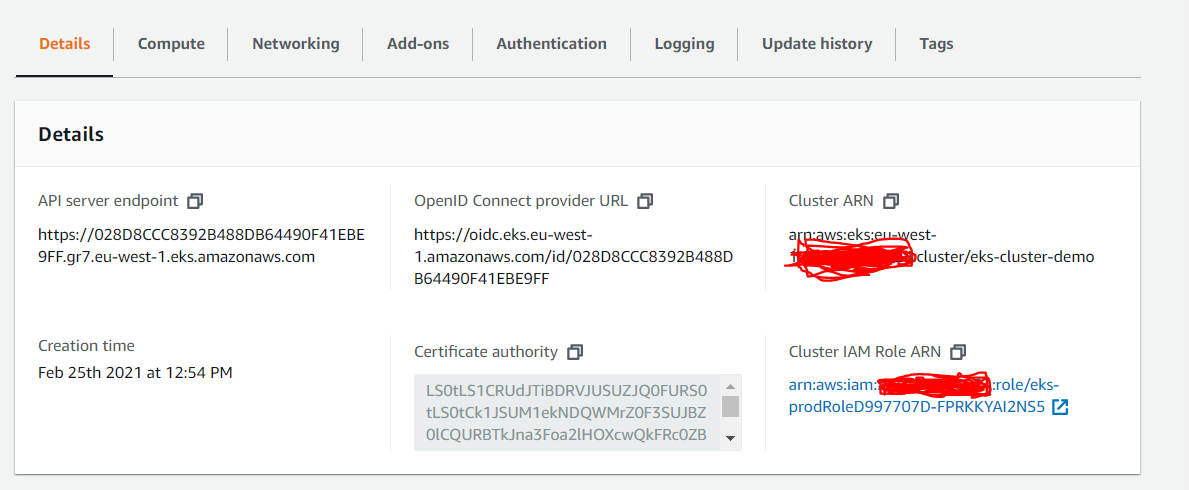
In the above code, you can see that I’m using version 1.9, cluster will use private subnets and the IAM role that was created will be used. I used default_capacity = 0 since, I do not want EKS to create default node group. I will be creating node groups separately and will use SPOT instances for worker nodes in this case. This is all about control plane definition.

Now, let us create node group.

nodegroup = cluster.add_nodegroup_capacity('eks-nodegroup',
                                                   instance_types=[ec2.InstanceType('t3.large'),
                                                                   ec2.InstanceType('m5.large'),
                                                                   ec2.InstanceType('c5.large')],
                                                   disk_size=50,
                                                   min_size=2,
                                                   max_size=2,
                                                   desired_size=2,
                                                   subnets=ec2.SubnetSelection(subnet_type=ec2.SubnetType.PRIVATE),
                                                   remote_access=eks.NodegroupRemoteAccess(
                                                       ssh_key_name='eks-ssh-keypair'),
                                                   capacity_type=eks.CapacityType.SPOT)

I’ve used multiple instance types for SPOT for different worker nodes. Disk size for the nodes to set to 50GB and two nodes will be created. you can adjust these parameters based on your requirement.

Now, let’s call the stack.

from mycdkproject.eks_stack import EKSStack
app = core.App()
vpc_stack = VPCStack(app, "mycdkproject")
eks_stack = EKSStack(app,'eks',vpc=vpc_stack.vpc)
app.synth()

you need to update requirements.txt file to import modules for iam and eks. you can install these modules using pip install -r requirements.txt


aws-cdk.aws-iam
aws-cdk.aws-eks

now, let’s run cdk ls to see howmany stacks we can see. we should expect to see two stacks.

Now, let’s Synthesize an AWS CloudFormation template for the app, as follows.

(.venv) C:\Rama\MyProjects\mycdkproject>cdk synth
Successfully synthesized to C:\Rama\MyProjects\mycdkproject\cdk.out
Supply a stack id (mycdkproject, eks) to display its template.

Now, let’s deploy

cdk deploy eks --profile cdkprofile

if you have encountered an error as eks failed: Error: This stack uses assets, so the toolkit stack must be deployed to the environment (Run “cdk bootstrap aws://unknown-account/unknown-region”)

you can fix this by running cdk bootstrap aws://accountnumber/region

(.venv) C:\Rama\MyProjects\mycdkproject>cdk deploy eks --profile cdkprofile
Including dependency stacks: mycdkproject
mycdkproject
mycdkproject: deploying...

 ✅  mycdkproject (no changes)

Outputs:
mycdkproject.ExportsOutputRefdemovpcF2DCF540F486AA93 = vpc-0a28afc429ef12e7d
mycdkproject.ExportsOutputRefdemovpcPrivateSubnetSubnet1Subnet7F4868328AE74887 = subnet-01d19280e1eca62f5
mycdkproject.ExportsOutputRefdemovpcPrivateSubnetSubnet2Subnet4FD8659B8BB1175E = subnet-05cedf7ea3c9a2d1a

Stack ARN:
arn:aws:cloudformation:eu-west-1:604035856224:stack/mycdkproject/ced8f3a0-7791-11eb-8a02-02fbd2f362b9
eks
eks: deploying...
[0%] start: Publishing 50e10880d134a01b440991fc77d217f39f01c2d56945215ee9a3b81187c6f3b1:current
[14%] success: Published 50e10880d134a01b440991fc77d217f39f01c2d56945215ee9a3b81187c6f3b1:current
[14%] start: Publishing c691172cdeefa2c91b5a2907f9d81118e47597634943344795f1a844192dd49c:current
[28%] success: Published c691172cdeefa2c91b5a2907f9d81118e47597634943344795f1a844192dd49c:current
[28%] start: Publishing 299e5262386e9f084fcd72906b8282f5c3cb1885c39d0912db1670b472873fb5:current
[42%] success: Published 299e5262386e9f084fcd72906b8282f5c3cb1885c39d0912db1670b472873fb5:current
[42%] start: Publishing e9882ab123687399f934da0d45effe675ecc8ce13b40cb946f3e1d6141fe8d68:current
[57%] success: Published e9882ab123687399f934da0d45effe675ecc8ce13b40cb946f3e1d6141fe8d68:current
[57%] start: Publishing 844c1a4b13479b359ea0e607dccb4a04b73e22cf88cf9b64feed2c5f0de213c0:current
[71%] success: Published 844c1a4b13479b359ea0e607dccb4a04b73e22cf88cf9b64feed2c5f0de213c0:current
[71%] start: Publishing 7f9c09e9e3ebb8ac17932545378ebfc732075bc1529c3f5294d1220ab938c1a8:current
[85%] success: Published 7f9c09e9e3ebb8ac17932545378ebfc732075bc1529c3f5294d1220ab938c1a8:current
[85%] start: Publishing 53fdcf13d33580b64d5d493f823aa68fa304539df464fedc629ad48b949244ad:current
[100%] success: Published 53fdcf13d33580b64d5d493f823aa68fa304539df464fedc629ad48b949244ad:current
eks: creating CloudFormation changeset...
  0/15 | 12:50:35 PM | REVIEW_IN_PROGRESS   | AWS::CloudFormation::Stack            | eks User Initiated
  0/15 | 12:50:40 PM | CREATE_IN_PROGRESS   | AWS::CloudFormation::Stack            | eks User Initiated
  0/15 | 12:51:09 PM | CREATE_IN_PROGRESS   | AWS::EC2::SecurityGroup               | prod/ControlPlaneSecurityGroup (prodControlPlaneSecurityGroup7CE46782)
  0/15 | 12:51:09 PM | CREATE_IN_PROGRESS   | AWS::IAM::Role                        | eksadmin (eksadminBEE25D8E)
  0/15 | 12:51:09 PM | CREATE_IN_PROGRESS   | AWS::IAM::Role                        | prod/Resource/CreationRole (prodCreationRole5E247585)
  0/15 | 12:51:09 PM | CREATE_IN_PROGRESS   | AWS::CDK::Metadata                    | @aws-cdk--aws-eks.ClusterResourceProvider/CDKMetadata/Default (CDKMetadata)
  0/15 | 12:51:09 PM | CREATE_IN_PROGRESS   | AWS::IAM::Role                        | prod/Role (prodRoleD997707D)
  0/15 | 12:51:09 PM | CREATE_IN_PROGRESS   | AWS::IAM::Role                        | prod/Nodegroupeks-nodegroup/NodeGroupRole (prodNodegroupeksnodegroupNodeGroupRoleB635EB43)
  0/15 | 12:51:09 PM | CREATE_IN_PROGRESS   | AWS::IAM::Role                        | prod/Resource/CreationRole (prodCreationRole5E247585) Resource creation Initiated
  0/15 | 12:51:09 PM | CREATE_IN_PROGRESS   | AWS::IAM::Role                        | prod/Role (prodRoleD997707D) Resource creation Initiated
  0/15 | 12:51:09 PM | CREATE_IN_PROGRESS   | AWS::IAM::Role                        | prod/Nodegroupeks-nodegroup/NodeGroupRole (prodNodegroupeksnodegroupNodeGroupRoleB635EB43)
Resource creation Initiated
  0/15 | 12:51:10 PM | CREATE_IN_PROGRESS   | AWS::IAM::Role                        | eksadmin (eksadminBEE25D8E) Resource creation Initiated
  2/15 | 12:51:11 PM | CREATE_IN_PROGRESS   | AWS::CDK::Metadata                    | @aws-cdk--aws-eks.ClusterResourceProvider/CDKMetadata/Default (CDKMetadata) Resource creati
on Initiated
  2/15 | 12:51:12 PM | CREATE_COMPLETE      | AWS::CDK::Metadata                    | @aws-cdk--aws-eks.ClusterResourceProvider/CDKMetadata/Default (CDKMetadata)
  2/15 | 12:51:13 PM | CREATE_IN_PROGRESS   | AWS::EC2::SecurityGroup               | prod/ControlPlaneSecurityGroup (prodControlPlaneSecurityGroup7CE46782) Resource creation In
itiated
  2/15 | 12:51:15 PM | CREATE_COMPLETE      | AWS::EC2::SecurityGroup               | prod/ControlPlaneSecurityGroup (prodControlPlaneSecurityGroup7CE46782)
  6/15 | 12:51:26 PM | CREATE_COMPLETE      | AWS::IAM::Role                        | prod/Resource/CreationRole (prodCreationRole5E247585)
  6/15 | 12:51:26 PM | CREATE_COMPLETE      | AWS::IAM::Role                        | prod/Role (prodRoleD997707D)
  6/15 | 12:51:27 PM | CREATE_COMPLETE      | AWS::IAM::Role                        | prod/Nodegroupeks-nodegroup/NodeGroupRole (prodNodegroupeksnodegroupNodeGroupRoleB635EB43)
  6/15 | 12:51:27 PM | CREATE_COMPLETE      | AWS::IAM::Role                        | eksadmin (eksadminBEE25D8E)
  6/15 | 12:51:30 PM | CREATE_IN_PROGRESS   | AWS::CloudFormation::Stack            | @aws-cdk--aws-eks.ClusterResourceProvider.NestedStack/@aws-cdk--aws-eks.ClusterResourceProv
ider.NestedStackResource (awscdkawseksClusterResourceProviderNestedStackawscdkawseksClusterResourceProviderNestedStackResource9827C454) 
  6/15 | 12:51:30 PM | CREATE_IN_PROGRESS   | AWS::IAM::InstanceProfile             | instanceprofile
  6/15 | 12:51:31 PM | CREATE_IN_PROGRESS   | AWS::IAM::Policy                      | prod/Resource/CreationRole/DefaultPolicy (prodCreationRoleDefaultPolicy46633E70)
  6/15 | 12:51:31 PM | CREATE_IN_PROGRESS   | AWS::CloudFormation::Stack            | @aws-cdk--aws-eks.ClusterResourceProvider.NestedStack/@aws-cdk--aws-eks.ClusterResourceProv
ider.NestedStackResource (awscdkawseksClusterResourceProviderNestedStackawscdkawseksClusterResourceProviderNestedStackResource9827C454) Resource creation Initiated
  6/15 | 12:51:31 PM | CREATE_IN_PROGRESS   | AWS::IAM::InstanceProfile             | instanceprofile Resource creation Initiated
  6/15 | 12:51:32 PM | CREATE_IN_PROGRESS   | AWS::IAM::Policy                      | prod/Resource/CreationRole/DefaultPolicy (prodCreationRoleDefaultPolicy46633E70) Resource c
reation Initiated
  7/15 | 12:51:48 PM | CREATE_COMPLETE      | AWS::IAM::Policy                      | prod/Resource/CreationRole/DefaultPolicy (prodCreationRoleDefaultPolicy46633E70)
 7/15 Currently in progress: eks, awscdkawseksClusterResourceProviderNestedStackawscdkawseksClusterResourceProviderNestedStackResource9827C454, instanceprofile
  8/15 | 12:53:32 PM | CREATE_COMPLETE      | AWS::IAM::InstanceProfile             | instanceprofile
 8/15 Currently in progress: eks, awscdkawseksClusterResourceProviderNestedStackawscdkawseksClusterResourceProviderNestedStackResource9827C454
  9/15 | 12:54:09 PM | CREATE_COMPLETE      | AWS::CloudFormation::Stack            | @aws-cdk--aws-eks.ClusterResourceProvider.NestedStack/@aws-cdk--aws-eks.ClusterResourceProv
ider.NestedStackResource (awscdkawseksClusterResourceProviderNestedStackawscdkawseksClusterResourceProviderNestedStackResource9827C454) 
  9/15 | 12:54:13 PM | CREATE_IN_PROGRESS   | Custom::AWSCDK-EKS-Cluster            | prod/Resource/Resource/Default (prod3363F4D9)
 9/15 Currently in progress: eks, prod3363F4D9
 10/15 | 1:07:36 PM | CREATE_IN_PROGRESS   | Custom::AWSCDK-EKS-Cluster            | prod/Resource/Resource/Default (prod3363F4D9) Resource creation Initiated
 10/15 | 1:07:37 PM | CREATE_COMPLETE      | Custom::AWSCDK-EKS-Cluster            | prod/Resource/Resource/Default (prod3363F4D9)
 11/15 | 1:07:41 PM | CREATE_IN_PROGRESS   | AWS::SSM::Parameter                   | prod/KubectlReadyBarrier (prodKubectlReadyBarrier3183289D)
 11/15 | 1:07:41 PM | CREATE_IN_PROGRESS   | AWS::CloudFormation::Stack            | @aws-cdk--aws-eks.KubectlProvider.NestedStack/@aws-cdk--aws-eks.KubectlProvider.NestedStackR
esource (awscdkawseksKubectlProviderNestedStackawscdkawseksKubectlProviderNestedStackResourceA7AEBA6B) 
 11/15 | 1:07:42 PM | CREATE_IN_PROGRESS   | AWS::EKS::Nodegroup                   | prod/Nodegroupeks-nodegroup (prodNodegroupeksnodegroupE8147B13)
 11/15 | 1:07:42 PM | CREATE_IN_PROGRESS   | AWS::CloudFormation::Stack            | @aws-cdk--aws-eks.KubectlProvider.NestedStack/@aws-cdk--aws-eks.KubectlProvider.NestedStackR
esource (awscdkawseksKubectlProviderNestedStackawscdkawseksKubectlProviderNestedStackResourceA7AEBA6B) Resource creation Initiated
 11/15 | 1:07:42 PM | CREATE_IN_PROGRESS   | AWS::SSM::Parameter                   | prod/KubectlReadyBarrier (prodKubectlReadyBarrier3183289D) Resource creation Initiated
 11/15 | 1:07:43 PM | CREATE_COMPLETE      | AWS::SSM::Parameter                   | prod/KubectlReadyBarrier (prodKubectlReadyBarrier3183289D)
 11/15 | 1:07:46 PM | CREATE_IN_PROGRESS   | AWS::EKS::Nodegroup                   | prod/Nodegroupeks-nodegroup (prodNodegroupeksnodegroupE8147B13) Resource creation Initiated
11/15 Currently in progress: eks, awscdkawseksKubectlProviderNestedStackawscdkawseksKubectlProviderNestedStackResourceA7AEBA6B, prodNodegroupeksnodegroupE8147B13
 12/15 | 1:10:13 PM | CREATE_COMPLETE      | AWS::EKS::Nodegroup                   | prod/Nodegroupeks-nodegroup (prodNodegroupeksnodegroupE8147B13)
12/15 Currently in progress: eks, awscdkawseksKubectlProviderNestedStackawscdkawseksKubectlProviderNestedStackResourceA7AEBA6B
 13/15 | 1:12:57 PM | CREATE_COMPLETE      | AWS::CloudFormation::Stack            | @aws-cdk--aws-eks.KubectlProvider.NestedStack/@aws-cdk--aws-eks.KubectlProvider.NestedStackR
esource (awscdkawseksKubectlProviderNestedStackawscdkawseksKubectlProviderNestedStackResourceA7AEBA6B) 
 13/15 | 1:13:02 PM | CREATE_IN_PROGRESS   | Custom::AWSCDK-EKS-KubernetesResource | prod/AwsAuth/manifest/Resource/Default (prodAwsAuthmanifest0B7F1A5F)
 15/15 | 1:13:10 PM | CREATE_IN_PROGRESS   | Custom::AWSCDK-EKS-KubernetesResource | prod/AwsAuth/manifest/Resource/Default (prodAwsAuthmanifest0B7F1A5F) Resource creation Initi
ated
 15/15 | 1:13:10 PM | CREATE_COMPLETE      | Custom::AWSCDK-EKS-KubernetesResource | prod/AwsAuth/manifest/Resource/Default (prodAwsAuthmanifest0B7F1A5F)
 15/15 | 1:13:13 PM | CREATE_COMPLETE      | AWS::CloudFormation::Stack            | eks

 ✅  eks

Outputs:
eks.prodConfigCommand1B086551 = aws eks update-kubeconfig --name eks-cluster-demo --region eu-west-1 --role-arn arn:aws:iam::accountnumber:role/eks-cluster-role
eks.prodGetTokenCommand0CE8FF77 = aws eks get-token --cluster-name eks-cluster-demo --region eu-west-1 --role-arn arn:aws:iam::accountnumber:role/eks-cluster-role

Stack ARN:
arn:aws:cloudformation:eu-west-1:accountnumber:stack/eks/57cd8dd0-779a-11eb-9605-06cacdbbe755

That’s it. You can see that EKS cluster has been setup using AWS CDK (Python). You can find the EKSStack on my github repository here.

Hope you enjoyed the post.

Cheers

Ramasankar Molleti

LinkedIn

AWS CDK (Python)- How to Configure VPC, Subnets, Internet gateway, NatGateway

So far, i’ve discussed about how to configure vpc, subnets, natgateway, ec2 using terraform, in this post i’m going to discuss how to configure VPC, Subnets, Internet Gateway, NatGateway with AWS CDK using python as language. We don’t need to write any complex cloudformation scripts, we use AWS CDK to construct resources. For more information about AWS CDK, you may check here.

Pre-requisites:

You need to install aws cdk and python installed on your environment.

#Install AWS-CDK
npm install -g aws-cdk 
# Check CDK Version 
cdk --version

Once, you have aws cdk and python installed we can initialize new project. I’m using visual studio code in my example to create project, you can use any of your favorite IDE.

mkdir mycdkproject 
cdk init --language python 

The above will create a cdk structure with python as language. Activate your virtual environment source .env/bin/activate or python -m venv .venv depending on your OS (Linux/MaC/Windows). Once you initialized then the structure would look like this

We have cdk structure ready, let us start importing required modules (aws_ec2, aws_ssm, core)

edit the requirements.txt file (

aws-cdk.core
aws-cdk.aws-ssm
aws-cdk.aws-ec2) and install them using python install -r requirements.txt

This will ensure you have required modules to start with.

Let us modify the mycdkproject_stack.py.

from aws_cdk import (
     aws_ec2 as ec2,
     aws_ssm as ssm,
     core
) 


class MycdkprojectStack(core.Stack):

    def __init__(self, scope: core.Construct, construct_id: str, **kwargs) -> None:
        super().__init__(scope, construct_id, **kwargs)

        # The code that defines your stack goes here
        env_name = self.node.try_get_context("env")

        self.vpc = ec2.Vpc(self, 'demovpc',
            cidr = '192.168.50.0/24',
            max_azs = 2,
            enable_dns_hostnames = True,
            enable_dns_support = True, 
            subnet_configuration=[
                ec2.SubnetConfiguration(
                    name = 'Public-Subent',
                    subnet_type = ec2.SubnetType.PUBLIC,
                    cidr_mask = 26
                ),
                ec2.SubnetConfiguration(
                    name = 'Private-Subnet',
                    subnet_type = ec2.SubnetType.PRIVATE,
                    cidr_mask = 26
                )
            ],
            nat_gateways = 1,

        )
        priv_subnets = [subnet.subnet_id for subnet in self.vpc.private_subnets]

        count = 1
        for psub in priv_subnets: 
            ssm.StringParameter(self, 'private-subnet-'+ str(count),
                string_value = psub,
                parameter_name = '/'+env_name+'/private-subnet-'+str(count)
                )
            count += 1 

The above script will create vpc, public, private subnets and nategateway.

Call this stack into your app.py as below

#!/usr/bin/env python3

from aws_cdk import core

from mycdkproject.mycdkproject_stack import MycdkprojectStack

app = core.App()
MycdkprojectStack(app, "mycdkproject")

app.synth()

let us run cdk ls to see if there any list of stacks

cdk ls

Synthesize an AWS CloudFormation template for the app, as follows.

cdk synth

If your app contained more than one stack, you’d need to specify which stack(s) to synthesize. But since it only contains one, the Toolkit knows you must mean that one.

The cdk synth command executes your app, which causes the resources defined in it to be translated to an AWS CloudFormation template. The displayed output of cdk synth is a YAML-format template; our app’s output is shown below. The template is also saved in the cdk.out directory in JSON format.

PS C:\Users\Ramasankar\mycdkproject> cdk synth
Resources:
  demovpcF2DCF540:
    Type: AWS::EC2::VPC
    Properties:
      CidrBlock: 192.168.50.0/24
      EnableDnsHostnames: true
      EnableDnsSupport: true
      InstanceTenancy: default
      Tags:
        - Key: Name
          Value: mycdkproject/demovpc
    Metadata:
      aws:cdk:path: mycdkproject/demovpc/Resource
  demovpcPublicSubentSubnet1Subnet9D54A554:
    Type: AWS::EC2::Subnet
    Properties:
      CidrBlock: 192.168.50.0/26
      VpcId:
        Ref: demovpcF2DCF540
      AvailabilityZone:
        Fn::Select:
          - 0
          - Fn::GetAZs: ""
      MapPublicIpOnLaunch: true
      Tags:
        - Key: aws-cdk:subnet-name
          Value: Public-Subent
        - Key: aws-cdk:subnet-type
          Value: Public
        - Key: Name
          Value: mycdkproject/demovpc/Public-SubentSubnet1
    Metadata:
      aws:cdk:path: mycdkproject/demovpc/Public-SubentSubnet1/Subnet
  demovpcPublicSubentSubnet1RouteTable91CAF0D9:
    Type: AWS::EC2::RouteTable
    Properties:
      VpcId:
        Ref: demovpcF2DCF540
      Tags:
        - Key: Name
          Value: mycdkproject/demovpc/Public-SubentSubnet1
    Metadata:
      aws:cdk:path: mycdkproject/demovpc/Public-SubentSubnet1/RouteTable
  demovpcPublicSubentSubnet1RouteTableAssociationB046656F:
    Type: AWS::EC2::SubnetRouteTableAssociation
    Properties:
      RouteTableId:
        Ref: demovpcPublicSubentSubnet1RouteTable91CAF0D9
      SubnetId:
        Ref: demovpcPublicSubentSubnet1Subnet9D54A554
    Metadata:
      aws:cdk:path: mycdkproject/demovpc/Public-SubentSubnet1/RouteTableAssociation
  demovpcPublicSubentSubnet1DefaultRouteD441EE14:
    Type: AWS::EC2::Route
    Properties:
      RouteTableId:
        Ref: demovpcPublicSubentSubnet1RouteTable91CAF0D9
      DestinationCidrBlock: 0.0.0.0/0
      GatewayId:
        Ref: demovpcIGW048842AE
    DependsOn:
      - demovpcVPCGW7D2E1CAC
    Metadata:
      aws:cdk:path: mycdkproject/demovpc/Public-SubentSubnet1/DefaultRoute
  demovpcPublicSubentSubnet1EIPBD2741E1:
    Type: AWS::EC2::EIP
    Properties:
      Domain: vpc
      Tags:
        - Key: Name
          Value: mycdkproject/demovpc/Public-SubentSubnet1
    Metadata:
      aws:cdk:path: mycdkproject/demovpc/Public-SubentSubnet1/EIP
  demovpcPublicSubentSubnet1NATGateway89406216:
    Type: AWS::EC2::NatGateway
    Properties:
      AllocationId:
        Fn::GetAtt:
          - demovpcPublicSubentSubnet1EIPBD2741E1
          - AllocationId
      SubnetId:
        Ref: demovpcPublicSubentSubnet1Subnet9D54A554
      Tags:
        - Key: Name
          Value: mycdkproject/demovpc/Public-SubentSubnet1
    Metadata:
      aws:cdk:path: mycdkproject/demovpc/Public-SubentSubnet1/NATGateway
  demovpcPublicSubentSubnet2Subnet1ECEB9DF:
    Type: AWS::EC2::Subnet
    Properties:
      CidrBlock: 192.168.50.64/26
      VpcId:
        Ref: demovpcF2DCF540
      AvailabilityZone:
        Fn::Select:
          - 1
          - Fn::GetAZs: ""
      MapPublicIpOnLaunch: true
      Tags:
        - Key: aws-cdk:subnet-name
          Value: Public-Subent
        - Key: aws-cdk:subnet-type
          Value: Public
        - Key: Name
          Value: mycdkproject/demovpc/Public-SubentSubnet2
    Metadata:
      aws:cdk:path: mycdkproject/demovpc/Public-SubentSubnet2/Subnet
  demovpcPublicSubentSubnet2RouteTable859486AD:
    Type: AWS::EC2::RouteTable
    Properties:
      VpcId:
        Ref: demovpcF2DCF540
      Tags:
        - Key: Name
          Value: mycdkproject/demovpc/Public-SubentSubnet2
    Metadata:
      aws:cdk:path: mycdkproject/demovpc/Public-SubentSubnet2/RouteTable
  demovpcPublicSubentSubnet2RouteTableAssociation4812D27C:
    Type: AWS::EC2::SubnetRouteTableAssociation
    Properties:
      RouteTableId:
        Ref: demovpcPublicSubentSubnet2RouteTable859486AD
      SubnetId:
        Ref: demovpcPublicSubentSubnet2Subnet1ECEB9DF
    Metadata:
      aws:cdk:path: mycdkproject/demovpc/Public-SubentSubnet2/RouteTableAssociation
  demovpcPublicSubentSubnet2DefaultRoute41BC99C2:
    Type: AWS::EC2::Route
    Properties:
      RouteTableId:
        Ref: demovpcPublicSubentSubnet2RouteTable859486AD
      DestinationCidrBlock: 0.0.0.0/0
      GatewayId:
        Ref: demovpcIGW048842AE
    DependsOn:
      - demovpcVPCGW7D2E1CAC
    Metadata:
      aws:cdk:path: mycdkproject/demovpc/Public-SubentSubnet2/DefaultRoute
  demovpcPrivateSubnetSubnet1Subnet7F486832:
    Type: AWS::EC2::Subnet
    Properties:
      CidrBlock: 192.168.50.128/26
      VpcId:
        Ref: demovpcF2DCF540
      AvailabilityZone:
        Fn::Select:
          - 0
          - Fn::GetAZs: ""
      MapPublicIpOnLaunch: false
      Tags:
        - Key: aws-cdk:subnet-name
          Value: Private-Subnet
        - Key: aws-cdk:subnet-type
          Value: Private
        - Key: Name
          Value: mycdkproject/demovpc/Private-SubnetSubnet1
    Metadata:
      aws:cdk:path: mycdkproject/demovpc/Private-SubnetSubnet1/Subnet
  demovpcPrivateSubnetSubnet1RouteTableDA716B65:
    Type: AWS::EC2::RouteTable
    Properties:
      VpcId:
        Ref: demovpcF2DCF540
      Tags:
        - Key: Name
          Value: mycdkproject/demovpc/Private-SubnetSubnet1
    Metadata:
      aws:cdk:path: mycdkproject/demovpc/Private-SubnetSubnet1/RouteTable
  demovpcPrivateSubnetSubnet1RouteTableAssociation942BFC16:
    Type: AWS::EC2::SubnetRouteTableAssociation
    Properties:
      RouteTableId:
        Ref: demovpcPrivateSubnetSubnet1RouteTableDA716B65
      SubnetId:
        Ref: demovpcPrivateSubnetSubnet1Subnet7F486832
    Metadata:
      aws:cdk:path: mycdkproject/demovpc/Private-SubnetSubnet1/RouteTableAssociation
  demovpcPrivateSubnetSubnet1DefaultRouteDC8CEC57:
    Type: AWS::EC2::Route
    Properties:
      RouteTableId:
        Ref: demovpcPrivateSubnetSubnet1RouteTableDA716B65
      DestinationCidrBlock: 0.0.0.0/0
      NatGatewayId:
        Ref: demovpcPublicSubentSubnet1NATGateway89406216
    Metadata:
      aws:cdk:path: mycdkproject/demovpc/Private-SubnetSubnet1/DefaultRoute
  demovpcPrivateSubnetSubnet2Subnet4FD8659B:
    Type: AWS::EC2::Subnet
    Properties:
      CidrBlock: 192.168.50.192/26
      VpcId:
        Ref: demovpcF2DCF540
      AvailabilityZone:
        Fn::Select:
          - 1
          - Fn::GetAZs: ""
      MapPublicIpOnLaunch: false
      Tags:
        - Key: aws-cdk:subnet-name
          Value: Private-Subnet
        - Key: aws-cdk:subnet-type
          Value: Private
        - Key: Name
          Value: mycdkproject/demovpc/Private-SubnetSubnet2
    Metadata:
      aws:cdk:path: mycdkproject/demovpc/Private-SubnetSubnet2/Subnet
  demovpcPrivateSubnetSubnet2RouteTable8983B828:
    Type: AWS::EC2::RouteTable
    Properties:
      VpcId:
        Ref: demovpcF2DCF540
      Tags:
        - Key: Name
          Value: mycdkproject/demovpc/Private-SubnetSubnet2
    Metadata:
      aws:cdk:path: mycdkproject/demovpc/Private-SubnetSubnet2/RouteTable
  demovpcPrivateSubnetSubnet2RouteTableAssociationDCEDC16A:
    Type: AWS::EC2::SubnetRouteTableAssociation
    Properties:
      RouteTableId:
        Ref: demovpcPrivateSubnetSubnet2RouteTable8983B828
      SubnetId:
        Ref: demovpcPrivateSubnetSubnet2Subnet4FD8659B
    Metadata:
      aws:cdk:path: mycdkproject/demovpc/Private-SubnetSubnet2/RouteTableAssociation
  demovpcPrivateSubnetSubnet2DefaultRouteFFB48155:
    Type: AWS::EC2::Route
    Properties:
      RouteTableId:
        Ref: demovpcPrivateSubnetSubnet2RouteTable8983B828
      DestinationCidrBlock: 0.0.0.0/0
      NatGatewayId:
        Ref: demovpcPublicSubentSubnet1NATGateway89406216
    Metadata:
      aws:cdk:path: mycdkproject/demovpc/Private-SubnetSubnet2/DefaultRoute
  demovpcIGW048842AE:
    Type: AWS::EC2::InternetGateway
    Properties:
      Tags:
        - Key: Name
          Value: mycdkproject/demovpc
    Metadata:
      aws:cdk:path: mycdkproject/demovpc/IGW
  demovpcVPCGW7D2E1CAC:
    Type: AWS::EC2::VPCGatewayAttachment
    Properties:
      VpcId:
        Ref: demovpcF2DCF540
      InternetGatewayId:
        Ref: demovpcIGW048842AE
    Metadata:
      aws:cdk:path: mycdkproject/demovpc/VPCGW
  privatesubnet1ABCDFA53:
    Type: AWS::SSM::Parameter
    Properties:
      Type: String
      Value:
        Ref: demovpcPrivateSubnetSubnet1Subnet7F486832
      Name: /demo/private-subnet-1
    Metadata:
      aws:cdk:path: mycdkproject/private-subnet-1/Resource
  privatesubnet2260E229D:
    Type: AWS::SSM::Parameter
    Properties:
      Type: String
      Value:
        Ref: demovpcPrivateSubnetSubnet2Subnet4FD8659B
      Name: /demo/private-subnet-2
    Metadata:
      aws:cdk:path: mycdkproject/private-subnet-2/Resource
  CDKMetadata:
    Type: AWS::CDK::Metadata
    Properties:
      Modules: aws-cdk=1.90.1,@aws-cdk/assets=1.90.0,@aws-cdk/aws-cloudwatch=1.90.0,@aws-cdk/aws-ec2=1.90.0,@aws-cdk/aws-events=1.90.0,@aws-cdk/aws-iam=1.90.0,@aws-cdk/aws-kms=1.90.0,@aws-cdk/aws-logs=1.90.0,@aws-cdk/aws-s3=1.90.0,@aws-cdk/aws-s3-assets=1.90.0,@aws-cdk/aws-ssm=1.90.0,@aws-cdk/cloud-assembly-schema=1.90.0,@aws-cdk/core=1.90.0,@aws-cdk/cx-api=1.90.0,@aws-cdk/region-info=1.90.0,jsii-runtime=Python/3.7.2
    Metadata:
      aws:cdk:path: mycdkproject/CDKMetadata/Default
    Condition: CDKMetadataAvailable
Conditions:
  CDKMetadataAvailable:
    Fn::Or:
      - Fn::Or:
          - Fn::Equals:
              - Ref: AWS::Region
              - ap-east-1
          - Fn::Equals:
              - Ref: AWS::Region
              - ap-northeast-1
          - Fn::Equals:
              - Ref: AWS::Region
              - ap-northeast-2
          - Fn::Equals:
              - Ref: AWS::Region
              - ap-south-1
          - Fn::Equals:
              - Ref: AWS::Region
              - ap-southeast-1
          - Fn::Equals:
              - Ref: AWS::Region
              - ap-southeast-2
          - Fn::Equals:
              - Ref: AWS::Region
              - ca-central-1
          - Fn::Equals:
              - Ref: AWS::Region
              - cn-north-1
          - Fn::Equals:
              - Ref: AWS::Region
              - cn-northwest-1
          - Fn::Equals:
              - Ref: AWS::Region
              - eu-central-1
      - Fn::Or:
          - Fn::Equals:
              - Ref: AWS::Region
              - eu-north-1
          - Fn::Equals:
              - Ref: AWS::Region
              - eu-west-1
          - Fn::Equals:
              - Ref: AWS::Region
              - eu-west-2
          - Fn::Equals:
              - Ref: AWS::Region
              - eu-west-3
          - Fn::Equals:
              - Ref: AWS::Region
              - me-south-1
          - Fn::Equals:
              - Ref: AWS::Region
              - sa-east-1
          - Fn::Equals:
              - Ref: AWS::Region
              - us-east-1
          - Fn::Equals:
              - Ref: AWS::Region
              - us-east-2
          - Fn::Equals:
              - Ref: AWS::Region
              - us-west-1
          - Fn::Equals:
              - Ref: AWS::Region
              - us-west-2
{
  "Resources": {
    "demovpcF2DCF540": {
      "Type": "AWS::EC2::VPC",
      "Properties": {
        "CidrBlock": "192.168.50.0/24",
        "EnableDnsHostnames": true,
        "EnableDnsSupport": true,
        "InstanceTenancy": "default",
        "Tags": [
          {
            "Key": "Name",
            "Value": "mycdkproject/demovpc"
          }
        ]
      },
      "Metadata": {
        "aws:cdk:path": "mycdkproject/demovpc/Resource"
      }
    },
    "demovpcPublicSubentSubnet1Subnet9D54A554": {
      "Type": "AWS::EC2::Subnet",
      "Properties": {
        "CidrBlock": "192.168.50.0/26",
        "VpcId": {
          "Ref": "demovpcF2DCF540"
        },
        "AvailabilityZone": {
          "Fn::Select": [
            0,
            {
              "Fn::GetAZs": ""
            }
          ]
        },
        "MapPublicIpOnLaunch": true,
        "Tags": [
          {
            "Key": "aws-cdk:subnet-name",
            "Value": "Public-Subent"
          },
          {
            "Key": "aws-cdk:subnet-type",
            "Value": "Public"
          },
          {
            "Key": "Name",
            "Value": "mycdkproject/demovpc/Public-SubentSubnet1"
          }
        ]
      },
      "Metadata": {
        "aws:cdk:path": "mycdkproject/demovpc/Public-SubentSubnet1/Subnet"
      }
    },
    "demovpcPublicSubentSubnet1RouteTable91CAF0D9": {
      "Type": "AWS::EC2::RouteTable",
      "Properties": {
        "VpcId": {
          "Ref": "demovpcF2DCF540"
        },
        "Tags": [
          {
            "Key": "Name",
            "Value": "mycdkproject/demovpc/Public-SubentSubnet1"
          }
        ]
      },
      "Metadata": {
        "aws:cdk:path": "mycdkproject/demovpc/Public-SubentSubnet1/RouteTable"
      }
    },
    "demovpcPublicSubentSubnet1RouteTableAssociationB046656F": {
      "Type": "AWS::EC2::SubnetRouteTableAssociation",
      "Properties": {
        "RouteTableId": {
          "Ref": "demovpcPublicSubentSubnet1RouteTable91CAF0D9"
        },
        "SubnetId": {
          "Ref": "demovpcPublicSubentSubnet1Subnet9D54A554"
        }
      },
      "Metadata": {
        "aws:cdk:path": "mycdkproject/demovpc/Public-SubentSubnet1/RouteTableAssociation"
      }
    },
    "demovpcPublicSubentSubnet1DefaultRouteD441EE14": {
      "Type": "AWS::EC2::Route",
      "Properties": {
        "RouteTableId": {
          "Ref": "demovpcPublicSubentSubnet1RouteTable91CAF0D9"
        },
        "DestinationCidrBlock": "0.0.0.0/0",
        "GatewayId": {
          "Ref": "demovpcIGW048842AE"
        }
      },
      "DependsOn": [
        "demovpcVPCGW7D2E1CAC"
      ],
      "Metadata": {
        "aws:cdk:path": "mycdkproject/demovpc/Public-SubentSubnet1/DefaultRoute"
      }
    },
    "demovpcPublicSubentSubnet1EIPBD2741E1": {
      "Type": "AWS::EC2::EIP",
      "Properties": {
        "Domain": "vpc",
        "Tags": [
          {
            "Key": "Name",
            "Value": "mycdkproject/demovpc/Public-SubentSubnet1"
          }
        ]
      },
      "Metadata": {
        "aws:cdk:path": "mycdkproject/demovpc/Public-SubentSubnet1/EIP"
      }
    },
    "demovpcPublicSubentSubnet1NATGateway89406216": {
      "Type": "AWS::EC2::NatGateway",
      "Properties": {
        "AllocationId": {
          "Fn::GetAtt": [
            "demovpcPublicSubentSubnet1EIPBD2741E1",
            "AllocationId"
          ]
        },
        "SubnetId": {
          "Ref": "demovpcPublicSubentSubnet1Subnet9D54A554"
        },
        "Tags": [
          {
            "Key": "Name",
            "Value": "mycdkproject/demovpc/Public-SubentSubnet1"
          }
        ]
      },
      "Metadata": {
        "aws:cdk:path": "mycdkproject/demovpc/Public-SubentSubnet1/NATGateway"
      }
    },
    "demovpcPublicSubentSubnet2Subnet1ECEB9DF": {
      "Type": "AWS::EC2::Subnet",
      "Properties": {
        "CidrBlock": "192.168.50.64/26",
        "VpcId": {
          "Ref": "demovpcF2DCF540"
        },
        "AvailabilityZone": {
          "Fn::Select": [
            1,
            {
              "Fn::GetAZs": ""
            }
          ]
        },
        "MapPublicIpOnLaunch": true,
        "Tags": [
          {
            "Key": "aws-cdk:subnet-name",
            "Value": "Public-Subent"
          },
          {
            "Key": "aws-cdk:subnet-type",
            "Value": "Public"
          },
          {
            "Key": "Name",
            "Value": "mycdkproject/demovpc/Public-SubentSubnet2"
          }
        ]
      },
      "Metadata": {
        "aws:cdk:path": "mycdkproject/demovpc/Public-SubentSubnet2/Subnet"
      }
    },
    "demovpcPublicSubentSubnet2RouteTable859486AD": {
      "Type": "AWS::EC2::RouteTable",
      "Properties": {
        "VpcId": {
          "Ref": "demovpcF2DCF540"
        },
        "Tags": [
          {
            "Key": "Name",
            "Value": "mycdkproject/demovpc/Public-SubentSubnet2"
          }
        ]
      },
      "Metadata": {
        "aws:cdk:path": "mycdkproject/demovpc/Public-SubentSubnet2/RouteTable"
      }
    },
    "demovpcPublicSubentSubnet2RouteTableAssociation4812D27C": {
      "Type": "AWS::EC2::SubnetRouteTableAssociation",
      "Properties": {
        "RouteTableId": {
          "Ref": "demovpcPublicSubentSubnet2RouteTable859486AD"
        },
        "SubnetId": {
          "Ref": "demovpcPublicSubentSubnet2Subnet1ECEB9DF"
        }
      },
      "Metadata": {
        "aws:cdk:path": "mycdkproject/demovpc/Public-SubentSubnet2/RouteTableAssociation"
      }
    },
    "demovpcPublicSubentSubnet2DefaultRoute41BC99C2": {
      "Type": "AWS::EC2::Route",
      "Properties": {
        "RouteTableId": {
          "Ref": "demovpcPublicSubentSubnet2RouteTable859486AD"
        },
        "DestinationCidrBlock": "0.0.0.0/0",
        "GatewayId": {
          "Ref": "demovpcIGW048842AE"
        }
      },
      "DependsOn": [
        "demovpcVPCGW7D2E1CAC"
      ],
      "Metadata": {
        "aws:cdk:path": "mycdkproject/demovpc/Public-SubentSubnet2/DefaultRoute"
      }
    },
    "demovpcPrivateSubnetSubnet1Subnet7F486832": {
      "Type": "AWS::EC2::Subnet",
      "Properties": {
        "CidrBlock": "192.168.50.128/26",
        "VpcId": {
          "Ref": "demovpcF2DCF540"
        },
        "AvailabilityZone": {
          "Fn::Select": [
            0,
            {
              "Fn::GetAZs": ""
            }
          ]
        },
        "MapPublicIpOnLaunch": false,
        "Tags": [
          {
            "Key": "aws-cdk:subnet-name",
            "Value": "Private-Subnet"
          },
          {
            "Key": "aws-cdk:subnet-type",
            "Value": "Private"
          },
          {
            "Key": "Name",
            "Value": "mycdkproject/demovpc/Private-SubnetSubnet1"
          }
        ]
      },
      "Metadata": {
        "aws:cdk:path": "mycdkproject/demovpc/Private-SubnetSubnet1/Subnet"
      }
    },
    "demovpcPrivateSubnetSubnet1RouteTableDA716B65": {
      "Type": "AWS::EC2::RouteTable",
      "Properties": {
        "VpcId": {
          "Ref": "demovpcF2DCF540"
        },
        "Tags": [
          {
            "Key": "Name",
            "Value": "mycdkproject/demovpc/Private-SubnetSubnet1"
          }
        ]
      },
      "Metadata": {
        "aws:cdk:path": "mycdkproject/demovpc/Private-SubnetSubnet1/RouteTable"
      }
    },
    "demovpcPrivateSubnetSubnet1RouteTableAssociation942BFC16": {
      "Type": "AWS::EC2::SubnetRouteTableAssociation",
      "Properties": {
        "RouteTableId": {
          "Ref": "demovpcPrivateSubnetSubnet1RouteTableDA716B65"
        },
        "SubnetId": {
          "Ref": "demovpcPrivateSubnetSubnet1Subnet7F486832"
        }
      },
      "Metadata": {
        "aws:cdk:path": "mycdkproject/demovpc/Private-SubnetSubnet1/RouteTableAssociation"
      }
    },
    "demovpcPrivateSubnetSubnet1DefaultRouteDC8CEC57": {
      "Type": "AWS::EC2::Route",
      "Properties": {
        "RouteTableId": {
          "Ref": "demovpcPrivateSubnetSubnet1RouteTableDA716B65"
        },
        "DestinationCidrBlock": "0.0.0.0/0",
        "NatGatewayId": {
          "Ref": "demovpcPublicSubentSubnet1NATGateway89406216"
        }
      },
      "Metadata": {
        "aws:cdk:path": "mycdkproject/demovpc/Private-SubnetSubnet1/DefaultRoute"
      }
    },
    "demovpcPrivateSubnetSubnet2Subnet4FD8659B": {
      "Type": "AWS::EC2::Subnet",
      "Properties": {
        "CidrBlock": "192.168.50.192/26",
        "VpcId": {
          "Ref": "demovpcF2DCF540"
        },
        "AvailabilityZone": {
          "Fn::Select": [
            1,
            {
              "Fn::GetAZs": ""
            }
          ]
        },
        "MapPublicIpOnLaunch": false,
        "Tags": [
          {
            "Key": "aws-cdk:subnet-name",
            "Value": "Private-Subnet"
          },
          {
            "Key": "aws-cdk:subnet-type",
            "Value": "Private"
          },
          {
            "Key": "Name",
            "Value": "mycdkproject/demovpc/Private-SubnetSubnet2"
          }
        ]
      },
      "Metadata": {
        "aws:cdk:path": "mycdkproject/demovpc/Private-SubnetSubnet2/Subnet"
      }
    },
    "demovpcPrivateSubnetSubnet2RouteTable8983B828": {
      "Type": "AWS::EC2::RouteTable",
      "Properties": {
        "VpcId": {
          "Ref": "demovpcF2DCF540"
        },
        "Tags": [
          {
            "Key": "Name",
            "Value": "mycdkproject/demovpc/Private-SubnetSubnet2"
          }
        ]
      },
      "Metadata": {
        "aws:cdk:path": "mycdkproject/demovpc/Private-SubnetSubnet2/RouteTable"
      }
    },
    "demovpcPrivateSubnetSubnet2RouteTableAssociationDCEDC16A": {
      "Type": "AWS::EC2::SubnetRouteTableAssociation",
      "Properties": {
        "RouteTableId": {
          "Ref": "demovpcPrivateSubnetSubnet2RouteTable8983B828"
        },
        "SubnetId": {
          "Ref": "demovpcPrivateSubnetSubnet2Subnet4FD8659B"
        }
      },
      "Metadata": {
        "aws:cdk:path": "mycdkproject/demovpc/Private-SubnetSubnet2/RouteTableAssociation"
      }
    },
    "demovpcPrivateSubnetSubnet2DefaultRouteFFB48155": {
      "Type": "AWS::EC2::Route",
      "Properties": {
        "RouteTableId": {
          "Ref": "demovpcPrivateSubnetSubnet2RouteTable8983B828"
        },
        "DestinationCidrBlock": "0.0.0.0/0",
        "NatGatewayId": {
          "Ref": "demovpcPublicSubentSubnet1NATGateway89406216"
        }
      },
      "Metadata": {
        "aws:cdk:path": "mycdkproject/demovpc/Private-SubnetSubnet2/DefaultRoute"
      }
    },
    "demovpcIGW048842AE": {
      "Type": "AWS::EC2::InternetGateway",
      "Properties": {
        "Tags": [
          {
            "Key": "Name",
            "Value": "mycdkproject/demovpc"
          }
        ]
      },
      "Metadata": {
        "aws:cdk:path": "mycdkproject/demovpc/IGW"
      }
    },
    "demovpcVPCGW7D2E1CAC": {
      "Type": "AWS::EC2::VPCGatewayAttachment",
      "Properties": {
        "VpcId": {
          "Ref": "demovpcF2DCF540"
        },
        "InternetGatewayId": {
          "Ref": "demovpcIGW048842AE"
        }
      },
      "Metadata": {
        "aws:cdk:path": "mycdkproject/demovpc/VPCGW"
      }
    },
    "privatesubnet1ABCDFA53": {
      "Type": "AWS::SSM::Parameter",
      "Properties": {
        "Type": "String",
        "Value": {
          "Ref": "demovpcPrivateSubnetSubnet1Subnet7F486832"
        },
        "Name": "/demo/private-subnet-1"
      },
      "Metadata": {
        "aws:cdk:path": "mycdkproject/private-subnet-1/Resource"
      }
    },
    "privatesubnet2260E229D": {
      "Type": "AWS::SSM::Parameter",
      "Properties": {
        "Type": "String",
        "Value": {
          "Ref": "demovpcPrivateSubnetSubnet2Subnet4FD8659B"
        },
        "Name": "/demo/private-subnet-2"
      },
      "Metadata": {
        "aws:cdk:path": "mycdkproject/private-subnet-2/Resource"
      }
    },
    "CDKMetadata": {
      "Type": "AWS::CDK::Metadata",
      "Properties": {
        "Modules": "aws-cdk=1.90.1,@aws-cdk/assets=1.90.0,@aws-cdk/aws-cloudwatch=1.90.0,@aws-cdk/aws-ec2=1.90.0,@aws-cdk/aws-events=1.90.0,@aws-cdk/aws-iam=1.90.0,@aws-cdk/aws-kms=1.90.0,@aws-cdk/aws-logs=1.90.0,@aws-cdk/aws-s3=1.90.0,@aws-cdk/aws-s3-assets=1.90.0,@aws-cdk/aws-ssm=1.90.0,@aws-cdk/cloud-assembly-schema=1.90.0,@aws-cdk/core=1.90.0,@aws-cdk/cx-api=1.90.0,@aws-cdk/region-info=1.90.0,jsii-runtime=Python/3.7.2"
      },
      "Metadata": {
        "aws:cdk:path": "mycdkproject/CDKMetadata/Default"
      },
      "Condition": "CDKMetadataAvailable"
    }
  },
  "Conditions": {
    "CDKMetadataAvailable": {
      "Fn::Or": [
        {
          "Fn::Or": [
            {
              "Fn::Equals": [
                {
                  "Ref": "AWS::Region"
                },
                "ap-east-1"
              ]
            },
            {
              "Fn::Equals": [
                {
                  "Ref": "AWS::Region"
                },
                "ap-northeast-1"
              ]
            },
            {
              "Fn::Equals": [
                {
                  "Ref": "AWS::Region"
                },
                "ap-northeast-2"
              ]
            },
            {
              "Fn::Equals": [
                {
                  "Ref": "AWS::Region"
                },
                "ap-south-1"
              ]
            },
            {
              "Fn::Equals": [
                {
                  "Ref": "AWS::Region"
                },
                "ap-southeast-1"
              ]
            },
            {
              "Fn::Equals": [
                {
                  "Ref": "AWS::Region"
                },
                "ap-southeast-2"
              ]
            },
            {
              "Fn::Equals": [
                {
                  "Ref": "AWS::Region"
                },
                "ca-central-1"
              ]
            },
            {
              "Fn::Equals": [
                {
                  "Ref": "AWS::Region"
                },
                "cn-north-1"
              ]
            },
            {
              "Fn::Equals": [
                {
                  "Ref": "AWS::Region"
                },
                "cn-northwest-1"
              ]
            },
            {
              "Fn::Equals": [
                {
                  "Ref": "AWS::Region"
                },
                "eu-central-1"
              ]
            }
          ]
        },
        {
          "Fn::Or": [
            {
              "Fn::Equals": [
                {
                  "Ref": "AWS::Region"
                },
                "eu-north-1"
              ]
            },
            {
              "Fn::Equals": [
                {
                  "Ref": "AWS::Region"
                },
                "eu-west-1"
              ]
            },
            {
              "Fn::Equals": [
                {
                  "Ref": "AWS::Region"
                },
                "eu-west-2"
              ]
            },
            {
              "Fn::Equals": [
                {
                  "Ref": "AWS::Region"
                },
                "eu-west-3"
              ]
            },
            {
              "Fn::Equals": [
                {
                  "Ref": "AWS::Region"
                },
                "me-south-1"
              ]
            },
            {
              "Fn::Equals": [
                {
                  "Ref": "AWS::Region"
                },
                "sa-east-1"
              ]
            },
            {
              "Fn::Equals": [
                {
                  "Ref": "AWS::Region"
                },
                "us-east-1"
              ]
            },
            {
              "Fn::Equals": [
                {
                  "Ref": "AWS::Region"
                },
                "us-east-2"
              ]
            },
            {
              "Fn::Equals": [
                {
                  "Ref": "AWS::Region"
                },
                "us-west-1"
              ]
            },
            {
              "Fn::Equals": [
                {
                  "Ref": "AWS::Region"
                },
                "us-west-2"
              ]
            }
          ]
        }
      ]
    }
  }
}

If you can see that templates are created under cdk.out. Now, let’s deploy.

cdk deploy --profile cdkprofile
PS C:\Users\Ramasankar\mycdkproject> cdk deploy --profile cdkprofile
mycdkproject: deploying...
mycdkproject: creating CloudFormation changeset...
  0/25 | 6:20:17 PM | REVIEW_IN_PROGRESS   | AWS::CloudFormation::Stack            | mycdkproject User Initiated
  0/25 | 6:20:23 PM | CREATE_IN_PROGRESS   | AWS::CloudFormation::Stack            | mycdkproject User Initiated
  0/25 | 6:20:28 PM | CREATE_IN_PROGRESS   | AWS::CDK::Metadata                    | CDKMetadata/Default (CDKMetadata)
  0/25 | 6:20:28 PM | CREATE_IN_PROGRESS   | AWS::EC2::InternetGateway             | demovpc/IGW (demovpcIGW048842AE)
  0/25 | 6:20:28 PM | CREATE_IN_PROGRESS   | AWS::EC2::EIP                         | demovpc/Public-SubentSubnet1/EIP (demovpcPublicSubentSubnet1EIPBD2741E1)
  0/25 | 6:20:28 PM | CREATE_IN_PROGRESS   | AWS::EC2::VPC                         | demovpc 
(demovpcF2DCF540)
  0/25 | 6:20:28 PM | CREATE_IN_PROGRESS   | AWS::EC2::InternetGateway             | demovpc/IGW (demovpcIGW048842AE) Resource creation Initiated
  1/25 | 6:20:28 PM | CREATE_IN_PROGRESS   | AWS::EC2::VPC                         | demovpc 
(demovpcF2DCF540) Resource creation Initiated
  1/25 | 6:20:29 PM | CREATE_IN_PROGRESS   | AWS::CDK::Metadata                    | CDKMetadata/Default (CDKMetadata) Resource creation Initiated
  1/25 | 6:20:30 PM | CREATE_COMPLETE      | AWS::CDK::Metadata                    | CDKMetadata/Default (CDKMetadata) 
  1/25 | 6:20:30 PM | CREATE_IN_PROGRESS   | AWS::EC2::EIP                         | demovpc/Public-SubentSubnet1/EIP (demovpcPublicSubentSubnet1EIPBD2741E1) Resource creation Initiated 
  8/25 | 6:20:44 PM | CREATE_COMPLETE      | AWS::EC2::InternetGateway             | demovpc/IGW (demovpcIGW048842AE) 
  8/25 | 6:20:44 PM | CREATE_COMPLETE      | AWS::EC2::VPC                         | demovpc 
(demovpcF2DCF540)
  8/25 | 6:20:46 PM | CREATE_IN_PROGRESS   | AWS::EC2::RouteTable                  | demovpc/Public-SubentSubnet1/RouteTable (demovpcPublicSubentSubnet1RouteTable91CAF0D9) 
  8/25 | 6:20:46 PM | CREATE_COMPLETE      | AWS::EC2::EIP                         | demovpc/Public-SubentSubnet1/EIP (demovpcPublicSubentSubnet1EIPBD2741E1) 
  8/25 | 6:20:46 PM | CREATE_IN_PROGRESS   | AWS::EC2::RouteTable                  | demovpc/Private-SubnetSubnet1/RouteTable (demovpcPrivateSubnetSubnet1RouteTableDA716B65) 
  8/25 | 6:20:46 PM | CREATE_IN_PROGRESS   | AWS::EC2::RouteTable                  | demovpc/Public-SubentSubnet2/RouteTable (demovpcPublicSubentSubnet2RouteTable859486AD) 
  8/25 | 6:20:46 PM | CREATE_IN_PROGRESS   | AWS::EC2::RouteTable                  | demovpc/Private-SubnetSubnet2/RouteTable (demovpcPrivateSubnetSubnet2RouteTable8983B828) 
  8/25 | 6:20:46 PM | CREATE_IN_PROGRESS   | AWS::EC2::VPCGatewayAttachment        | demovpc/VPCGW (demovpcVPCGW7D2E1CAC) 
  8/25 | 6:20:46 PM | CREATE_IN_PROGRESS   | AWS::EC2::RouteTable                  | demovpc/Private-SubnetSubnet1/RouteTable (demovpcPrivateSubnetSubnet1RouteTableDA716B65) Resource creation Initiated
  8/25 | 6:20:46 PM | CREATE_IN_PROGRESS   | AWS::EC2::RouteTable                  | demovpc/Public-SubentSubnet2/RouteTable (demovpcPublicSubentSubnet2RouteTable859486AD) Resource creation Initiated
  8/25 | 6:20:47 PM | CREATE_IN_PROGRESS   | AWS::EC2::Subnet                      | demovpc/Private-SubnetSubnet2/Subnet (demovpcPrivateSubnetSubnet2Subnet4FD8659B) 
  8/25 | 6:20:47 PM | CREATE_IN_PROGRESS   | AWS::EC2::RouteTable                  | demovpc/Private-SubnetSubnet2/RouteTable (demovpcPrivateSubnetSubnet2RouteTable8983B828) Resource creation Initiated
  8/25 | 6:20:47 PM | CREATE_IN_PROGRESS   | AWS::EC2::RouteTable                  | demovpc/Public-SubentSubnet1/RouteTable (demovpcPublicSubentSubnet1RouteTable91CAF0D9) Resource creation Initiated
  8/25 | 6:20:47 PM | CREATE_IN_PROGRESS   | AWS::EC2::VPCGatewayAttachment        | demovpc/VPCGW (demovpcVPCGW7D2E1CAC) Resource creation Initiated
  8/25 | 6:20:47 PM | CREATE_IN_PROGRESS   | AWS::EC2::Subnet                      | demovpc/Public-SubentSubnet2/Subnet (demovpcPublicSubentSubnet2Subnet1ECEB9DF) 
  8/25 | 6:20:47 PM | CREATE_IN_PROGRESS   | AWS::EC2::Subnet                      | demovpc/Private-SubnetSubnet2/Subnet (demovpcPrivateSubnetSubnet2Subnet4FD8659B) Resource creation Initiated
  8/25 | 6:20:47 PM | CREATE_IN_PROGRESS   | AWS::EC2::Subnet                      | demovpc/Private-SubnetSubnet1/Subnet (demovpcPrivateSubnetSubnet1Subnet7F486832) 
  8/25 | 6:20:47 PM | CREATE_COMPLETE      | AWS::EC2::RouteTable                  | demovpc/Private-SubnetSubnet1/RouteTable (demovpcPrivateSubnetSubnet1RouteTableDA716B65) 
  8/25 | 6:20:47 PM | CREATE_IN_PROGRESS   | AWS::EC2::Subnet                      | demovpc/Public-SubentSubnet2/Subnet (demovpcPublicSubentSubnet2Subnet1ECEB9DF) Resource creation Initiated
  8/25 | 6:20:47 PM | CREATE_IN_PROGRESS   | AWS::EC2::Subnet                      | demovpc/Public-SubentSubnet1/Subnet (demovpcPublicSubentSubnet1Subnet9D54A554) 
  8/25 | 6:20:47 PM | CREATE_IN_PROGRESS   | AWS::EC2::Subnet                      | demovpc/Private-SubnetSubnet1/Subnet (demovpcPrivateSubnetSubnet1Subnet7F486832) Resource creation Initiated
  8/25 | 6:20:47 PM | CREATE_COMPLETE      | AWS::EC2::RouteTable                  | demovpc/Public-SubentSubnet2/RouteTable (demovpcPublicSubentSubnet2RouteTable859486AD) 
  8/25 | 6:20:47 PM | CREATE_COMPLETE      | AWS::EC2::RouteTable                  | demovpc/Private-SubnetSubnet2/RouteTable (demovpcPrivateSubnetSubnet2RouteTable8983B828) 
  8/25 | 6:20:47 PM | CREATE_COMPLETE      | AWS::EC2::RouteTable                  | demovpc/Public-SubentSubnet1/RouteTable (demovpcPublicSubentSubnet1RouteTable91CAF0D9) 
  8/25 | 6:20:48 PM | CREATE_IN_PROGRESS   | AWS::EC2::Subnet                      | demovpc/Public-SubentSubnet1/Subnet (demovpcPublicSubentSubnet1Subnet9D54A554) Resource creation Initiated
 13/25 | 6:21:02 PM | CREATE_COMPLETE      | AWS::EC2::VPCGatewayAttachment        | demovpc/VPCGW (demovpcVPCGW7D2E1CAC) 
 13/25 | 6:21:03 PM | CREATE_COMPLETE      | AWS::EC2::Subnet                      | demovpc/Private-SubnetSubnet2/Subnet (demovpcPrivateSubnetSubnet2Subnet4FD8659B) 
 13/25 | 6:21:03 PM | CREATE_COMPLETE      | AWS::EC2::Subnet                      | demovpc/Public-SubentSubnet2/Subnet (demovpcPublicSubentSubnet2Subnet1ECEB9DF) 
 13/25 | 6:21:04 PM | CREATE_COMPLETE      | AWS::EC2::Subnet                      | demovpc/Private-SubnetSubnet1/Subnet (demovpcPrivateSubnetSubnet1Subnet7F486832) 
 13/25 | 6:21:04 PM | CREATE_COMPLETE      | AWS::EC2::Subnet                      | demovpc/Public-SubentSubnet1/Subnet (demovpcPublicSubentSubnet1Subnet9D54A554) 
 13/25 | 6:21:04 PM | CREATE_IN_PROGRESS   | AWS::EC2::Route                       | demovpc/Public-SubentSubnet2/DefaultRoute (demovpcPublicSubentSubnet2DefaultRoute41BC99C2) 
 13/25 | 6:21:04 PM | CREATE_IN_PROGRESS   | AWS::EC2::Route                       | demovpc/Public-SubentSubnet1/DefaultRoute (demovpcPublicSubentSubnet1DefaultRouteD441EE14) 
 13/25 | 6:21:04 PM | CREATE_IN_PROGRESS   | AWS::EC2::Route                       | demovpc/Public-SubentSubnet2/DefaultRoute (demovpcPublicSubentSubnet2DefaultRoute41BC99C2) Resource creation Initiated
 13/25 | 6:21:04 PM | CREATE_IN_PROGRESS   | AWS::EC2::Route                       | demovpc/Public-SubentSubnet1/DefaultRoute (demovpcPublicSubentSubnet1DefaultRouteD441EE14) Resource creation Initiated
 13/25 | 6:21:05 PM | CREATE_IN_PROGRESS   | AWS::SSM::Parameter                   | private-subnet-2 (privatesubnet2260E229D) 
 13/25 | 6:21:05 PM | CREATE_IN_PROGRESS   | AWS::EC2::SubnetRouteTableAssociation | demovpc/Private-SubnetSubnet2/RouteTableAssociation (demovpcPrivateSubnetSubnet2RouteTableAssociationDCEDC16A)
 13/25 | 6:21:05 PM | CREATE_IN_PROGRESS   | AWS::EC2::SubnetRouteTableAssociation | demovpc/Public-SubentSubnet2/RouteTableAssociation (demovpcPublicSubentSubnet2RouteTableAssociation4812D27C)
 13/25 | 6:21:05 PM | CREATE_IN_PROGRESS   | AWS::SSM::Parameter                   | private-subnet-1 (privatesubnet1ABCDFA53) 
 13/25 | 6:21:06 PM | CREATE_IN_PROGRESS   | AWS::EC2::SubnetRouteTableAssociation | demovpc/Private-SubnetSubnet1/RouteTableAssociation (demovpcPrivateSubnetSubnet1RouteTableAssociation942BFC16)
 13/25 | 6:21:06 PM | CREATE_IN_PROGRESS   | AWS::EC2::SubnetRouteTableAssociation | demovpc/Private-SubnetSubnet2/RouteTableAssociation (demovpcPrivateSubnetSubnet2RouteTableAssociationDCEDC16A) Resource creation Initiated
 13/25 | 6:21:06 PM | CREATE_IN_PROGRESS   | AWS::EC2::NatGateway                  | demovpc/Public-SubentSubnet1/NATGateway (demovpcPublicSubentSubnet1NATGateway89406216) 
 13/25 | 6:21:06 PM | CREATE_IN_PROGRESS   | AWS::EC2::SubnetRouteTableAssociation | demovpc/Public-SubentSubnet2/RouteTableAssociation (demovpcPublicSubentSubnet2RouteTableAssociation4812D27C) Resource creation Initiated
 13/25 | 6:21:06 PM | CREATE_IN_PROGRESS   | AWS::EC2::SubnetRouteTableAssociation | demovpc/Public-SubentSubnet1/RouteTableAssociation (demovpcPublicSubentSubnet1RouteTableAssociationB046656F)
 15/25 | 6:21:06 PM | CREATE_IN_PROGRESS   | AWS::EC2::NatGateway                  | demovpc/Public-SubentSubnet1/NATGateway (demovpcPublicSubentSubnet1NATGateway89406216) Resource creation Initiated
 15/25 | 6:21:06 PM | CREATE_IN_PROGRESS   | AWS::EC2::SubnetRouteTableAssociation | demovpc/Private-SubnetSubnet1/RouteTableAssociation (demovpcPrivateSubnetSubnet1RouteTableAssociation942BFC16) Resource creation Initiated
 15/25 | 6:21:06 PM | CREATE_IN_PROGRESS   | AWS::EC2::SubnetRouteTableAssociation | demovpc/Public-SubentSubnet1/RouteTableAssociation (demovpcPublicSubentSubnet1RouteTableAssociationB046656F) Resource creation Initiated
 15/25 | 6:21:07 PM | CREATE_IN_PROGRESS   | AWS::SSM::Parameter                   | private-subnet-2 (privatesubnet2260E229D) Resource creation Initiated
 15/25 | 6:21:07 PM | CREATE_IN_PROGRESS   | AWS::SSM::Parameter                   | private-subnet-1 (privatesubnet1ABCDFA53) Resource creation Initiated
 15/25 | 6:21:07 PM | CREATE_COMPLETE      | AWS::SSM::Parameter                   | private-subnet-2 (privatesubnet2260E229D) 
 15/25 | 6:21:08 PM | CREATE_COMPLETE      | AWS::SSM::Parameter                   | private-subnet-1 (privatesubnet1ABCDFA53) 
 21/25 | 6:21:20 PM | CREATE_COMPLETE      | AWS::EC2::Route                       | demovpc/Public-SubentSubnet2/DefaultRoute (demovpcPublicSubentSubnet2DefaultRoute41BC99C2) 
 21/25 | 6:21:20 PM | CREATE_COMPLETE      | AWS::EC2::Route                       | demovpc/Public-SubentSubnet1/DefaultRoute (demovpcPublicSubentSubnet1DefaultRouteD441EE14) 
 21/25 | 6:21:21 PM | CREATE_COMPLETE      | AWS::EC2::SubnetRouteTableAssociation | demovpc/Private-SubnetSubnet2/RouteTableAssociation (demovpcPrivateSubnetSubnet2RouteTableAssociationDCEDC16A)
 21/25 | 6:21:21 PM | CREATE_COMPLETE      | AWS::EC2::SubnetRouteTableAssociation | demovpc/Public-SubentSubnet2/RouteTableAssociation (demovpcPublicSubentSubnet2RouteTableAssociation4812D27C)
 21/25 | 6:21:22 PM | CREATE_COMPLETE      | AWS::EC2::SubnetRouteTableAssociation | demovpc/Private-SubnetSubnet1/RouteTableAssociation (demovpcPrivateSubnetSubnet1RouteTableAssociation942BFC16)
 21/25 | 6:21:22 PM | CREATE_COMPLETE      | AWS::EC2::SubnetRouteTableAssociation | demovpc/Public-SubentSubnet1/RouteTableAssociation (demovpcPublicSubentSubnet1RouteTableAssociationB046656F)
21/25 Currently in progress: mycdkproject, demovpcPublicSubentSubnet1NATGateway89406216
 22/25 | 6:22:54 PM | CREATE_COMPLETE      | AWS::EC2::NatGateway                  | demovpc/Public-SubentSubnet1/NATGateway (demovpcPublicSubentSubnet1NATGateway89406216) 
 22/25 | 6:22:56 PM | CREATE_IN_PROGRESS   | AWS::EC2::Route                       | demovpc/Private-SubnetSubnet1/DefaultRoute (demovpcPrivateSubnetSubnet1DefaultRouteDC8CEC57)         
 22/25 | 6:22:56 PM | CREATE_IN_PROGRESS   | AWS::EC2::Route                       | demovpc/Private-SubnetSubnet2/DefaultRoute (demovpcPrivateSubnetSubnet2DefaultRouteFFB48155)         
 22/25 | 6:22:56 PM | CREATE_IN_PROGRESS   | AWS::EC2::Route                       | demovpc/Private-SubnetSubnet1/DefaultRoute (demovpcPrivateSubnetSubnet1DefaultRouteDC8CEC57) Resource creation Initiated
 22/25 | 6:22:57 PM | CREATE_IN_PROGRESS   | AWS::EC2::Route                       | demovpc/Private-SubnetSubnet2/DefaultRoute (demovpcPrivateSubnetSubnet2DefaultRouteFFB48155) Resource creation Initiated
 25/25 | 6:23:12 PM | CREATE_COMPLETE      | AWS::EC2::Route                       | demovpc/Private-SubnetSubnet1/DefaultRoute (demovpcPrivateSubnetSubnet1DefaultRouteDC8CEC57)         
 25/25 | 6:23:12 PM | CREATE_COMPLETE      | AWS::EC2::Route                       | demovpc/Private-SubnetSubnet2/DefaultRoute (demovpcPrivateSubnetSubnet2DefaultRouteFFB48155)         
 25/25 | 6:23:14 PM | CREATE_COMPLETE      | AWS::CloudFormation::Stack            | mycdkproject 

 ✅  mycdkproject

Oh, well how simple is that? Very minimal code and you don’t need to write large cloud formation templates. This is just a sample example, i’m going to upload full project in my github repository (https://github.com/sankar276/awscdkpython)

Hope you enjoyed the post.

Cheers

Ramasankar Molleti

LinkedIn

Configure EC2, ALB using terraform

Continuation to the previous article I’m going to demonstrate how to create AWS EC2, ALB.

Backend.tf

terraform {
  required_version = ">=0.13.0"
  backend "s3" {
    region         = "eu-west-1"
    profile        = "default"
    key            = "terraformstatefile.tfstate"
    bucket         = "terraformstateinfo2020"
    dynamodb_table = "terraformlocking"
  }
}

Providers.tf

provider "aws" {
  profile = var.profile
  region  = var.region
  alias   = "region"
}

variables.tf

variable "profile" {
  type    = string
  default = "default"
}

variable "region" {
  type    = string
  default = "eu-west-1"
}

variable "vpc_cidr" {
  description = "Please entere cidr block"
  type        = string
  default     = "192.168.50.0/24"
}

variable "instance_type" {
  description = "Please chose instance type"
  type        = string
  default     = "t3.medium"
}

variable "ec2_tags" {
  type = map
  default = {
    Name = "appserver"
  }
}

variable "ec2_amis" {
  type = map
  default = {
    eu-west-1 = "ami-0fc970315c2d38f01"
    eu-west-2 = "ami-098828924dc89ea4a"
  }
}

variable "my_app_s3_bucket" {
  type    = string
  default = "terraform-demo-202102171102"
}

datasources.tf

# Declare the data source
data "aws_availability_zones" "azs" {
  state = "available"
}

vpc.tf

#Create VPC
resource "aws_vpc" "mydemodemo" {
  provider             = aws.region
  cidr_block           = var.vpc_cidr
  instance_tenancy     = "default"
  enable_dns_support   = true
  enable_dns_hostnames = true
  tags = {
    Name        = "mydemodemo",
    Environment = terraform.workspace
  }
}

publicsubnets.tf

locals {
  az_names       = data.aws_availability_zones.azs.names
  public_sub_ids = aws_subnet.public.*.id
}

resource "aws_subnet" "public" {
  count                   = length(slice(local.az_names, 0, 2))
  vpc_id                  = aws_vpc.mydemodemo.id
  cidr_block              = cidrsubnet(var.vpc_cidr, 2, count.index)
  availability_zone       = local.az_names[count.index]
  map_public_ip_on_launch = true
  tags = {
    Name = "PublicSubnet-${count.index + 1}"
  }
}

# Internet Gateway Setup

resource "aws_internet_gateway" "igw" {
  vpc_id = aws_vpc.mydemodemo.id

  tags = {
    Name = "mydemo-igw"
  }
}

# Route tables for public subnets

resource "aws_route_table" "publicrt" {
  vpc_id = aws_vpc.mydemodemo.id

  route {
    cidr_block = "0.0.0.0/0"
    gateway_id = aws_internet_gateway.igw.id
  }

  tags = {
    Name = "mydemopublicrt"
  }
}

# Subents association for public subnets

resource "aws_route_table_association" "pub_subnet_association" {
  count          = length(slice(local.az_names, 0, 2))
  subnet_id      = aws_subnet.public.*.id[count.index]
  route_table_id = aws_route_table.publicrt.id
}

privatesubnets.tf

# Create private subnets
resource "aws_subnet" "private" {
  count             = length(slice(local.az_names, 0, 2))
  vpc_id            = aws_vpc.mydemodemo.id
  cidr_block        = cidrsubnet(var.vpc_cidr, 2, count.index + length(slice(local.az_names, 0, 2)))
  availability_zone = local.az_names[count.index]
  tags = {
    Name = "PrivateSubnet-${count.index + 1}"
  }
}

# Elastic IP for NAT Gateway

resource "aws_eip" "nat" {
  vpc = true
}


# Create NAT Gateway for private subnets
resource "aws_nat_gateway" "ngw" {
  #  count         = length(slice(local.az_names, 0, 2))
  allocation_id = aws_eip.nat.id
  subnet_id     = aws_subnet.public.*.id[0]

  tags = {
    Name = "NatGateway"
  }
}

output "nat_gateway_ip" {
  value = aws_eip.nat.public_ip
}

# Route tables for private subnets

resource "aws_route_table" "privatert" {
  vpc_id = aws_vpc.mydemodemo.id

  route {
    cidr_block     = "0.0.0.0/0"
    nat_gateway_id = aws_nat_gateway.ngw.id
  }

  tags = {
    Name = "mydemoprivatert"
  }
}

# Subents association for private subnets

resource "aws_route_table_association" "private_subnet_association" {
  count          = length(slice(local.az_names, 0, 2))
  subnet_id      = aws_subnet.private.*.id[count.index]
  route_table_id = aws_route_table.privatert.id
}

create iam roles , polcies for ec2 instance

data "template_file" "s3_ec2_policy" {
  template = file("scripts/iam/ec2-policy.json")
  vars = {
    s3_bucket_arn = "arn:aws:s3:::${var.my_app_s3_bucket}/*"
  }
}

resource "aws_iam_role_policy" "ec2_policy" {
  name = "ec2_policy"
  role = aws_iam_role.ec2_role.id

  # Terraform's "jsonencode" function converts a
  # Terraform expression result to valid JSON syntax.
  policy = data.template_file.s3_ec2_policy.rendered
}

resource "aws_iam_role" "ec2_role" {
  name = "ec2_role"

  assume_role_policy = file("scripts/iam/ec2_assume_role.json")
}

# Attach role to EC2

resource "aws_iam_instance_profile" "ec2_profile" {
  name = "ec2_profile"
  role = aws_iam_role.ec2_role.name
}

ec2_assume_role.json

{
  "Version": "2012-10-17",
  "Statement": [
    {
      "Effect": "Allow",
      "Principal": {
        "Service": "ec2.amazonaws.com"
      },
      "Action": "sts:AssumeRole"
    }
  ]
}

ec2-policy.json (This policy grants s3 list put and get, ec2 full access )

{
    "Version": "2012-10-17",
    "Statement": [
        {
            "Sid": "Stmt202102171510",
            "Effect": "Allow",
            "Action": [
                "s3:ListStorageLensConfigurations",
                "s3:ListAllMyBuckets",
                "s3:ListJobs",
                "ec2:*"
            ],
            "Resource": "*"
        },
        {
            "Sid": "Stmt202102171530",
            "Effect": "Allow",
            "Action": [
                "s3:PutObject",
                "s3:GetObject",
                "s3:ListBucketMultipartUploads",
                "s3:ListBucketVersions",
                "s3:ListBucket",
                "s3:ListMultipartUploadParts"
            ],
            "Resource": [
                "${s3_bucket_arn}",
                "${s3_bucket_arn}/*"
            ]
        }
    ]
}

create s3 bucket

resource "aws_s3_bucket" "my_bucket" {
  bucket = var.my_app_s3_bucket
  acl    = "private"
  tags = {
    Name        = "My bucket"
    Environment = terraform.workspace
  }
}

ec2-sg.tf

resource "aws_security_group" "ec2_sg" {
  name        = "ec2_sg"
  description = "Allow inbound traffic for web applicaiton on ec2"
  vpc_id      = aws_vpc.mydemodemo.id

  ingress {    description = "web port"
    from_port   = 80    to_port     = 80
    protocol    = "tcp"    cidr_blocks = [aws_vpc.mydemodemo.cidr_block]
  }
  ingress {
    description = "ssh port"
    from_port   = 22    to_port     = 22
    protocol    = "tcp"
    cidr_blocks = [aws_vpc.mydemodemo.cidr_block]
  }

  egress {
    from_port   = 0
    to_port     = 0
    protocol    = "-1"
    cidr_blocks = ["0.0.0.0/0"]
  }

  tags = {
    Name = "ec2_sg"
  }
}

ec2.tf

locals {
  env_tag = {
    Environment = terraform.workspace
  }
  tags = merge(var.ec2_tags, local.env_tag)
}

resource "aws_instance" "web" {
  count                  = 2
  ami                    = var.ec2_amis[var.region]
  instance_type          = var.instance_type
  subnet_id              = aws_subnet.private.*.id[count.index]
  tags                   = var.ec2_tags
  user_data              = file("scripts/apache.sh")
  iam_instance_profile   = aws_iam_instance_profile.ec2_profile.name
  vpc_security_group_ids = [aws_security_group.ec2_sg.id]
}

The above script creates ec2 instance and attach iam role, and security group. Let us create application load balancer

alb.tf

# Create Target group

resource "aws_lb_target_group" "myapp" {
  name     = "myapp-lb-tg"
  port     = 80
  protocol = "HTTP"
  vpc_id   = aws_vpc.mydemodemo.id
}

# Attach EC2 instances to traget group

resource "aws_lb_target_group_attachment" "myapp" {
  count            = 2
  target_group_arn = aws_lb_target_group.myapp.arn
  target_id        = aws_instance.web.*.id[count.index]
  port             = 80
}

# Create ALB

resource "aws_lb" "myapp" {
  name               = "myapp-lb-tf"
  internal           = false
  load_balancer_type = "application"
  security_groups    = [aws_security_group.alb_sg.id]
  subnets            = aws_subnet.public.*.id

  enable_deletion_protection = true

  tags = {
    Environment = terraform.workspace
  }
}

# Configure ALB Listerner

resource "aws_lb_listener" "myapp" {
  load_balancer_arn = aws_lb.myapp.arn
  port              = "80"
  protocol          = "HTTP"

  default_action {
    type             = "forward"
    target_group_arn = aws_lb_target_group.myapp.arn
  }
}

Please note that this is just a demonstration of how to create EC2 and ALB using terraform and i’ve not created certificate for alb example here. You can create ssl cert and attach it to alb.

Now, let us do terraform plan

terraform plan
provider.aws.region
  The region where AWS operations will take place. Examples
  are us-east-1, us-west-2, etc.

  Enter a value: eu-west-1

Refreshing Terraform state in-memory prior to plan...
The refreshed state will be used to calculate this plan, but will not be
persisted to local or remote state storage.

data.template_file.s3_ec2_policy: Refreshing state...
data.aws_availability_zones.azs: Refreshing state...

------------------------------------------------------------------------

An execution plan has been generated and is shown below.
Resource actions are indicated with the following symbols:
  + create

Terraform will perform the following actions:

  # aws_eip.nat will be created
  + resource "aws_eip" "nat" {
      + allocation_id        = (known after apply)
      + association_id       = (known after apply)
      + customer_owned_ip    = (known after apply)
      + domain               = (known after apply)
      + id                   = (known after apply)
      + instance             = (known after apply)
      + network_border_group = (known after apply)
      + network_interface    = (known after apply)
      + private_dns          = (known after apply)
      + private_ip           = (known after apply)
      + public_dns           = (known after apply)
      + public_ip            = (known after apply)
      + public_ipv4_pool     = (known after apply)
      + vpc                  = true
    }

  # aws_iam_instance_profile.ec2_profile will be created
  + resource "aws_iam_instance_profile" "ec2_profile" {
      + arn         = (known after apply)
      + create_date = (known after apply)
      + id          = (known after apply)
      + name        = "ec2_profile"
      + path        = "/"
      + role        = "ec2_role"
      + unique_id   = (known after apply)
    }

  # aws_iam_role.ec2_role will be created
  + resource "aws_iam_role" "ec2_role" {
      + arn                   = (known after apply)
      + assume_role_policy    = jsonencode(
            {
              + Statement = [
                  + {
                      + Action    = "sts:AssumeRole"
                      + Effect    = "Allow"
                      + Principal = {
                          + Service = "ec2.amazonaws.com"
                        }
                    },
                ]
              + Version   = "2012-10-17"
            }
        )
      + create_date           = (known after apply)
      + force_detach_policies = false
      + id                    = (known after apply)
      + max_session_duration  = 3600
      + name                  = "ec2_role"
      + path                  = "/"
      + unique_id             = (known after apply)
    }

  # aws_iam_role_policy.ec2_policy will be created
  + resource "aws_iam_role_policy" "ec2_policy" {
      + id     = (known after apply)
      + name   = "ec2_policy"
      + policy = jsonencode(
            {
              + Statement = [
                  + {
                      + Action   = [
                          + "s3:ListStorageLensConfigurations",
                          + "s3:ListAllMyBuckets",
                          + "s3:ListJobs",
                          + "ec2:*",
                        ]
                      + Effect   = "Allow"
                      + Resource = "*"
                      + Sid      = "Stmt202102171510"
                    },
                  + {
                      + Action   = [
                          + "s3:PutObject",
                          + "s3:GetObject",
                          + "s3:ListBucketMultipartUploads",
                          + "s3:ListBucketVersions",
                          + "s3:ListBucket",
                          + "s3:ListMultipartUploadParts",
                        ]
                      + Effect   = "Allow"
                      + Resource = [
                          + "arn:aws:s3:::terraform-demo-202102171103/*",
                          + "arn:aws:s3:::terraform-demo-202102171103/*/*",
                        ]
                      + Sid      = "Stmt202102171530"
                    },
                ]
              + Version   = "2012-10-17"
            }
        )
      + role   = (known after apply)
    }

  # aws_instance.web[0] will be created
  + resource "aws_instance" "web" {
      + ami                          = "ami-0fc970315c2d38f01"
      + arn                          = (known after apply)
      + associate_public_ip_address  = (known after apply)
      + availability_zone            = (known after apply)
      + cpu_core_count               = (known after apply)
      + cpu_threads_per_core         = (known after apply)
      + get_password_data            = false
      + host_id                      = (known after apply)
      + iam_instance_profile         = "ec2_profile"
      + id                           = (known after apply)
      + instance_state               = (known after apply)
      + instance_type                = "t3.medium"
      + ipv6_address_count           = (known after apply)
      + ipv6_addresses               = (known after apply)
      + key_name                     = (known after apply)
      + outpost_arn                  = (known after apply)
      + password_data                = (known after apply)
      + placement_group              = (known after apply)
      + primary_network_interface_id = (known after apply)
      + private_dns                  = (known after apply)
      + private_ip                   = (known after apply)
      + public_dns                   = (known after apply)
      + public_ip                    = (known after apply)
      + secondary_private_ips        = (known after apply)
      + security_groups              = (known after apply)
      + source_dest_check            = true
      + subnet_id                    = (known after apply)
      + tags                         = {
          + "Name" = "appserver"
        }
      + tenancy                      = (known after apply)
      + user_data                    = "4cf0e018e9af98d1b7ebab63b0c032d4a207b7ef"
      + volume_tags                  = (known after apply)
      + vpc_security_group_ids       = (known after apply)

      + ebs_block_device {
          + delete_on_termination = (known after apply)
          + device_name           = (known after apply)
          + encrypted             = (known after apply)
          + iops                  = (known after apply)
          + kms_key_id            = (known after apply)
          + snapshot_id           = (known after apply)
          + volume_id             = (known after apply)
          + volume_size           = (known after apply)
          + volume_type           = (known after apply)
        }

      + ephemeral_block_device {
          + device_name  = (known after apply)
          + no_device    = (known after apply)
          + virtual_name = (known after apply)
        }

      + metadata_options {
          + http_endpoint               = (known after apply)
          + http_put_response_hop_limit = (known after apply)
          + http_tokens                 = (known after apply)
        }

      + network_interface {
          + delete_on_termination = (known after apply)
          + device_index          = (known after apply)
          + network_interface_id  = (known after apply)
        }

      + root_block_device {
          + delete_on_termination = (known after apply)
          + device_name           = (known after apply)
          + encrypted             = (known after apply)
          + iops                  = (known after apply)
          + kms_key_id            = (known after apply)
          + volume_id             = (known after apply)
          + volume_size           = (known after apply)
          + volume_type           = (known after apply)
        }
    }

  # aws_instance.web[1] will be created
  + resource "aws_instance" "web" {
      + ami                          = "ami-0fc970315c2d38f01"
      + arn                          = (known after apply)
      + associate_public_ip_address  = (known after apply)
      + availability_zone            = (known after apply)
      + cpu_core_count               = (known after apply)
      + cpu_threads_per_core         = (known after apply)
      + get_password_data            = false
      + host_id                      = (known after apply)
      + iam_instance_profile         = "ec2_profile"
      + id                           = (known after apply)
      + instance_state               = (known after apply)
      + instance_type                = "t3.medium"
      + ipv6_address_count           = (known after apply)
      + ipv6_addresses               = (known after apply)
      + key_name                     = (known after apply)
      + outpost_arn                  = (known after apply)
      + password_data                = (known after apply)
      + placement_group              = (known after apply)
      + primary_network_interface_id = (known after apply)
      + private_dns                  = (known after apply)
      + private_ip                   = (known after apply)
      + public_dns                   = (known after apply)
      + public_ip                    = (known after apply)
      + secondary_private_ips        = (known after apply)
      + security_groups              = (known after apply)
      + source_dest_check            = true
      + subnet_id                    = (known after apply)
      + tags                         = {
          + "Name" = "appserver"
        }
      + tenancy                      = (known after apply)
      + user_data                    = "4cf0e018e9af98d1b7ebab63b0c032d4a207b7ef"
      + volume_tags                  = (known after apply)
      + vpc_security_group_ids       = (known after apply)

      + ebs_block_device {
          + delete_on_termination = (known after apply)
          + device_name           = (known after apply)
          + encrypted             = (known after apply)
          + iops                  = (known after apply)
          + kms_key_id            = (known after apply)
          + snapshot_id           = (known after apply)
          + volume_id             = (known after apply)
          + volume_size           = (known after apply)
          + volume_type           = (known after apply)
        }

      + ephemeral_block_device {
          + device_name  = (known after apply)
          + no_device    = (known after apply)
          + virtual_name = (known after apply)
        }

      + metadata_options {
          + http_endpoint               = (known after apply)
          + http_put_response_hop_limit = (known after apply)
          + http_tokens                 = (known after apply)
        }

      + network_interface {
          + delete_on_termination = (known after apply)
          + device_index          = (known after apply)
          + network_interface_id  = (known after apply)
        }

      + root_block_device {
          + delete_on_termination = (known after apply)
          + device_name           = (known after apply)
          + encrypted             = (known after apply)
          + iops                  = (known after apply)
          + kms_key_id            = (known after apply)
          + volume_id             = (known after apply)
          + volume_size           = (known after apply)
          + volume_type           = (known after apply)
        }
    }

  # aws_internet_gateway.igw will be created
  + resource "aws_internet_gateway" "igw" {
      + arn      = (known after apply)
      + id       = (known after apply)
      + owner_id = (known after apply)
      + tags     = {
          + "Name" = "mydemo-igw"
        }
      + vpc_id   = (known after apply)
    }

  # aws_lb.myapp will be created
  + resource "aws_lb" "myapp" {
      + arn                        = (known after apply)
      + arn_suffix                 = (known after apply)
      + dns_name                   = (known after apply)
      + drop_invalid_header_fields = false
      + enable_deletion_protection = true
      + enable_http2               = true
      + id                         = (known after apply)
      + idle_timeout               = 60
      + internal                   = false
      + ip_address_type            = (known after apply)
      + load_balancer_type         = "application"
      + name                       = "myapp-lb-tf"
      + security_groups            = (known after apply)
      + subnets                    = (known after apply)
      + tags                       = {
          + "Environment" = "demo"
        }
      + vpc_id                     = (known after apply)
      + zone_id                    = (known after apply)

      + subnet_mapping {
          + allocation_id        = (known after apply)
          + outpost_id           = (known after apply)
          + private_ipv4_address = (known after apply)
          + subnet_id            = (known after apply)
        }
    }

  # aws_lb_listener.myapp will be created
  + resource "aws_lb_listener" "myapp" {
      + arn               = (known after apply)
      + id                = (known after apply)
      + load_balancer_arn = (known after apply)
      + port              = 80
      + protocol          = "HTTP"
      + ssl_policy        = (known after apply)

      + default_action {
          + order            = (known after apply)
          + target_group_arn = (known after apply)
          + type             = "forward"
        }
    }

  # aws_lb_target_group.myapp will be created
  + resource "aws_lb_target_group" "myapp" {
      + arn                                = (known after apply)
      + arn_suffix                         = (known after apply)
      + deregistration_delay               = 300
      + id                                 = (known after apply)
      + lambda_multi_value_headers_enabled = false
      + load_balancing_algorithm_type      = (known after apply)
      + name                               = "myapp-lb-tg"
      + port                               = 80
      + protocol                           = "HTTP"
      + proxy_protocol_v2                  = false
      + slow_start                         = 0
      + target_type                        = "instance"
      + vpc_id                             = (known after apply)

      + health_check {
          + enabled             = (known after apply)
          + healthy_threshold   = (known after apply)
          + interval            = (known after apply)
          + matcher             = (known after apply)
          + path                = (known after apply)
          + port                = (known after apply)
          + protocol            = (known after apply)
          + timeout             = (known after apply)
          + unhealthy_threshold = (known after apply)
        }

      + stickiness {
          + cookie_duration = (known after apply)
          + enabled         = (known after apply)
          + type            = (known after apply)
        }
    }

  # aws_lb_target_group_attachment.myapp[0] will be created
  + resource "aws_lb_target_group_attachment" "myapp" {
      + id               = (known after apply)
      + port             = 80
      + target_group_arn = (known after apply)
      + target_id        = (known after apply)
    }

  # aws_lb_target_group_attachment.myapp[1] will be created
  + resource "aws_lb_target_group_attachment" "myapp" {
      + id               = (known after apply)
      + port             = 80
      + target_group_arn = (known after apply)
      + target_id        = (known after apply)
    }

  # aws_nat_gateway.ngw will be created
  + resource "aws_nat_gateway" "ngw" {
      + allocation_id        = (known after apply)
      + id                   = (known after apply)
      + network_interface_id = (known after apply)
      + private_ip           = (known after apply)
      + public_ip            = (known after apply)
      + subnet_id            = (known after apply)
      + tags                 = {
          + "Name" = "NatGateway"
        }
    }

  # aws_route_table.privatert will be created
  + resource "aws_route_table" "privatert" {
      + id               = (known after apply)
      + owner_id         = (known after apply)
      + propagating_vgws = (known after apply)
      + route            = [
          + {
              + cidr_block                = "0.0.0.0/0"
              + egress_only_gateway_id    = ""
              + gateway_id                = ""
              + instance_id               = ""
              + ipv6_cidr_block           = ""
              + local_gateway_id          = ""
              + nat_gateway_id            = (known after apply)
              + network_interface_id      = ""
              + transit_gateway_id        = ""
              + vpc_endpoint_id           = ""
              + vpc_peering_connection_id = ""
            },
        ]
      + tags             = {
          + "Name" = "mydemoprivatert"
        }
      + vpc_id           = (known after apply)
    }

  # aws_route_table.publicrt will be created
  + resource "aws_route_table" "publicrt" {
      + id               = (known after apply)
      + owner_id         = (known after apply)
      + propagating_vgws = (known after apply)
      + route            = [
          + {
              + cidr_block                = "0.0.0.0/0"
              + egress_only_gateway_id    = ""
              + gateway_id                = (known after apply)
              + instance_id               = ""
              + ipv6_cidr_block           = ""
              + local_gateway_id          = ""
              + nat_gateway_id            = ""
              + network_interface_id      = ""
              + transit_gateway_id        = ""
              + vpc_endpoint_id           = ""
              + vpc_peering_connection_id = ""
            },
        ]
      + tags             = {
          + "Name" = "mydemopublicrt"
        }
      + vpc_id           = (known after apply)
    }

  # aws_route_table_association.private_subnet_association[0] will be created
  + resource "aws_route_table_association" "private_subnet_association" {
      + id             = (known after apply)
      + route_table_id = (known after apply)
      + subnet_id      = (known after apply)
    }

  # aws_route_table_association.private_subnet_association[1] will be created
  + resource "aws_route_table_association" "private_subnet_association" {
      + id             = (known after apply)
      + route_table_id = (known after apply)
      + subnet_id      = (known after apply)
    }

  # aws_route_table_association.pub_subnet_association[0] will be created
  + resource "aws_route_table_association" "pub_subnet_association" {
      + id             = (known after apply)
      + route_table_id = (known after apply)
      + subnet_id      = (known after apply)
    }

  # aws_route_table_association.pub_subnet_association[1] will be created
  + resource "aws_route_table_association" "pub_subnet_association" {
      + id             = (known after apply)
      + route_table_id = (known after apply)
      + subnet_id      = (known after apply)
    }

  # aws_s3_bucket.my_bucket will be created
  + resource "aws_s3_bucket" "my_bucket" {
      + acceleration_status         = (known after apply)
      + acl                         = "private"
      + arn                         = (known after apply)
      + bucket                      = "terraform-demo-202102171103"
      + bucket_domain_name          = (known after apply)
      + bucket_regional_domain_name = (known after apply)
      + force_destroy               = false
      + hosted_zone_id              = (known after apply)
      + id                          = (known after apply)
      + region                      = (known after apply)
      + request_payer               = (known after apply)
      + tags                        = {
          + "Environment" = "demo"
          + "Name"        = "My bucket"
        }
      + website_domain              = (known after apply)
      + website_endpoint            = (known after apply)

      + versioning {
          + enabled    = (known after apply)
          + mfa_delete = (known after apply)
        }
    }

  # aws_security_group.alb_sg will be created
  + resource "aws_security_group" "alb_sg" {
      + arn                    = (known after apply)
      + description            = "Allow inbound traffic for web applicaiton on ec2"
      + egress                 = (known after apply)
      + id                     = (known after apply)
      + ingress                = [
          + {
              + cidr_blocks      = [
                  + "0.0.0.0/0",
                ]
              + description      = "alb web port"
              + from_port        = 80
              + ipv6_cidr_blocks = []
              + prefix_list_ids  = []
              + protocol         = "tcp"
              + security_groups  = []
              + self             = false
              + to_port          = 80
            },
        ]
      + name                   = "alb_sg"
      + owner_id               = (known after apply)
      + revoke_rules_on_delete = false
      + tags                   = {
          + "Name" = "alb_sg"
        }
      + vpc_id                 = (known after apply)
    }

  # aws_security_group.ec2_sg will be created
  + resource "aws_security_group" "ec2_sg" {
      + arn                    = (known after apply)
      + description            = "Allow inbound traffic for web applicaiton on ec2"
      + egress                 = [
          + {
              + cidr_blocks      = [
                  + "0.0.0.0/0",
                ]
              + description      = ""
              + from_port        = 0
              + ipv6_cidr_blocks = []
              + prefix_list_ids  = []
              + protocol         = "-1"
              + security_groups  = []
              + self             = false
              + to_port          = 0
            },
        ]
      + id                     = (known after apply)
      + ingress                = [
          + {
              + cidr_blocks      = [
                  + "192.168.50.0/24",
                ]
              + description      = "ssh port"
              + from_port        = 22
              + ipv6_cidr_blocks = []
              + prefix_list_ids  = []
              + protocol         = "tcp"
              + security_groups  = []
              + self             = false
              + to_port          = 22
            },
          + {
              + cidr_blocks      = [
                  + "192.168.50.0/24",
                ]
              + description      = "web port"
              + from_port        = 80
              + ipv6_cidr_blocks = []
              + prefix_list_ids  = []
              + protocol         = "tcp"
              + security_groups  = []
              + self             = false
              + to_port          = 80
            },
        ]
      + name                   = "ec2_sg"
      + owner_id               = (known after apply)
      + revoke_rules_on_delete = false
      + tags                   = {
          + "Name" = "ec2_sg"
        }
      + vpc_id                 = (known after apply)
    }

  # aws_subnet.private[0] will be created
  + resource "aws_subnet" "private" {
      + arn                             = (known after apply)
      + assign_ipv6_address_on_creation = false
      + availability_zone               = "eu-west-1a"
      + availability_zone_id            = (known after apply)
      + cidr_block                      = "192.168.50.128/26"
      + id                              = (known after apply)
      + ipv6_cidr_block_association_id  = (known after apply)
      + map_public_ip_on_launch         = false
      + owner_id                        = (known after apply)
      + tags                            = {
          + "Name" = "PrivateSubnet-1"
        }
      + vpc_id                          = (known after apply)
    }

  # aws_subnet.private[1] will be created
  + resource "aws_subnet" "private" {
      + arn                             = (known after apply)
      + assign_ipv6_address_on_creation = false
      + availability_zone               = "eu-west-1b"
      + availability_zone_id            = (known after apply)
      + cidr_block                      = "192.168.50.192/26"
      + id                              = (known after apply)
      + ipv6_cidr_block_association_id  = (known after apply)
      + map_public_ip_on_launch         = false
      + owner_id                        = (known after apply)
      + tags                            = {
          + "Name" = "PrivateSubnet-2"
        }
      + vpc_id                          = (known after apply)
    }

  # aws_subnet.public[0] will be created
  + resource "aws_subnet" "public" {
      + arn                             = (known after apply)
      + assign_ipv6_address_on_creation = false
      + availability_zone               = "eu-west-1a"
      + availability_zone_id            = (known after apply)
      + cidr_block                      = "192.168.50.0/26"
      + id                              = (known after apply)
      + ipv6_cidr_block_association_id  = (known after apply)
      + map_public_ip_on_launch         = true
      + owner_id                        = (known after apply)
      + tags                            = {
          + "Name" = "PublicSubnet-1"
        }
      + vpc_id                          = (known after apply)
    }

  # aws_subnet.public[1] will be created
  + resource "aws_subnet" "public" {
      + arn                             = (known after apply)
      + assign_ipv6_address_on_creation = false
      + availability_zone               = "eu-west-1b"
      + availability_zone_id            = (known after apply)
      + cidr_block                      = "192.168.50.64/26"
      + id                              = (known after apply)
      + ipv6_cidr_block_association_id  = (known after apply)
      + map_public_ip_on_launch         = true
      + owner_id                        = (known after apply)
      + tags                            = {
          + "Name" = "PublicSubnet-2"
        }
      + vpc_id                          = (known after apply)
    }

  # aws_vpc.mydemodemo will be created
  + resource "aws_vpc" "mydemodemo" {
      + arn                              = (known after apply)
      + assign_generated_ipv6_cidr_block = false
      + cidr_block                       = "192.168.50.0/24"
      + default_network_acl_id           = (known after apply)
      + default_route_table_id           = (known after apply)
      + default_security_group_id        = (known after apply)
      + dhcp_options_id                  = (known after apply)
      + enable_classiclink               = (known after apply)
      + enable_classiclink_dns_support   = (known after apply)
      + enable_dns_hostnames             = true
      + enable_dns_support               = true
      + id                               = (known after apply)
      + instance_tenancy                 = "default"
      + ipv6_association_id              = (known after apply)
      + ipv6_cidr_block                  = (known after apply)
      + main_route_table_id              = (known after apply)
      + owner_id                         = (known after apply)
      + tags                             = {
          + "Environment" = "demo"
          + "Name"        = "mydemodemo"
        }
    }

Plan: 27 to add, 0 to change, 0 to destroy.

Changes to Outputs:
  + nat_gateway_ip = (known after apply)

------------------------------------------------------------------------

Note: You didn't specify an "-out" parameter to save this plan, so Terraform
can't guarantee that exactly these actions will be performed if
"terraform apply" is subsequently run.

If you can see that plan is creating ec2, ec2 roles, ec2 security groups, attaching ec2_role to ec2 instance, creating target groups, alb, listerners. Let us apply terraform

That’s it. if you see that the ec2 and alb’s are created. you can customize the script based on your requirement.

Hope you enjoyed the post.

Cheers

Ramasankar Molleti

LinkedIn

How to configure VPC, Network, Internet gateway, NAT Gateway using terraform

Continuation to the previous article, I’m going to demonstrate how to configure vpc, public subnet, internet gateway, private subnet, NAT Gateway. I’ve modified the scripts to simplify and easy to manage.

Backend.tf

terraform {
  required_version = ">=0.13.0"
  backend "s3" {
    region         = "eu-west-1"
    profile        = "default"
    key            = "terraformstatefile.tfstate"
    bucket         = "terraformstateinfo2020"
    dynamodb_table = "terraformlocking"
  }
}

I’ve added dynamodb for locking the terraform state. Locking helps make sure that only one team member runs terraform configuration.

Providers.tf

provider "aws" {
  profile = var.profile
  region  = var.region
  alias   = "region"
}

variables.tf

variable "profile" {
  type    = string
  default = "default"
}

variable "region" {
  type    = string
  default = "eu-west-1"
}

variable "vpc_cidr" {
  description = "Please entere cidr block"
  type        = string
  default     = "192.168.50.0/24"
}

Datasource.tf

# Declare the data source
data "aws_availability_zones" "azs" {
  state = "available"
}

Created datasource to get available availability zone in a region

vpc.tf

#Create VPC
resource "aws_vpc" "mydemodemo" {
  provider             = aws.region
  cidr_block           = var.vpc_cidr
  instance_tenancy     = "default"
  enable_dns_support   = true
  enable_dns_hostnames = true
  tags = {
    Name        = "mydemodemo",
    Environment = terraform.workspace
  }
}

I’ve created two terraform workspace as demo so that the terraform will create all resources on demo workspace. This will help us to isolate different environments when you are working on multiple environments such as dev,qa,uat,prod. terraform state files will be created based on the workspace environment.

publicsubnet.tf

locals {
  az_names       = data.aws_availability_zones.azs.names
  public_sub_ids = aws_subnet.public.*.id
}

resource "aws_subnet" "public" {
  count                   = length(slice(local.az_names, 0, 2))
  vpc_id                  = aws_vpc.mydemodemo.id
  cidr_block              = cidrsubnet(var.vpc_cidr, 2, count.index)
  availability_zone       = local.az_names[count.index]
  map_public_ip_on_launch = true
  tags = {
    Name = "PublicSubnet-${count.index + 1}"
  }
}

# Internet Gateway Setup

resource "aws_internet_gateway" "igw" {
  vpc_id = aws_vpc.mydemodemo.id

  tags = {
    Name = "mydemo-igw"
  }
}

# Route tables for public subnets

resource "aws_route_table" "publicrt" {
  vpc_id = aws_vpc.mydemodemo.id

  route {
    cidr_block = "0.0.0.0/0"
    gateway_id = aws_internet_gateway.igw.id
  }

  tags = {
    Name = "mydemopublicrt"
  }
}

# Subents association for public subnets

resource "aws_route_table_association" "pub_subnet_association" {
  count          = length(slice(local.az_names, 0, 2))
  subnet_id      = aws_subnet.public.*.id[count.index]
  route_table_id = aws_route_table.publicrt.id
}

I’ve used cidrsubent function to create subnets without have to provide them manually. I’ve also used slice and length functions to extract consecutive elements within a list of availability zones and calculate the length to loop through each availability zone to create subnet id’s. For more details, you may refer terraform documentation.

Create private subnets and NAT gateway

privatesubnet.tf

# Create private subnets
resource "aws_subnet" "private" {
  count             = length(slice(local.az_names, 0, 2))
  vpc_id            = aws_vpc.mydemodemo.id
  cidr_block        = cidrsubnet(var.vpc_cidr, 2, count.index + length(slice(local.az_names, 0, 2)))
  availability_zone = local.az_names[count.index]
  tags = {
    Name = "PrivateSubnet-${count.index + 1}"
  }
}

# Elastic IP for NAT Gateway

resource "aws_eip" "nat" {
  vpc = true
}


# Create NAT Gateway for private subnets
resource "aws_nat_gateway" "ngw" {
  #  count         = length(slice(local.az_names, 0, 2))
  allocation_id = aws_eip.nat.id
  subnet_id     = aws_subnet.private.*.id[0]

  tags = {
    Name = "NatGateway"
  }
}

output "nat_gateway_ip" {
  value = aws_eip.nat.public_ip
}

# Route tables for private subnets

resource "aws_route_table" "privatert" {
  vpc_id = aws_vpc.mydemodemo.id

  route {
    cidr_block     = "0.0.0.0/0"
    nat_gateway_id = aws_nat_gateway.ngw.id
  }

  tags = {
    Name = "mydemoprivatert"
  }
}

# Subents association for private subnets

resource "aws_route_table_association" "private_subnet_association" {
  count          = length(slice(local.az_names, 0, 2))
  subnet_id      = aws_subnet.private.*.id[count.index]
  route_table_id = aws_route_table.privatert.id
}

The above terraform file creates, elastic ip address, nat gateway, private subnets, route tables, route table associations.

Please note that i’ve only created two public and two private subnets in this example. If you do want to create subnets for each availability zones then you can modify

count = length(slice(local.az_names)).

Also modify cidr function according to your cidr range. I’m using /24 in this example, if you would like to use larger range /16 cidr then you can modify the function as below

cidrsubnet(var.vpc_cidr, 8, count.index). you can also pass newbits(8) as parameter to generate subnets according to your requirement.

Let us test this and apply.

terraform plan

terraform plan
provider.aws.region
  The region where AWS operations will take place. Examples
  are us-east-1, us-west-2, etc.

  Enter a value: eu-west-1

Refreshing Terraform state in-memory prior to plan...
The refreshed state will be used to calculate this plan, but will not be
persisted to local or remote state storage.

data.aws_availability_zones.azs: Refreshing state...

------------------------------------------------------------------------

An execution plan has been generated and is shown below.
Resource actions are indicated with the following symbols:
  + create

Terraform will perform the following actions:

  # aws_eip.nat will be created
  + resource "aws_eip" "nat" {
      + allocation_id        = (known after apply)
      + association_id       = (known after apply)
      + customer_owned_ip    = (known after apply)
      + domain               = (known after apply)
      + id                   = (known after apply)
      + instance             = (known after apply)
      + network_border_group = (known after apply)
      + network_interface    = (known after apply)
      + private_dns          = (known after apply)
      + private_ip           = (known after apply)
      + public_dns           = (known after apply)
      + public_ip            = (known after apply)
      + public_ipv4_pool     = (known after apply)
      + vpc                  = true
    }

  # aws_internet_gateway.igw will be created
  + resource "aws_internet_gateway" "igw" {
      + arn      = (known after apply)
      + id       = (known after apply)
      + owner_id = (known after apply)
      + tags     = {
          + "Name" = "mydemo-igw"
        }
      + vpc_id   = (known after apply)
    }

  # aws_nat_gateway.ngw will be created
  + resource "aws_nat_gateway" "ngw" {
      + allocation_id        = (known after apply)
      + id                   = (known after apply)
      + network_interface_id = (known after apply)
      + private_ip           = (known after apply)
      + public_ip            = (known after apply)
      + subnet_id            = (known after apply)
      + tags                 = {
          + "Name" = "NatGateway"
        }
    }

  # aws_route_table.privatert will be created
  + resource "aws_route_table" "privatert" {
      + id               = (known after apply)
      + owner_id         = (known after apply)
      + propagating_vgws = (known after apply)
      + route            = [
          + {
              + cidr_block                = "0.0.0.0/0"
              + egress_only_gateway_id    = ""
              + gateway_id                = ""
              + instance_id               = ""
              + ipv6_cidr_block           = ""
              + local_gateway_id          = ""
              + nat_gateway_id            = (known after apply)
              + network_interface_id      = ""
              + transit_gateway_id        = ""
              + vpc_endpoint_id           = ""
              + vpc_peering_connection_id = ""
            },
        ]
      + tags             = {
          + "Name" = "mydemoprivatert"
        }
      + vpc_id           = (known after apply)
    }

  # aws_route_table.publicrt will be created
  + resource "aws_route_table" "publicrt" {
      + id               = (known after apply)
      + owner_id         = (known after apply)
      + propagating_vgws = (known after apply)
      + route            = [
          + {
              + cidr_block                = "0.0.0.0/0"
              + egress_only_gateway_id    = ""
              + gateway_id                = (known after apply)
              + instance_id               = ""
              + ipv6_cidr_block           = ""
              + local_gateway_id          = ""
              + nat_gateway_id            = ""
              + network_interface_id      = ""
              + transit_gateway_id        = ""
              + vpc_endpoint_id           = ""
              + vpc_peering_connection_id = ""
            },
        ]
      + tags             = {
          + "Name" = "mydemopublicrt"
        }
      + vpc_id           = (known after apply)
    }

  # aws_route_table_association.private_subnet_association[0] will be created
  + resource "aws_route_table_association" "private_subnet_association" {
      + id             = (known after apply)
      + route_table_id = (known after apply)
      + subnet_id      = (known after apply)
    }

  # aws_route_table_association.private_subnet_association[1] will be created
  + resource "aws_route_table_association" "private_subnet_association" {
      + id             = (known after apply)
      + route_table_id = (known after apply)
      + subnet_id      = (known after apply)
    }

  # aws_route_table_association.pub_subnet_association[0] will be created
  + resource "aws_route_table_association" "pub_subnet_association" {
      + id             = (known after apply)
      + route_table_id = (known after apply)
      + subnet_id      = (known after apply)
    }

  # aws_route_table_association.pub_subnet_association[1] will be created
  + resource "aws_route_table_association" "pub_subnet_association" {
      + id             = (known after apply)
      + route_table_id = (known after apply)
      + subnet_id      = (known after apply)
    }

  # aws_subnet.private[0] will be created
  + resource "aws_subnet" "private" {
      + arn                             = (known after apply)
      + assign_ipv6_address_on_creation = false
      + availability_zone               = "eu-west-1a"
      + availability_zone_id            = (known after apply)
      + cidr_block                      = "192.168.50.128/26"
      + id                              = (known after apply)
      + ipv6_cidr_block_association_id  = (known after apply)
      + map_public_ip_on_launch         = false
      + owner_id                        = (known after apply)
      + tags                            = {
          + "Name" = "PrivateSubnet-1"
        }
      + vpc_id                          = (known after apply)
    }

  # aws_subnet.private[1] will be created
  + resource "aws_subnet" "private" {
      + arn                             = (known after apply)
      + assign_ipv6_address_on_creation = false
      + availability_zone               = "eu-west-1b"
      + availability_zone_id            = (known after apply)
      + cidr_block                      = "192.168.50.192/26"
      + id                              = (known after apply)
      + ipv6_cidr_block_association_id  = (known after apply)
      + map_public_ip_on_launch         = false
      + owner_id                        = (known after apply)
      + tags                            = {
          + "Name" = "PrivateSubnet-2"
        }
      + vpc_id                          = (known after apply)
    }

  # aws_subnet.public[0] will be created
  + resource "aws_subnet" "public" {
      + arn                             = (known after apply)
      + assign_ipv6_address_on_creation = false
      + availability_zone               = "eu-west-1a"
      + availability_zone_id            = (known after apply)
      + cidr_block                      = "192.168.50.0/26"
      + id                              = (known after apply)
      + ipv6_cidr_block_association_id  = (known after apply)
      + map_public_ip_on_launch         = true
      + owner_id                        = (known after apply)
      + tags                            = {
          + "Name" = "PublicSubnet-1"
        }
      + vpc_id                          = (known after apply)
    }

  # aws_subnet.public[1] will be created
  + resource "aws_subnet" "public" {
      + arn                             = (known after apply)
      + assign_ipv6_address_on_creation = false
      + availability_zone               = "eu-west-1b"
      + availability_zone_id            = (known after apply)
      + cidr_block                      = "192.168.50.64/26"
      + id                              = (known after apply)
      + ipv6_cidr_block_association_id  = (known after apply)
      + map_public_ip_on_launch         = true
      + owner_id                        = (known after apply)
      + tags                            = {
          + "Name" = "PublicSubnet-2"
        }
      + vpc_id                          = (known after apply)
    }

  # aws_vpc.mydemodemo will be created
  + resource "aws_vpc" "mydemodemo" {
      + arn                              = (known after apply)
      + assign_generated_ipv6_cidr_block = false
      + cidr_block                       = "192.168.50.0/24"
      + default_network_acl_id           = (known after apply)
      + default_route_table_id           = (known after apply)
      + default_security_group_id        = (known after apply)
      + dhcp_options_id                  = (known after apply)
      + enable_classiclink               = (known after apply)
      + enable_classiclink_dns_support   = (known after apply)
      + enable_dns_hostnames             = true
      + enable_dns_support               = true
      + id                               = (known after apply)
      + instance_tenancy                 = "default"
      + ipv6_association_id              = (known after apply)
      + ipv6_cidr_block                  = (known after apply)
      + main_route_table_id              = (known after apply)
      + owner_id                         = (known after apply)
      + tags                             = {
          + "Environment" = "demo"
          + "Name"        = "mydemodemo"
        }
    }

Plan: 14 to add, 0 to change, 0 to destroy.

Changes to Outputs:
  + nat_gateway_ip = (known after apply)

------------------------------------------------------------------------

Note: You didn't specify an "-out" parameter to save this plan, so Terraform
can't guarantee that exactly these actions will be performed if
"terraform apply" is subsequently run.

If you look the plan, it creates vpc, internet gateway, route tables, public subnets, elastic ip, nat gateway, private subnets, route table association.

Plan looks good, let us apply.

terraform apply

terraform apply
provider.aws.region
  The region where AWS operations will take place. Examples
  are us-east-1, us-west-2, etc.

  Enter a value: eu-west-1

data.aws_availability_zones.azs: Refreshing state...

An execution plan has been generated and is shown below.
Resource actions are indicated with the following symbols:
  + create

Terraform will perform the following actions:

  # aws_eip.nat will be created
  + resource "aws_eip" "nat" {
      + allocation_id        = (known after apply)
      + association_id       = (known after apply)
      + customer_owned_ip    = (known after apply)
      + domain               = (known after apply)
      + id                   = (known after apply)
      + instance             = (known after apply)
      + network_border_group = (known after apply)
      + network_interface    = (known after apply)
      + private_dns          = (known after apply)
      + private_ip           = (known after apply)
      + public_dns           = (known after apply)
      + public_ip            = (known after apply)
      + public_ipv4_pool     = (known after apply)
      + vpc                  = true
    }

  # aws_internet_gateway.igw will be created
  + resource "aws_internet_gateway" "igw" {
      + arn      = (known after apply)
      + id       = (known after apply)
      + owner_id = (known after apply)
      + tags     = {
          + "Name" = "mydemo-igw"
        }
      + vpc_id   = (known after apply)
    }

  # aws_nat_gateway.ngw will be created
  + resource "aws_nat_gateway" "ngw" {
      + allocation_id        = (known after apply)
      + id                   = (known after apply)
      + network_interface_id = (known after apply)
      + private_ip           = (known after apply)
      + public_ip            = (known after apply)
      + subnet_id            = (known after apply)
      + tags                 = {
          + "Name" = "NatGateway"
        }
    }

  # aws_route_table.privatert will be created
  + resource "aws_route_table" "privatert" {
      + id               = (known after apply)
      + owner_id         = (known after apply)
      + propagating_vgws = (known after apply)
      + route            = [
          + {
              + cidr_block                = "0.0.0.0/0"
              + egress_only_gateway_id    = ""
              + gateway_id                = ""
              + instance_id               = ""
              + ipv6_cidr_block           = ""
              + local_gateway_id          = ""
              + nat_gateway_id            = (known after apply)
              + network_interface_id      = ""
              + transit_gateway_id        = ""
              + vpc_endpoint_id           = ""
              + vpc_peering_connection_id = ""
            },
        ]
      + tags             = {
          + "Name" = "mydemoprivatert"
        }
      + vpc_id           = (known after apply)
    }

  # aws_route_table.publicrt will be created
  + resource "aws_route_table" "publicrt" {
      + id               = (known after apply)
      + owner_id         = (known after apply)
      + propagating_vgws = (known after apply)
      + route            = [
          + {
              + cidr_block                = "0.0.0.0/0"
              + egress_only_gateway_id    = ""
              + gateway_id                = (known after apply)
              + instance_id               = ""
              + ipv6_cidr_block           = ""
              + local_gateway_id          = ""
              + nat_gateway_id            = ""
              + network_interface_id      = ""
              + transit_gateway_id        = ""
              + vpc_endpoint_id           = ""
              + vpc_peering_connection_id = ""
            },
        ]
      + tags             = {
          + "Name" = "mydemopublicrt"
        }
      + vpc_id           = (known after apply)
    }

  # aws_route_table_association.private_subnet_association[0] will be created
  + resource "aws_route_table_association" "private_subnet_association" {
      + id             = (known after apply)
      + route_table_id = (known after apply)
      + subnet_id      = (known after apply)
    }

  # aws_route_table_association.private_subnet_association[1] will be created
  + resource "aws_route_table_association" "private_subnet_association" {
      + id             = (known after apply)
      + route_table_id = (known after apply)
      + subnet_id      = (known after apply)
    }

  # aws_route_table_association.pub_subnet_association[0] will be created
  + resource "aws_route_table_association" "pub_subnet_association" {
      + id             = (known after apply)
      + route_table_id = (known after apply)
      + subnet_id      = (known after apply)
    }

  # aws_route_table_association.pub_subnet_association[1] will be created
  + resource "aws_route_table_association" "pub_subnet_association" {
      + id             = (known after apply)
      + route_table_id = (known after apply)
      + subnet_id      = (known after apply)
    }

  # aws_subnet.private[0] will be created
  + resource "aws_subnet" "private" {
      + arn                             = (known after apply)
      + assign_ipv6_address_on_creation = false
      + availability_zone               = "eu-west-1a"
      + availability_zone_id            = (known after apply)
      + cidr_block                      = "192.168.50.128/26"
      + id                              = (known after apply)
      + ipv6_cidr_block_association_id  = (known after apply)
      + map_public_ip_on_launch         = false
      + owner_id                        = (known after apply)
      + tags                            = {
          + "Name" = "PrivateSubnet-1"
        }
      + vpc_id                          = (known after apply)
    }

  # aws_subnet.private[1] will be created
  + resource "aws_subnet" "private" {
      + arn                             = (known after apply)
      + assign_ipv6_address_on_creation = false
      + availability_zone               = "eu-west-1b"
      + availability_zone_id            = (known after apply)
      + cidr_block                      = "192.168.50.192/26"
      + id                              = (known after apply)
      + ipv6_cidr_block_association_id  = (known after apply)
      + map_public_ip_on_launch         = false
      + owner_id                        = (known after apply)
      + tags                            = {
          + "Name" = "PrivateSubnet-2"
        }
      + vpc_id                          = (known after apply)
    }

  # aws_subnet.public[0] will be created
  + resource "aws_subnet" "public" {
      + arn                             = (known after apply)
      + assign_ipv6_address_on_creation = false
      + availability_zone               = "eu-west-1a"
      + availability_zone_id            = (known after apply)
      + cidr_block                      = "192.168.50.0/26"
      + id                              = (known after apply)
      + ipv6_cidr_block_association_id  = (known after apply)
      + map_public_ip_on_launch         = true
      + owner_id                        = (known after apply)
      + tags                            = {
          + "Name" = "PublicSubnet-1"
        }
      + vpc_id                          = (known after apply)
    }

  # aws_subnet.public[1] will be created
  + resource "aws_subnet" "public" {
      + arn                             = (known after apply)
      + assign_ipv6_address_on_creation = false
      + availability_zone               = "eu-west-1b"
      + availability_zone_id            = (known after apply)
      + cidr_block                      = "192.168.50.64/26"
      + id                              = (known after apply)
      + ipv6_cidr_block_association_id  = (known after apply)
      + map_public_ip_on_launch         = true
      + owner_id                        = (known after apply)
      + tags                            = {
          + "Name" = "PublicSubnet-2"
        }
      + vpc_id                          = (known after apply)
    }

  # aws_vpc.mydemodemo will be created
  + resource "aws_vpc" "mydemodemo" {
      + arn                              = (known after apply)
      + assign_generated_ipv6_cidr_block = false
      + cidr_block                       = "192.168.50.0/24"
      + default_network_acl_id           = (known after apply)
      + default_route_table_id           = (known after apply)
      + default_security_group_id        = (known after apply)
      + dhcp_options_id                  = (known after apply)
      + enable_classiclink               = (known after apply)
      + enable_classiclink_dns_support   = (known after apply)
      + enable_dns_hostnames             = true
      + enable_dns_support               = true
      + id                               = (known after apply)
      + instance_tenancy                 = "default"
      + ipv6_association_id              = (known after apply)
      + ipv6_cidr_block                  = (known after apply)
      + main_route_table_id              = (known after apply)
      + owner_id                         = (known after apply)
      + tags                             = {
          + "Environment" = "demo"
          + "Name"        = "mydemodemo"
        }
    }

Plan: 14 to add, 0 to change, 0 to destroy.

Changes to Outputs:
  + nat_gateway_ip = (known after apply)

Do you want to perform these actions in workspace "demo"?
  Terraform will perform the actions described above.
  Only 'yes' will be accepted to approve.

  Enter a value: yes

aws_eip.nat: Creating...
aws_vpc.mydemodemo: Creating...
aws_eip.nat: Creation complete after 0s [id=eipalloc-0575af76798f68266]
aws_vpc.mydemodemo: Creation complete after 1s [id=vpc-0d96547a55dd596f6]
aws_subnet.public[1]: Creating...
aws_subnet.private[0]: Creating...
aws_internet_gateway.igw: Creating...
aws_subnet.private[1]: Creating...
aws_subnet.public[0]: Creating...
aws_internet_gateway.igw: Creation complete after 1s [id=igw-06d576b66aec53673]
aws_route_table.publicrt: Creating...
aws_subnet.private[1]: Creation complete after 1s [id=subnet-0ab88aee1b33b8483]
aws_subnet.private[0]: Creation complete after 1s [id=subnet-0ce8e8f1440ffd973]
aws_nat_gateway.ngw: Creating...
aws_subnet.public[0]: Creation complete after 1s [id=subnet-000a4de59eecee2a3]
aws_subnet.public[1]: Creation complete after 1s [id=subnet-0d53209d4e1208cd9]
aws_route_table.publicrt: Creation complete after 0s [id=rtb-046e80cb1d2e37801]
aws_route_table_association.pub_subnet_association[1]: Creating...
aws_route_table_association.pub_subnet_association[0]: Creating...
aws_route_table_association.pub_subnet_association[0]: Creation complete after 0s [id=rtbassoc-0eb5f538c92bf0a9b]
aws_route_table_association.pub_subnet_association[1]: Creation complete after 0s [id=rtbassoc-088d81f0ac032d6db]
aws_nat_gateway.ngw: Still creating... [10s elapsed]
aws_nat_gateway.ngw: Still creating... [20s elapsed]
aws_nat_gateway.ngw: Still creating... [30s elapsed]
aws_nat_gateway.ngw: Still creating... [40s elapsed]
aws_nat_gateway.ngw: Still creating... [50s elapsed]
aws_nat_gateway.ngw: Still creating... [1m0s elapsed]
aws_nat_gateway.ngw: Still creating... [1m10s elapsed]
aws_nat_gateway.ngw: Still creating... [1m20s elapsed]
aws_nat_gateway.ngw: Still creating... [1m30s elapsed]
aws_nat_gateway.ngw: Still creating... [1m40s elapsed]
aws_nat_gateway.ngw: Creation complete after 1m44s [id=nat-094789de3dcb5d9a9]
aws_route_table.privatert: Creating...
aws_route_table.privatert: Creation complete after 0s [id=rtb-09c75e35733f44b0d]
aws_route_table_association.private_subnet_association[1]: Creating...
aws_route_table_association.private_subnet_association[0]: Creating...
aws_route_table_association.private_subnet_association[1]: Creation complete after 1s [id=rtbassoc-0d97f7027cdf93594]
aws_route_table_association.private_subnet_association[0]: Creation complete after 1s [id=rtbassoc-00dd10f8578438faa]

Apply complete! Resources: 14 added, 0 changed, 0 destroyed.

Outputs:

nat_gateway_ip = xx.xx.xxx.xxx

That’s it. Stay tuned for more updates on this series (Terraform, Ansible, AWS CDK)

Hope you enjoyed the post.

Cheers

Ramasankar Molleti

LinkedIn

How to configure VPC, Network, Internet gateway using terraform

Continuing to previous airtcle , let us setup network using terraform.

To begin with, let us create terraform variables, providers

I’ve created profile and region as two variables that I will be referring in the terraform resources.

variable.tf

 variable "profile" {
   type    = string
   default = "default"
 }
  
 variable "region" {
   type    = string
   default = "eu-west-1" 

provider.tf

 provider "aws" {
   profile = var.profile
   region  = var.region
   alias   = "region"
 } 

Let’s run terraform init

Now you can see that aws provider has been created. You can see the details in hidden folder as below.

Now, you have setup aws provider. Let us start by setting up networking (VPC, Internet gateway and subnets)

Create VPC


 resource "aws_vpc" "mydemodemo" {
   provider             = aws.region
   cidr_block           = "192.168.50.0/24"
   instance_tenancy     = "default"
   enable_dns_support   = true
   enable_dns_hostnames = true
   tags = {
     Name = "mydemodemo"
   }
 } 

Create Internet Gateway

 resource "aws_internet_gateway" "mydemodemo-igw" {
   provider = aws.region
   vpc_id   = aws_vpc.mydemodemo.id
 } 

Get all Availability Zones in the current vpc mydemodemo

 data "aws_availability_zones" "AZs" {
   provider = aws.region
   state    = "available"
 } 

Create public subnet # 1 in eu-west-1 region

 resource "aws_subnet" "mydemodemo-public-a" {
   provider          = aws.region
   availability_zone = element(data.aws_availability_zones.AZs.names, 0)
   vpc_id            = aws_vpc.mydemodemo.id
   cidr_block        = "192.168.50.0/26"
   tags = {
     Name = "mydemodemo-public-a"
                }
 } 

Create public subnet # 2

 resource "aws_subnet" "mydemodemo-public-b" {
   provider          = aws.region
   availability_zone = element(data.aws_availability_zones.AZs.names, 2)
   vpc_id            = aws_vpc.mydemodemo.id
   cidr_block        = "192.168.50.128/26"
   tags = {
     Name = "mydemodemo-public-b"
   }
 } 

Create private subnet # 1

Create private subnet #1 in eu-west-1 region
 resource "aws_subnet" "mydemodemo-private-a" {
   provider          = aws.region
   availability_zone = element(data.aws_availability_zones.AZs.names, 2)
   vpc_id            = aws_vpc.mydemodemo.id
   cidr_block        = "192.168.50.64/26"
   tags = {
     Name = "mydemodemo-private-a"
   }
 }

Create private subnet #2

resource "aws_subnet" "mydemodemo-private-b" {
   provider          = aws.region
   availability_zone = element(data.aws_availability_zones.AZs.names, 3)
   vpc_id            = aws_vpc.mydemodemo.id
   cidr_block        = "192.168.50.192/26"
   tags = {
     Name = "mydemodemo-private-b"
   }
 }

I used element function to get the list of availability zones and create them respectively. For more details about element function you may refer here

Now, let’s run terraform plan

terraform plan
 Refreshing Terraform state in-memory prior to plan…
 The refreshed state will be used to calculate this plan, but will not be
 persisted to local or remote state storage.
 data.aws_availability_zones.AZs: Refreshing state…
 
 An execution plan has been generated and is shown below.
 Resource actions are indicated with the following symbols:
 create 
 Terraform will perform the following actions:
 # aws_internet_gateway.mydemodemo-igw will be created
 resource "aws_internet_gateway" "mydemodemo-igw" {
 arn      = (known after apply)
 id       = (known after apply)
 owner_id = (known after apply)
 vpc_id   = (known after apply)
 }
 aws_subnet.mydemodemo-private-a will be created
 resource "aws_subnet" "mydemodemo-private-a" {
 arn                             = (known after apply)
 assign_ipv6_address_on_creation = false
 availability_zone               = "eu-west-1c"
 availability_zone_id            = (known after apply)
 cidr_block                      = "192.168.50.64/26"
 id                              = (known after apply)
 ipv6_cidr_block_association_id  = (known after apply)
 map_public_ip_on_launch         = false
 owner_id                        = (known after apply)
 tags                            = { "Name" = "mydemodemo-private-a"
 }
 vpc_id                          = (known after apply)
 }
 aws_subnet.mydemodemo-private-b will be created
 resource "aws_subnet" "mydemodemo-private-b" {
 arn                             = (known after apply)
 assign_ipv6_address_on_creation = false
 availability_zone               = "eu-west-1a"
 availability_zone_id            = (known after apply)
 cidr_block                      = "192.168.50.192/26"
 id                              = (known after apply)
 ipv6_cidr_block_association_id  = (known after apply)
 map_public_ip_on_launch         = false
 owner_id                        = (known after apply)
 tags                            = { "Name" = "mydemodemo-private-b"
 }
 vpc_id                          = (known after apply)
 }
 aws_subnet.mydemodemo-public-a will be created
 resource "aws_subnet" "mydemodemo-public-a" {
 arn                             = (known after apply)
 assign_ipv6_address_on_creation = false
 availability_zone               = "eu-west-1a"
 availability_zone_id            = (known after apply)
 cidr_block                      = "192.168.50.0/26"
 id                              = (known after apply)
 ipv6_cidr_block_association_id  = (known after apply)
 map_public_ip_on_launch         = false
 owner_id                        = (known after apply)
 tags                            = { "Name" = "mydemodemo-public-a"
 }
 vpc_id                          = (known after apply)
 }
 aws_subnet.mydemodemo-public-b will be created
 resource "aws_subnet" "mydemodemo-public-b" {
 arn                             = (known after apply)
 assign_ipv6_address_on_creation = false
 availability_zone               = "eu-west-1b"
 availability_zone_id            = (known after apply)
 cidr_block                      = "192.168.50.128/26"
 id                              = (known after apply)
 ipv6_cidr_block_association_id  = (known after apply)
 map_public_ip_on_launch         = false
 owner_id                        = (known after apply)
 tags                            = { "Name" = "mydemodemo-public-b"
 }
 vpc_id                          = (known after apply)
 }
 aws_vpc.mydemodemo will be created
 resource "aws_vpc" "mydemodemo" {
 arn                              = (known after apply)
 assign_generated_ipv6_cidr_block = false
 cidr_block                       = "192.168.50.0/24"
 default_network_acl_id           = (known after apply)
 default_route_table_id           = (known after apply)
 default_security_group_id        = (known after apply)
 dhcp_options_id                  = (known after apply)
 enable_classiclink               = (known after apply)
 enable_classiclink_dns_support   = (known after apply)
 enable_dns_hostnames             = true
 enable_dns_support               = true
 id                               = (known after apply)
 instance_tenancy                 = "default"
 ipv6_association_id              = (known after apply)
 ipv6_cidr_block                  = (known after apply)
 main_route_table_id              = (known after apply)
 owner_id                         = (known after apply)
 tags                             = { "Name" = "mydemodemo"
 }
 } 
 Plan: 6 to add, 0 to change, 0 to destroy.
 
 Note: You didn't specify an "-out" parameter to save this plan, so Terraform
 can't guarantee that exactly these actions will be performed if
 "terraform apply" is subsequently run.

Terraform plan looks good. you can see that the resources are going to be created without any errors.

Here is the full network.tf file

Create VPC
 resource "aws_vpc" "mydemodemo" {
   provider             = aws.region
   cidr_block           = "192.168.50.0/24"
   instance_tenancy     = "default"
   enable_dns_support   = true
   enable_dns_hostnames = true
   tags = {
     Name = "mydemodemo"
   }
 }
 Create internet gateways
 resource "aws_internet_gateway" "mydemodemo-igw" {
   provider = aws.region
   vpc_id   = aws_vpc.mydemodemo.id
 }
 Get all Availability Zones in the current vpc mydemodemo
 data "aws_availability_zones" "AZs" {
   provider = aws.region
   state    = "available"
 }
 Create public subnet # 1 in eu-west-1 region
 resource "aws_subnet" "mydemodemo-public-a" {
   provider          = aws.region
   availability_zone = element(data.aws_availability_zones.AZs.names, 0)
   vpc_id            = aws_vpc.mydemodemo.id
   cidr_block        = "192.168.50.0/26"
   tags = {
     Name = "mydemodemo-public-a"
   }
 }
 Create public subnet # 2 in eu-west-1 region
 resource "aws_subnet" "mydemodemo-public-b" {
   provider          = aws.region
   availability_zone = element(data.aws_availability_zones.AZs.names, 1)
   vpc_id            = aws_vpc.mydemodemo.id
   cidr_block        = "192.168.50.128/26"
   tags = {
     Name = "mydemodemo-public-b"
   }
 }
 Create private subnet #1 in eu-west-1 region
 resource "aws_subnet" "mydemodemo-private-a" {
   provider          = aws.region
   availability_zone = element(data.aws_availability_zones.AZs.names, 2)
   vpc_id            = aws_vpc.mydemodemo.id
   cidr_block        = "192.168.50.64/26"
   tags = {
     Name = "mydemodemo-private-a"
   }
 }
 resource "aws_subnet" "mydemodemo-private-b" {
   provider          = aws.region
   availability_zone = element(data.aws_availability_zones.AZs.names, 3)
   vpc_id            = aws_vpc.mydemodemo.id
   cidr_block        = "192.168.50.192/26"
   tags = {
     Name = "mydemodemo-private-b"
   }
 }

Let us apply network.tf

terraform apply

terraform apply
 data.aws_availability_zones.AZs: Refreshing state…
 An execution plan has been generated and is shown below.
 Resource actions are indicated with the following symbols:
 create 
 Terraform will perform the following actions:
 # aws_internet_gateway.mydemodemo-igw will be created
 resource "aws_internet_gateway" "mydemodemo-igw" {
 arn      = (known after apply)
 id       = (known after apply)
 owner_id = (known after apply)
 vpc_id   = (known after apply)
 }
 aws_subnet.mydemodemo-private-a will be created
 resource "aws_subnet" "mydemodemo-private-a" {
 arn                             = (known after apply)
 assign_ipv6_address_on_creation = false
 availability_zone               = "eu-west-1c"
 availability_zone_id            = (known after apply)
 cidr_block                      = "192.168.50.64/26"
 id                              = (known after apply)
 ipv6_cidr_block_association_id  = (known after apply)
 map_public_ip_on_launch         = false
 owner_id                        = (known after apply)
 tags                            = { "Name" = "mydemodemo-private-a"
 }
 vpc_id                          = (known after apply)
 }
 aws_subnet.mydemodemo-private-b will be created
 resource "aws_subnet" "mydemodemo-private-b" {
 arn                             = (known after apply)
 assign_ipv6_address_on_creation = false
 availability_zone               = "eu-west-1a"
 availability_zone_id            = (known after apply)
 cidr_block                      = "192.168.50.192/26"
 id                              = (known after apply)
 ipv6_cidr_block_association_id  = (known after apply)
 map_public_ip_on_launch         = false
 owner_id                        = (known after apply)
 tags                            = { "Name" = "mydemodemo-private-b"
 }
 vpc_id                          = (known after apply)
 }
 aws_subnet.mydemodemo-public-a will be created
 resource "aws_subnet" "mydemodemo-public-a" {
 arn                             = (known after apply)
 assign_ipv6_address_on_creation = false
 availability_zone               = "eu-west-1a"
 availability_zone_id            = (known after apply)
 cidr_block                      = "192.168.50.0/26"
 id                              = (known after apply)
 ipv6_cidr_block_association_id  = (known after apply)
 map_public_ip_on_launch         = false
 owner_id                        = (known after apply)
 tags                            = { "Name" = "mydemodemo-public-a"
 }
 vpc_id                          = (known after apply)
 }
 aws_subnet.mydemodemo-public-b will be created
 resource "aws_subnet" "mydemodemo-public-b" {
 arn                             = (known after apply)
 assign_ipv6_address_on_creation = false
 availability_zone               = "eu-west-1b"
 availability_zone_id            = (known after apply)
 cidr_block                      = "192.168.50.128/26"
 id                              = (known after apply)
 ipv6_cidr_block_association_id  = (known after apply)
 map_public_ip_on_launch         = false
 owner_id                        = (known after apply)
 tags                            = { "Name" = "mydemodemo-public-b"
 }
 vpc_id                          = (known after apply)
 }
 aws_vpc.mydemodemo will be created
 resource "aws_vpc" "mydemodemo" {
 arn                              = (known after apply)
 assign_generated_ipv6_cidr_block = false
 cidr_block                       = "192.168.50.0/24"
 default_network_acl_id           = (known after apply)
 default_route_table_id           = (known after apply)
 default_security_group_id        = (known after apply)
 dhcp_options_id                  = (known after apply)
 enable_classiclink               = (known after apply)
 enable_classiclink_dns_support   = (known after apply)
 enable_dns_hostnames             = true
 enable_dns_support               = true
 id                               = (known after apply)
 instance_tenancy                 = "default"
 ipv6_association_id              = (known after apply)
 ipv6_cidr_block                  = (known after apply)
 main_route_table_id              = (known after apply)
 owner_id                         = (known after apply)
 tags                             = { "Name" = "mydemodemo"
 }
 } 
 Plan: 6 to add, 0 to change, 0 to destroy.
 Do you want to perform these actions?
   Terraform will perform the actions described above.
   Only 'yes' will be accepted to approve.
 Enter a value: yes
 aws_vpc.mydemodemo: Creating…
 aws_vpc.mydemodemo: Creation complete after 1s [id=vpc-00566cc74b0162d72]
 aws_subnet.mydemodemo-public-b: Creating…
 aws_subnet.mydemodemo-private-b: Creating…
 aws_subnet.mydemodemo-private-a: Creating…
 aws_internet_gateway.mydemodemo-igw: Creating…
 aws_subnet.mydemodemo-public-a: Creating…
 aws_internet_gateway.mydemodemo-igw: Creation complete after 0s [id=igw-054372249d1864798]
 aws_subnet.mydemodemo-private-b: Creation complete after 0s [id=subnet-0148fb04d52e33bca]
 aws_subnet.mydemodemo-public-b: Creation complete after 0s [id=subnet-0392daa47a4dfec77]
 aws_subnet.mydemodemo-private-a: Creation complete after 0s [id=subnet-0a2c8222c5acfc2c0]
 aws_subnet.mydemodemo-public-a: Creation complete after 0s [id=subnet-014010a55e3cb336a]
 Apply complete! Resources: 6 added, 0 changed, 0 destroyed.

You can see that 6 resources are created. Wait for few minutes to see them appear on aws console.

Here it is, I can see that vpc, network, internet gateway are created.

That’s it. you can see that we have created network (VPC, subnets, Internet gateway). I will be creating EC2, RDS in the upcoming articles. Stay tuned.

Hope you enjoyed the post.

Cheers

Ramasankar Molleti

LinkedIn

How to configure terraform state file as Amazon S3

In this blog post, I would like to present how to create terraform state file as s3. I will be writing series of blog posts about terraform, ansible automation, How to use AWS CDK to automate infrastructure.

To begin with, Let us start about how to configure terraform state file as Amazon S3.

Before you configure terraform state, you need to make sure terraform install. For more details about how to install terraform you may refer here

Create s3 bucket (You can do this by using aws console or aws cli)

I’ve used eu-west-1 region for creating bucket if you are using default region us-east-1 then you do not need to mention region, Locationconstraint.

Example with default region (us-east-1)

aws s3api create-bucket –bucket terraformstateinfo2020

Now, let’s create backed terraform file

Vim backend.tf

terraform {
required_version = “>=0.13.0”
backend “s3” {
region = “eu-west-1”
profile = “default”
key = “terraformstatefile”
bucket = ” terraformstateinfo2020″
}
}

Let us run terraform init command to see if the terraform state is configured!

You can check the state file locally as below. At this moment you don’t have any information except bucket name.

cd .terraform

Hope you enjoyed the post.

Cheers

Ramasankar Molleti

LinkedIn