
Continuation to the previous article, I’m going to demonstrate how to configure vpc, public subnet, internet gateway, private subnet, NAT Gateway. I’ve modified the scripts to simplify and easy to manage.
Backend.tf
terraform {
  required_version = ">=0.13.0"
  backend "s3" {
    region         = "eu-west-1"
    profile        = "default"
    key            = "terraformstatefile.tfstate"
    bucket         = "terraformstateinfo2020"
    dynamodb_table = "terraformlocking"
  }
}
I’ve added dynamodb for locking the terraform state. Locking helps make sure that only one team member runs terraform configuration.
Providers.tf
provider "aws" {
  profile = var.profile
  region  = var.region
  alias   = "region"
}
variables.tf
variable "profile" {
  type    = string
  default = "default"
}

variable "region" {
  type    = string
  default = "eu-west-1"
}

variable "vpc_cidr" {
  description = "Please entere cidr block"
  type        = string
  default     = "192.168.50.0/24"
}
Datasource.tf
# Declare the data source
data "aws_availability_zones" "azs" {
  state = "available"
}
Created datasource to get available availability zone in a region
vpc.tf
#Create VPC
resource "aws_vpc" "mydemodemo" {
  provider             = aws.region
  cidr_block           = var.vpc_cidr
  instance_tenancy     = "default"
  enable_dns_support   = true
  enable_dns_hostnames = true
  tags = {
    Name        = "mydemodemo",
    Environment = terraform.workspace
  }
}
I’ve created two terraform workspace as demo so that the terraform will create all resources on demo workspace. This will help us to isolate different environments when you are working on multiple environments such as dev,qa,uat,prod. terraform state files will be created based on the workspace environment.
publicsubnet.tf
locals {
  az_names       = data.aws_availability_zones.azs.names
  public_sub_ids = aws_subnet.public.*.id
}

resource "aws_subnet" "public" {
  count                   = length(slice(local.az_names, 0, 2))
  vpc_id                  = aws_vpc.mydemodemo.id
  cidr_block              = cidrsubnet(var.vpc_cidr, 2, count.index)
  availability_zone       = local.az_names[count.index]
  map_public_ip_on_launch = true
  tags = {
    Name = "PublicSubnet-${count.index + 1}"
  }
}

# Internet Gateway Setup

resource "aws_internet_gateway" "igw" {
  vpc_id = aws_vpc.mydemodemo.id

  tags = {
    Name = "mydemo-igw"
  }
}

# Route tables for public subnets

resource "aws_route_table" "publicrt" {
  vpc_id = aws_vpc.mydemodemo.id

  route {
    cidr_block = "0.0.0.0/0"
    gateway_id = aws_internet_gateway.igw.id
  }

  tags = {
    Name = "mydemopublicrt"
  }
}

# Subents association for public subnets

resource "aws_route_table_association" "pub_subnet_association" {
  count          = length(slice(local.az_names, 0, 2))
  subnet_id      = aws_subnet.public.*.id[count.index]
  route_table_id = aws_route_table.publicrt.id
}
I’ve used cidrsubent function to create subnets without have to provide them manually. I’ve also used slice and length functions to extract consecutive elements within a list of availability zones and calculate the length to loop through each availability zone to create subnet id’s. For more details, you may refer terraform documentation.
Create private subnets and NAT gateway
privatesubnet.tf
# Create private subnets
resource "aws_subnet" "private" {
  count             = length(slice(local.az_names, 0, 2))
  vpc_id            = aws_vpc.mydemodemo.id
  cidr_block        = cidrsubnet(var.vpc_cidr, 2, count.index + length(slice(local.az_names, 0, 2)))
  availability_zone = local.az_names[count.index]
  tags = {
    Name = "PrivateSubnet-${count.index + 1}"
  }
}

# Elastic IP for NAT Gateway

resource "aws_eip" "nat" {
  vpc = true
}


# Create NAT Gateway for private subnets
resource "aws_nat_gateway" "ngw" {
  #  count         = length(slice(local.az_names, 0, 2))
  allocation_id = aws_eip.nat.id
  subnet_id     = aws_subnet.private.*.id[0]

  tags = {
    Name = "NatGateway"
  }
}

output "nat_gateway_ip" {
  value = aws_eip.nat.public_ip
}

# Route tables for private subnets

resource "aws_route_table" "privatert" {
  vpc_id = aws_vpc.mydemodemo.id

  route {
    cidr_block     = "0.0.0.0/0"
    nat_gateway_id = aws_nat_gateway.ngw.id
  }

  tags = {
    Name = "mydemoprivatert"
  }
}

# Subents association for private subnets

resource "aws_route_table_association" "private_subnet_association" {
  count          = length(slice(local.az_names, 0, 2))
  subnet_id      = aws_subnet.private.*.id[count.index]
  route_table_id = aws_route_table.privatert.id
}
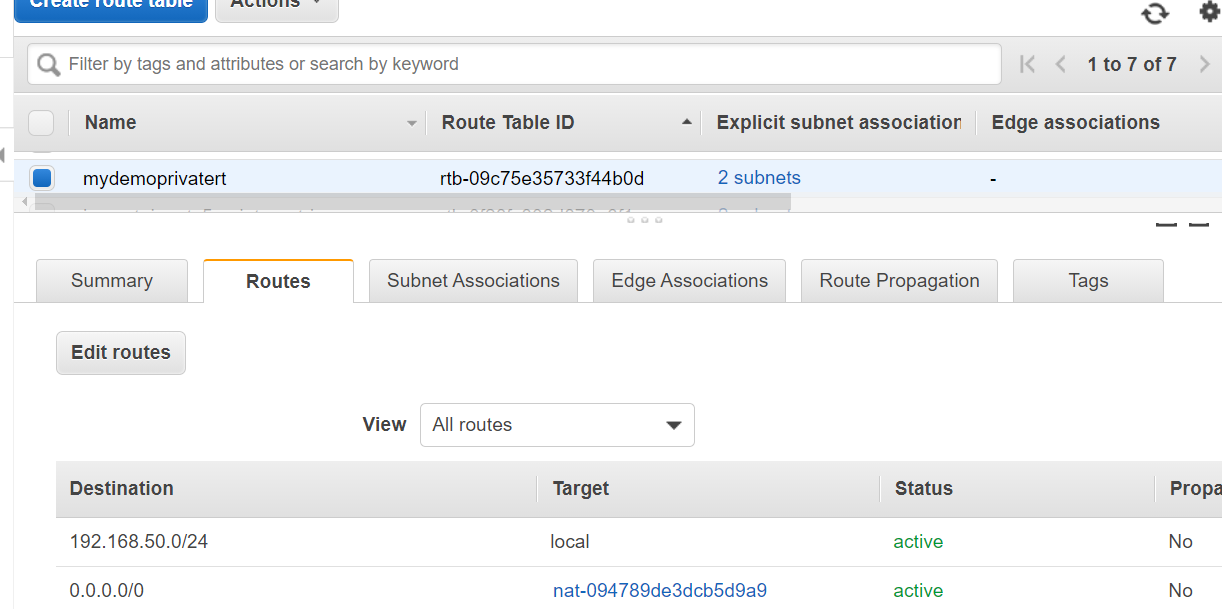
The above terraform file creates, elastic ip address, nat gateway, private subnets, route tables, route table associations.
Please note that i’ve only created two public and two private subnets in this example. If you do want to create subnets for each availability zones then you can modify
count = length(slice(local.az_names)).
Also modify cidr function according to your cidr range. I’m using /24 in this example, if you would like to use larger range /16 cidr then you can modify the function as below
cidrsubnet(var.vpc_cidr, 8, count.index). you can also pass newbits(8) as parameter to generate subnets according to your requirement.
Let us test this and apply.
terraform plan
terraform plan
provider.aws.region
  The region where AWS operations will take place. Examples
  are us-east-1, us-west-2, etc.

  Enter a value: eu-west-1

Refreshing Terraform state in-memory prior to plan...
The refreshed state will be used to calculate this plan, but will not be
persisted to local or remote state storage.

data.aws_availability_zones.azs: Refreshing state...

------------------------------------------------------------------------

An execution plan has been generated and is shown below.
Resource actions are indicated with the following symbols:
  + create

Terraform will perform the following actions:

  # aws_eip.nat will be created
  + resource "aws_eip" "nat" {
      + allocation_id        = (known after apply)
      + association_id       = (known after apply)
      + customer_owned_ip    = (known after apply)
      + domain               = (known after apply)
      + id                   = (known after apply)
      + instance             = (known after apply)
      + network_border_group = (known after apply)
      + network_interface    = (known after apply)
      + private_dns          = (known after apply)
      + private_ip           = (known after apply)
      + public_dns           = (known after apply)
      + public_ip            = (known after apply)
      + public_ipv4_pool     = (known after apply)
      + vpc                  = true
    }

  # aws_internet_gateway.igw will be created
  + resource "aws_internet_gateway" "igw" {
      + arn      = (known after apply)
      + id       = (known after apply)
      + owner_id = (known after apply)
      + tags     = {
          + "Name" = "mydemo-igw"
        }
      + vpc_id   = (known after apply)
    }

  # aws_nat_gateway.ngw will be created
  + resource "aws_nat_gateway" "ngw" {
      + allocation_id        = (known after apply)
      + id                   = (known after apply)
      + network_interface_id = (known after apply)
      + private_ip           = (known after apply)
      + public_ip            = (known after apply)
      + subnet_id            = (known after apply)
      + tags                 = {
          + "Name" = "NatGateway"
        }
    }

  # aws_route_table.privatert will be created
  + resource "aws_route_table" "privatert" {
      + id               = (known after apply)
      + owner_id         = (known after apply)
      + propagating_vgws = (known after apply)
      + route            = [
          + {
              + cidr_block                = "0.0.0.0/0"
              + egress_only_gateway_id    = ""
              + gateway_id                = ""
              + instance_id               = ""
              + ipv6_cidr_block           = ""
              + local_gateway_id          = ""
              + nat_gateway_id            = (known after apply)
              + network_interface_id      = ""
              + transit_gateway_id        = ""
              + vpc_endpoint_id           = ""
              + vpc_peering_connection_id = ""
            },
        ]
      + tags             = {
          + "Name" = "mydemoprivatert"
        }
      + vpc_id           = (known after apply)
    }

  # aws_route_table.publicrt will be created
  + resource "aws_route_table" "publicrt" {
      + id               = (known after apply)
      + owner_id         = (known after apply)
      + propagating_vgws = (known after apply)
      + route            = [
          + {
              + cidr_block                = "0.0.0.0/0"
              + egress_only_gateway_id    = ""
              + gateway_id                = (known after apply)
              + instance_id               = ""
              + ipv6_cidr_block           = ""
              + local_gateway_id          = ""
              + nat_gateway_id            = ""
              + network_interface_id      = ""
              + transit_gateway_id        = ""
              + vpc_endpoint_id           = ""
              + vpc_peering_connection_id = ""
            },
        ]
      + tags             = {
          + "Name" = "mydemopublicrt"
        }
      + vpc_id           = (known after apply)
    }

  # aws_route_table_association.private_subnet_association[0] will be created
  + resource "aws_route_table_association" "private_subnet_association" {
      + id             = (known after apply)
      + route_table_id = (known after apply)
      + subnet_id      = (known after apply)
    }

  # aws_route_table_association.private_subnet_association[1] will be created
  + resource "aws_route_table_association" "private_subnet_association" {
      + id             = (known after apply)
      + route_table_id = (known after apply)
      + subnet_id      = (known after apply)
    }

  # aws_route_table_association.pub_subnet_association[0] will be created
  + resource "aws_route_table_association" "pub_subnet_association" {
      + id             = (known after apply)
      + route_table_id = (known after apply)
      + subnet_id      = (known after apply)
    }

  # aws_route_table_association.pub_subnet_association[1] will be created
  + resource "aws_route_table_association" "pub_subnet_association" {
      + id             = (known after apply)
      + route_table_id = (known after apply)
      + subnet_id      = (known after apply)
    }

  # aws_subnet.private[0] will be created
  + resource "aws_subnet" "private" {
      + arn                             = (known after apply)
      + assign_ipv6_address_on_creation = false
      + availability_zone               = "eu-west-1a"
      + availability_zone_id            = (known after apply)
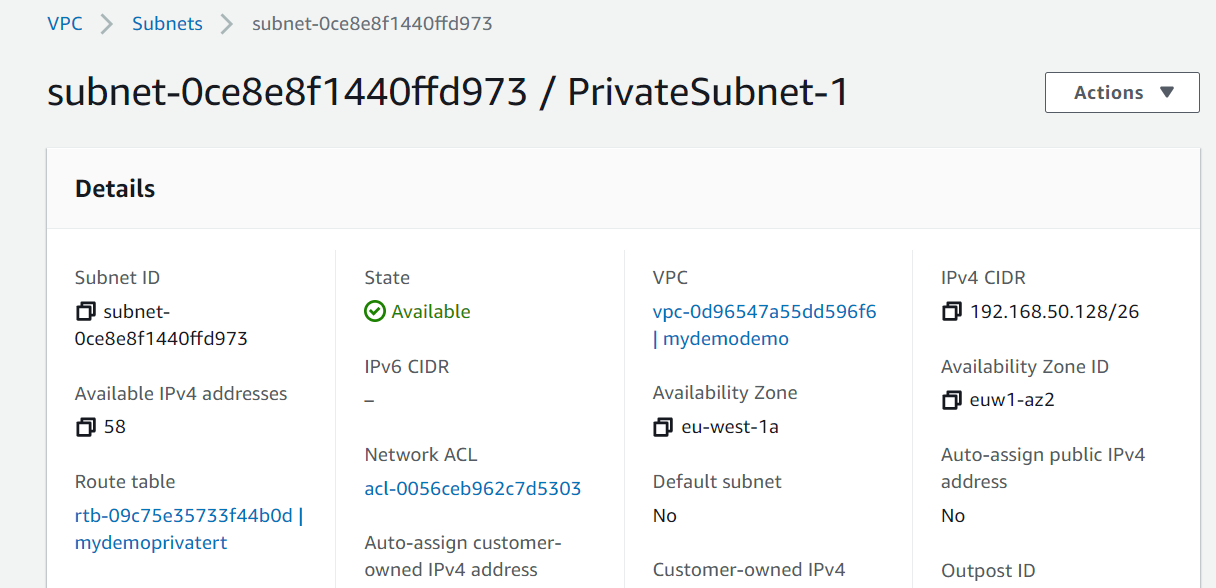
      + cidr_block                      = "192.168.50.128/26"
      + id                              = (known after apply)
      + ipv6_cidr_block_association_id  = (known after apply)
      + map_public_ip_on_launch         = false
      + owner_id                        = (known after apply)
      + tags                            = {
          + "Name" = "PrivateSubnet-1"
        }
      + vpc_id                          = (known after apply)
    }

  # aws_subnet.private[1] will be created
  + resource "aws_subnet" "private" {
      + arn                             = (known after apply)
      + assign_ipv6_address_on_creation = false
      + availability_zone               = "eu-west-1b"
      + availability_zone_id            = (known after apply)
      + cidr_block                      = "192.168.50.192/26"
      + id                              = (known after apply)
      + ipv6_cidr_block_association_id  = (known after apply)
      + map_public_ip_on_launch         = false
      + owner_id                        = (known after apply)
      + tags                            = {
          + "Name" = "PrivateSubnet-2"
        }
      + vpc_id                          = (known after apply)
    }

  # aws_subnet.public[0] will be created
  + resource "aws_subnet" "public" {
      + arn                             = (known after apply)
      + assign_ipv6_address_on_creation = false
      + availability_zone               = "eu-west-1a"
      + availability_zone_id            = (known after apply)
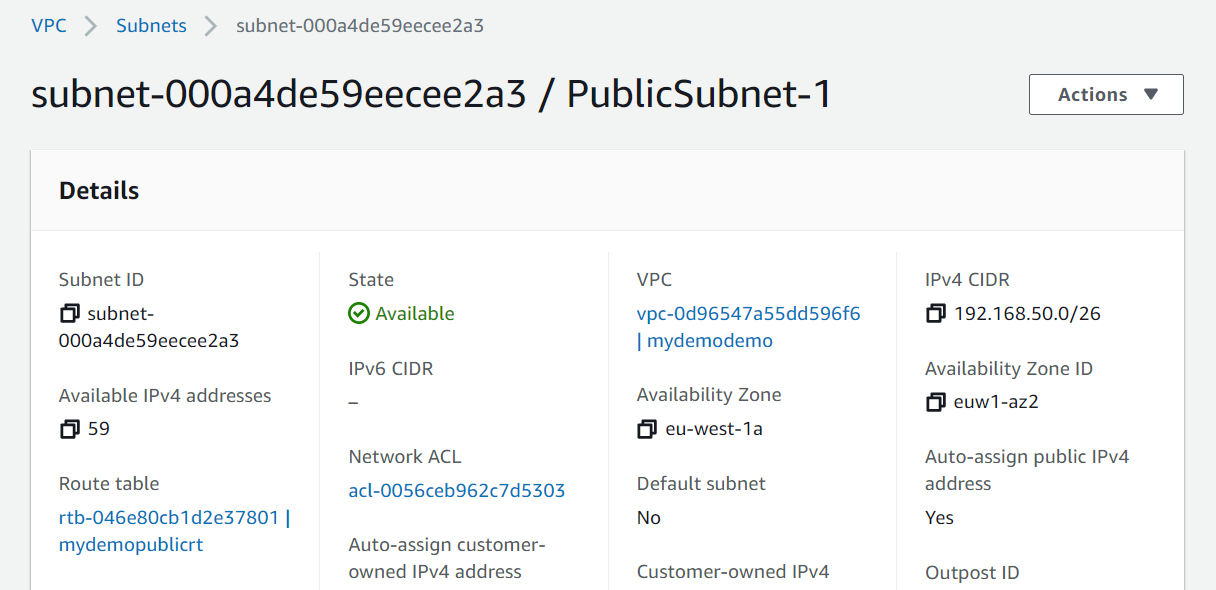
      + cidr_block                      = "192.168.50.0/26"
      + id                              = (known after apply)
      + ipv6_cidr_block_association_id  = (known after apply)
      + map_public_ip_on_launch         = true
      + owner_id                        = (known after apply)
      + tags                            = {
          + "Name" = "PublicSubnet-1"
        }
      + vpc_id                          = (known after apply)
    }

  # aws_subnet.public[1] will be created
  + resource "aws_subnet" "public" {
      + arn                             = (known after apply)
      + assign_ipv6_address_on_creation = false
      + availability_zone               = "eu-west-1b"
      + availability_zone_id            = (known after apply)
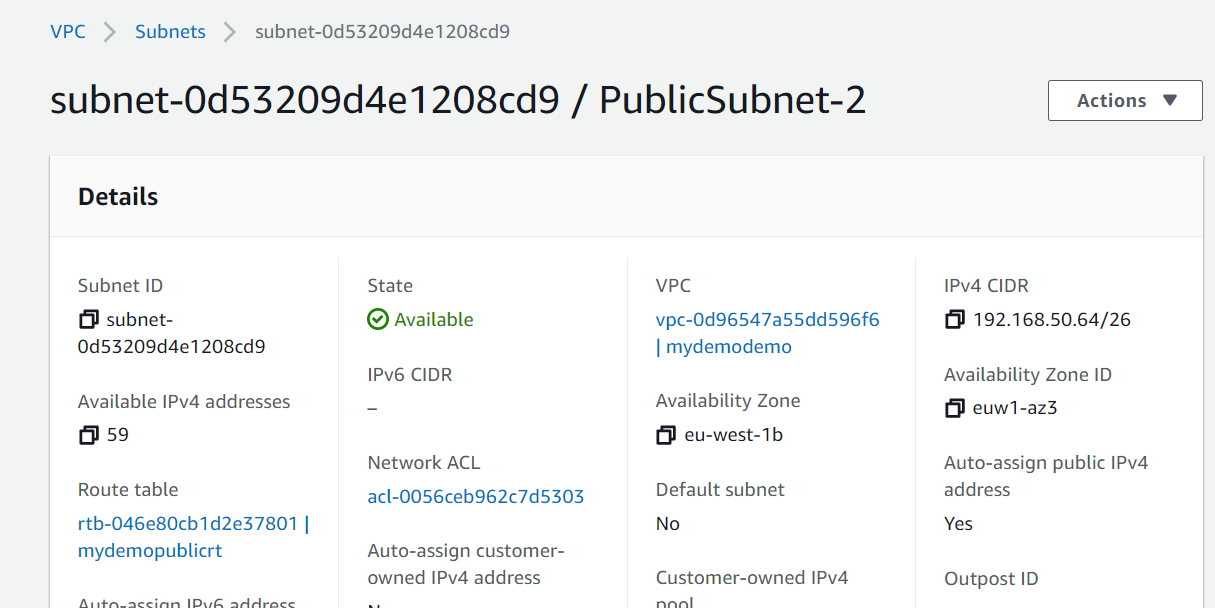
      + cidr_block                      = "192.168.50.64/26"
      + id                              = (known after apply)
      + ipv6_cidr_block_association_id  = (known after apply)
      + map_public_ip_on_launch         = true
      + owner_id                        = (known after apply)
      + tags                            = {
          + "Name" = "PublicSubnet-2"
        }
      + vpc_id                          = (known after apply)
    }

  # aws_vpc.mydemodemo will be created
  + resource "aws_vpc" "mydemodemo" {
      + arn                              = (known after apply)
      + assign_generated_ipv6_cidr_block = false
      + cidr_block                       = "192.168.50.0/24"
      + default_network_acl_id           = (known after apply)
      + default_route_table_id           = (known after apply)
      + default_security_group_id        = (known after apply)
      + dhcp_options_id                  = (known after apply)
      + enable_classiclink               = (known after apply)
      + enable_classiclink_dns_support   = (known after apply)
      + enable_dns_hostnames             = true
      + enable_dns_support               = true
      + id                               = (known after apply)
      + instance_tenancy                 = "default"
      + ipv6_association_id              = (known after apply)
      + ipv6_cidr_block                  = (known after apply)
      + main_route_table_id              = (known after apply)
      + owner_id                         = (known after apply)
      + tags                             = {
          + "Environment" = "demo"
          + "Name"        = "mydemodemo"
        }
    }

Plan: 14 to add, 0 to change, 0 to destroy.

Changes to Outputs:
  + nat_gateway_ip = (known after apply)

------------------------------------------------------------------------

Note: You didn't specify an "-out" parameter to save this plan, so Terraform
can't guarantee that exactly these actions will be performed if
"terraform apply" is subsequently run.
If you look the plan, it creates vpc, internet gateway, route tables, public subnets, elastic ip, nat gateway, private subnets, route table association.
Plan looks good, let us apply.
terraform apply
terraform apply
provider.aws.region
  The region where AWS operations will take place. Examples
  are us-east-1, us-west-2, etc.

  Enter a value: eu-west-1

data.aws_availability_zones.azs: Refreshing state...

An execution plan has been generated and is shown below.
Resource actions are indicated with the following symbols:
  + create

Terraform will perform the following actions:

  # aws_eip.nat will be created
  + resource "aws_eip" "nat" {
      + allocation_id        = (known after apply)
      + association_id       = (known after apply)
      + customer_owned_ip    = (known after apply)
      + domain               = (known after apply)
      + id                   = (known after apply)
      + instance             = (known after apply)
      + network_border_group = (known after apply)
      + network_interface    = (known after apply)
      + private_dns          = (known after apply)
      + private_ip           = (known after apply)
      + public_dns           = (known after apply)
      + public_ip            = (known after apply)
      + public_ipv4_pool     = (known after apply)
      + vpc                  = true
    }

  # aws_internet_gateway.igw will be created
  + resource "aws_internet_gateway" "igw" {
      + arn      = (known after apply)
      + id       = (known after apply)
      + owner_id = (known after apply)
      + tags     = {
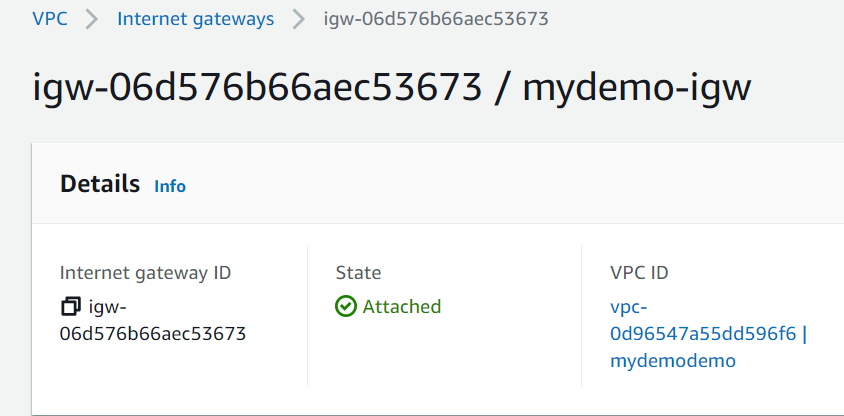
          + "Name" = "mydemo-igw"
        }
      + vpc_id   = (known after apply)
    }

  # aws_nat_gateway.ngw will be created
  + resource "aws_nat_gateway" "ngw" {
      + allocation_id        = (known after apply)
      + id                   = (known after apply)
      + network_interface_id = (known after apply)
      + private_ip           = (known after apply)
      + public_ip            = (known after apply)
      + subnet_id            = (known after apply)
      + tags                 = {
          + "Name" = "NatGateway"
        }
    }

  # aws_route_table.privatert will be created
  + resource "aws_route_table" "privatert" {
      + id               = (known after apply)
      + owner_id         = (known after apply)
      + propagating_vgws = (known after apply)
      + route            = [
          + {
              + cidr_block                = "0.0.0.0/0"
              + egress_only_gateway_id    = ""
              + gateway_id                = ""
              + instance_id               = ""
              + ipv6_cidr_block           = ""
              + local_gateway_id          = ""
              + nat_gateway_id            = (known after apply)
              + network_interface_id      = ""
              + transit_gateway_id        = ""
              + vpc_endpoint_id           = ""
              + vpc_peering_connection_id = ""
            },
        ]
      + tags             = {
          + "Name" = "mydemoprivatert"
        }
      + vpc_id           = (known after apply)
    }

  # aws_route_table.publicrt will be created
  + resource "aws_route_table" "publicrt" {
      + id               = (known after apply)
      + owner_id         = (known after apply)
      + propagating_vgws = (known after apply)
      + route            = [
          + {
              + cidr_block                = "0.0.0.0/0"
              + egress_only_gateway_id    = ""
              + gateway_id                = (known after apply)
              + instance_id               = ""
              + ipv6_cidr_block           = ""
              + local_gateway_id          = ""
              + nat_gateway_id            = ""
              + network_interface_id      = ""
              + transit_gateway_id        = ""
              + vpc_endpoint_id           = ""
              + vpc_peering_connection_id = ""
            },
        ]
      + tags             = {
          + "Name" = "mydemopublicrt"
        }
      + vpc_id           = (known after apply)
    }

  # aws_route_table_association.private_subnet_association[0] will be created
  + resource "aws_route_table_association" "private_subnet_association" {
      + id             = (known after apply)
      + route_table_id = (known after apply)
      + subnet_id      = (known after apply)
    }

  # aws_route_table_association.private_subnet_association[1] will be created
  + resource "aws_route_table_association" "private_subnet_association" {
      + id             = (known after apply)
      + route_table_id = (known after apply)
      + subnet_id      = (known after apply)
    }

  # aws_route_table_association.pub_subnet_association[0] will be created
  + resource "aws_route_table_association" "pub_subnet_association" {
      + id             = (known after apply)
      + route_table_id = (known after apply)
      + subnet_id      = (known after apply)
    }

  # aws_route_table_association.pub_subnet_association[1] will be created
  + resource "aws_route_table_association" "pub_subnet_association" {
      + id             = (known after apply)
      + route_table_id = (known after apply)
      + subnet_id      = (known after apply)
    }

  # aws_subnet.private[0] will be created
  + resource "aws_subnet" "private" {
      + arn                             = (known after apply)
      + assign_ipv6_address_on_creation = false
      + availability_zone               = "eu-west-1a"
      + availability_zone_id            = (known after apply)
      + cidr_block                      = "192.168.50.128/26"
      + id                              = (known after apply)
      + ipv6_cidr_block_association_id  = (known after apply)
      + map_public_ip_on_launch         = false
      + owner_id                        = (known after apply)
      + tags                            = {
          + "Name" = "PrivateSubnet-1"
        }
      + vpc_id                          = (known after apply)
    }

  # aws_subnet.private[1] will be created
  + resource "aws_subnet" "private" {
      + arn                             = (known after apply)
      + assign_ipv6_address_on_creation = false
      + availability_zone               = "eu-west-1b"
      + availability_zone_id            = (known after apply)
      + cidr_block                      = "192.168.50.192/26"
      + id                              = (known after apply)
      + ipv6_cidr_block_association_id  = (known after apply)
      + map_public_ip_on_launch         = false
      + owner_id                        = (known after apply)
      + tags                            = {
          + "Name" = "PrivateSubnet-2"
        }
      + vpc_id                          = (known after apply)
    }

  # aws_subnet.public[0] will be created
  + resource "aws_subnet" "public" {
      + arn                             = (known after apply)
      + assign_ipv6_address_on_creation = false
      + availability_zone               = "eu-west-1a"
      + availability_zone_id            = (known after apply)
      + cidr_block                      = "192.168.50.0/26"
      + id                              = (known after apply)
      + ipv6_cidr_block_association_id  = (known after apply)
      + map_public_ip_on_launch         = true
      + owner_id                        = (known after apply)
      + tags                            = {
          + "Name" = "PublicSubnet-1"
        }
      + vpc_id                          = (known after apply)
    }

  # aws_subnet.public[1] will be created
  + resource "aws_subnet" "public" {
      + arn                             = (known after apply)
      + assign_ipv6_address_on_creation = false
      + availability_zone               = "eu-west-1b"
      + availability_zone_id            = (known after apply)
      + cidr_block                      = "192.168.50.64/26"
      + id                              = (known after apply)
      + ipv6_cidr_block_association_id  = (known after apply)
      + map_public_ip_on_launch         = true
      + owner_id                        = (known after apply)
      + tags                            = {
          + "Name" = "PublicSubnet-2"
        }
      + vpc_id                          = (known after apply)
    }

  # aws_vpc.mydemodemo will be created
  + resource "aws_vpc" "mydemodemo" {
      + arn                              = (known after apply)
      + assign_generated_ipv6_cidr_block = false
      + cidr_block                       = "192.168.50.0/24"
      + default_network_acl_id           = (known after apply)
      + default_route_table_id           = (known after apply)
      + default_security_group_id        = (known after apply)
      + dhcp_options_id                  = (known after apply)
      + enable_classiclink               = (known after apply)
      + enable_classiclink_dns_support   = (known after apply)
      + enable_dns_hostnames             = true
      + enable_dns_support               = true
      + id                               = (known after apply)
      + instance_tenancy                 = "default"
      + ipv6_association_id              = (known after apply)
      + ipv6_cidr_block                  = (known after apply)
      + main_route_table_id              = (known after apply)
      + owner_id                         = (known after apply)
      + tags                             = {
          + "Environment" = "demo"
          + "Name"        = "mydemodemo"
        }
    }

Plan: 14 to add, 0 to change, 0 to destroy.

Changes to Outputs:
  + nat_gateway_ip = (known after apply)

Do you want to perform these actions in workspace "demo"?
  Terraform will perform the actions described above.
  Only 'yes' will be accepted to approve.

  Enter a value: yes

aws_eip.nat: Creating...
aws_vpc.mydemodemo: Creating...
aws_eip.nat: Creation complete after 0s [id=eipalloc-0575af76798f68266]
aws_vpc.mydemodemo: Creation complete after 1s [id=vpc-0d96547a55dd596f6]
aws_subnet.public[1]: Creating...
aws_subnet.private[0]: Creating...
aws_internet_gateway.igw: Creating...
aws_subnet.private[1]: Creating...
aws_subnet.public[0]: Creating...
aws_internet_gateway.igw: Creation complete after 1s [id=igw-06d576b66aec53673]
aws_route_table.publicrt: Creating...
aws_subnet.private[1]: Creation complete after 1s [id=subnet-0ab88aee1b33b8483]
aws_subnet.private[0]: Creation complete after 1s [id=subnet-0ce8e8f1440ffd973]
aws_nat_gateway.ngw: Creating...
aws_subnet.public[0]: Creation complete after 1s [id=subnet-000a4de59eecee2a3]
aws_subnet.public[1]: Creation complete after 1s [id=subnet-0d53209d4e1208cd9]
aws_route_table.publicrt: Creation complete after 0s [id=rtb-046e80cb1d2e37801]
aws_route_table_association.pub_subnet_association[1]: Creating...
aws_route_table_association.pub_subnet_association[0]: Creating...
aws_route_table_association.pub_subnet_association[0]: Creation complete after 0s [id=rtbassoc-0eb5f538c92bf0a9b]
aws_route_table_association.pub_subnet_association[1]: Creation complete after 0s [id=rtbassoc-088d81f0ac032d6db]
aws_nat_gateway.ngw: Still creating... [10s elapsed]
aws_nat_gateway.ngw: Still creating... [20s elapsed]
aws_nat_gateway.ngw: Still creating... [30s elapsed]
aws_nat_gateway.ngw: Still creating... [40s elapsed]
aws_nat_gateway.ngw: Still creating... [50s elapsed]
aws_nat_gateway.ngw: Still creating... [1m0s elapsed]
aws_nat_gateway.ngw: Still creating... [1m10s elapsed]
aws_nat_gateway.ngw: Still creating... [1m20s elapsed]
aws_nat_gateway.ngw: Still creating... [1m30s elapsed]
aws_nat_gateway.ngw: Still creating... [1m40s elapsed]
aws_nat_gateway.ngw: Creation complete after 1m44s [id=nat-094789de3dcb5d9a9]
aws_route_table.privatert: Creating...
aws_route_table.privatert: Creation complete after 0s [id=rtb-09c75e35733f44b0d]
aws_route_table_association.private_subnet_association[1]: Creating...
aws_route_table_association.private_subnet_association[0]: Creating...
aws_route_table_association.private_subnet_association[1]: Creation complete after 1s [id=rtbassoc-0d97f7027cdf93594]
aws_route_table_association.private_subnet_association[0]: Creation complete after 1s [id=rtbassoc-00dd10f8578438faa]

Apply complete! Resources: 14 added, 0 changed, 0 destroyed.

Outputs:

nat_gateway_ip = xx.xx.xxx.xxx



That’s it. Stay tuned for more updates on this series (Terraform, Ansible, AWS CDK)
Hope you enjoyed the post.
Cheers
Ramasankar Molleti
 Ramasankar Molleti Blog
One thought on “How to configure VPC, Network, Internet gateway, NAT Gateway using terraform”