
In this post, I will be explaining how to move tables/objects between different FileGroups.
- Create a sample database
USE master
GO
CREATE DATABASE MoveFG
GO
- Create Two file groups. In this example i have created two filegroups MoveFG_DATA_1 and MoveFG_DATA_2
ALTER DATABASE MoveFG ADD FILEGROUP MoveFG_DATA_1
GO
ALTER DATABASE MoveFG ADD FILEGROUP MoveFG_DATA_2
GO
- Create data files in different filegroups. In this example, i have created four data files, two for each filegroup
ALTER DATABASE MoveFG
ADD FILE
( NAME = MoveFG11,
FILENAME = 'C:\Ram\MoveFGDB\MoveFG_11.ndf',
SIZE = 1MB,
MAXSIZE = 10MB,
FILEGROWTH = 1MB)
TO FILEGROUP MoveFG_DATA_1
GO

ALTER DATABASE MoveFG
ADD FILE
( NAME = MoveFG20,
FILENAME = 'C:\Ram\MoveFGDB\MoveFG_20.ndf',
SIZE = 1MB,
MAXSIZE = 10MB,
FILEGROWTH = 1MB)
TO FILEGROUP MoveFG_DATA_2
GO

ALTER DATABASE MoveFG
ADD FILE
( NAME = MoveFG21,
FILENAME = 'C:\Ram\MoveFGDB\MoveFG_21.ndf',
SIZE = 1MB,
MAXSIZE = 10MB,
FILEGROWTH = 1MB)
TO FILEGROUP MoveFG_DATA_2
GO
- Now, create a table on filegroup MoveFG_DATA_1 and later move the filegroup to another group name MoveFG_DATA_2
USE MoveFG
GO

CREATE TABLE TAB1
(
TAB1_ID INT IDENTITY(1,1),
TAB1_NAME VARCHAR(100),
CONSTRAINT PK_TAB1 PRIMARY KEY(TAB1_ID)
) ON MoveFG_DATA_1 -- Filegroup we created.
GO
- Insert few records into the table TAB1
SET NOCOUNT OFF
INSERT INTO TAB1(TAB1_NAME)
SELECT TABLE_NAME
FROM INFORMATION_SCHEMA.TABLES
WHERE TABLE_TYPE = 'BASE TABLE'
GO 10000
- Verify which file group the data resides. You can use sp_help to get the details as shown in below.
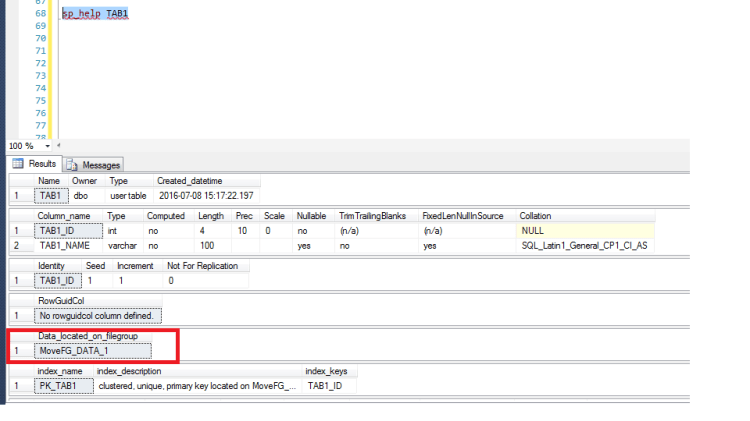
- As you can see above screenshot the table is on First file group MoveFG_DATA_1. Let us move the table TAB1 to another filegroup name MoveFG_DATA_2. To accomplish this we need to alter table with drop constraint with move option to move to another file group as shown below
ALTER TABLE TAB1 DROP CONSTRAINT PK_TAB1 WITH (MOVE TO MoveFG_DATA_2)
GO
ALTER TABLE TAB1 ADD CONSTRAINT PK_TAB1 PRIMARY KEY(TAB1_ID)
GO
- Now, Check which file group the table TAB1 resides

- There you go, The table has been moved to secondary file group MoveFG_DATA2. You can also use below query to get the details of tables/objects on different filegroups. I have taken this from Pinal’s Blog
SELECT obj.[name], obj.[type], i.[name], i.[index_id], fg.[name] FROM sys.indexes i
INNER JOIN sys.filegroups fg
ON i.data_space_id = fg.data_space_id
INNER JOIN sys.all_objects obj
ON i.[object_id] = obj.[object_id] WHERE i.data_space_id = fg.data_space_id
AND obj.type = 'U' -- User Created Tables
GO

- Be careful running this code on a production system, You may want to consider running this code during a maintenance window so the users are not impacted.
Hope you like the post. Stay tuned for next tip.
Ramasankar Molleti
 Ramasankar Molleti Blog
Awesome Ram, Thanks a lot. it will resolve many space issues. Thanks again for this lovely post.