Application team reported me that one of the SSIS package is failing after recent changes. It was failing with message “Binary Code for the script is not found”
I have been asked to troubleshoot the issue. I have opened the SSIS package in SQL Server Data tools and try to run the package from SSDT. Here is the error i have received
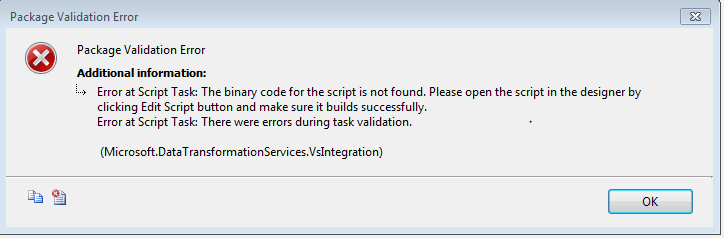
The package was using Script Task and i have opened the script tasks to see any coding/syntax errors. I found there was missing semicolon and un compiled code. I have modified the logic in Script task and save the package.
After that i have ran the package and it is successful.
Conclusion:
Error “The Binary code for the script is not found” usually occurs when you use Script task in SSIS and save the task with errors. Edit the script task, correct the issues and then execute the package.
Hope you enjoyed the post!
Cheers
Ramasankar Molleti
LinkedIn: LinkedIn Profile
Twitter: Twitter
Published by Ramasankar
As a Principal Cloud Architect with over 18 years of experience, I am dedicated to revolutionizing IT landscapes through cutting-edge cloud solutions. My expertise spans Cloud Architecture, Security Architecture, Solution Design, Cloud Migration, Database Transformation, Development, and Big Data Analytics.Currently, I spearhead cloud initiatives with a focus on Infrastructure, Containerization, Security, Big Data, Machine Learning, and Artificial Intelligence. I collaborate closely with development teams to architect, build, and manage robust cloud ecosystems that drive business growth and technological advancement.Core Competencies:
• Cloud Platforms: AWS, Google Cloud Platform, Microsoft Azure
• Technologies: Kubernetes, Serverless Computing, Microservices
• Databases: MS SQL Server, PostgreSQL, Oracle, MongoDB, Amazon Redshift, DynamoDB, Aurora
• Industries: Finance, Retail, Manufacturing.
Throughout my career, I’ve had the privilege of working with industry leaders such as OCC, Gate Gourmet, Walgreens, and Johnson Controls, gaining invaluable insights across diverse sectors.As a lifelong learner and knowledge sharer, I take pride in being the first in my organization to complete all major AWS certifications. I am passionate about mentoring and guiding fellow professionals in their cloud journey, fostering a culture of continuous learning and innovation.Let’s connect and explore how we can leverage cloud technologies to transform your business:
• LinkedIn: https://www.linkedin.com/in/ramasankar-molleti-23b13218/
• Book a mentorship session: [1:1] Together, let’s architect the future of cloud computing and drive technological excellence.
Disclaimer
The views expressed on this website/blog are mine alone and do not reflect the views of my company. All postings on this blog are provided “AS IS” with no warranties, and confers no rights. The owner of https://ramasankarmolleti.com will not be liable for any errors or omissions in this information nor for the availability of this information. The owner will not be liable for any losses, injuries, or damages from the display or use of this information.
View more posts

 Ramasankar Molleti Blog
How did you modify the logic in Script task? Is this all about semi colon?
There was a syntax error in the script task. In this case semi colon, but in general if you do save the script task with errors you do get this type of error. That is the mistake from the TFS side, they Checked in the package in source control with syntax errors. My team deployed the same in server as a SQL Agent job. Hence, the failure of the package.
million thanks
Glad it helped.