
Continuing to previous airtcle , let us setup network using terraform.
To begin with, let us create terraform variables, providers
I’ve created profile and region as two variables that I will be referring in the terraform resources.
variable.tf
 variable "profile" {
   type    = string
   default = "default"
 }

 variable "region" {
   type    = string
default = "eu-west-1" 
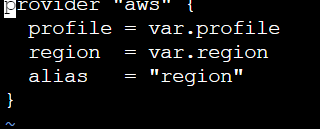
provider.tf
 provider "aws" {
   profile = var.profile
   region  = var.region
   alias   = "region"
} 
Let’s run terraform init
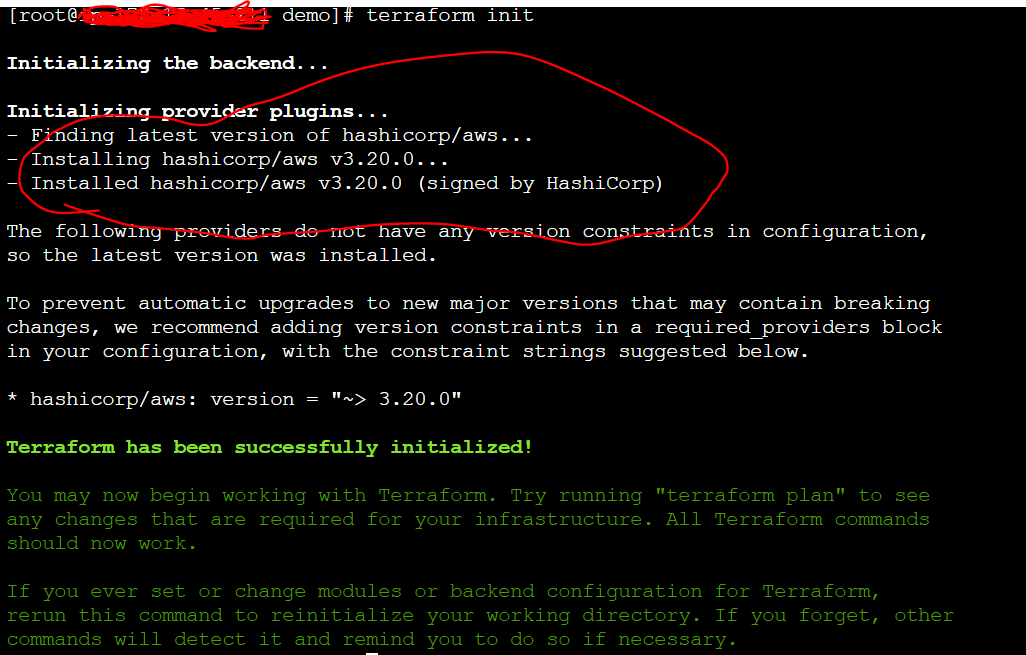
Now you can see that aws provider has been created. You can see the details in hidden folder as below.

Now, you have setup aws provider. Let us start by setting up networking (VPC, Internet gateway and subnets)
Create VPC
 resource "aws_vpc" "mydemodemo" {
   provider             = aws.region
   cidr_block           = "192.168.50.0/24"
   instance_tenancy     = "default"
   enable_dns_support   = true
   enable_dns_hostnames = true
   tags = {
     Name = "mydemodemo"
   }
 }
Create Internet Gateway
 resource "aws_internet_gateway" "mydemodemo-igw" {
   provider = aws.region
   vpc_id   = aws_vpc.mydemodemo.id
 }
Get all Availability Zones in the current vpc mydemodemo
 data "aws_availability_zones" "AZs" {
   provider = aws.region
   state    = "available"
 }
Create public subnet # 1 in eu-west-1 region
 resource "aws_subnet" "mydemodemo-public-a" {
   provider          = aws.region
   availability_zone = element(data.aws_availability_zones.AZs.names, 0)
   vpc_id            = aws_vpc.mydemodemo.id
   cidr_block        = "192.168.50.0/26"
   tags = {
     Name = "mydemodemo-public-a"
                }
 }
Create public subnet # 2
 resource "aws_subnet" "mydemodemo-public-b" {
   provider          = aws.region
   availability_zone = element(data.aws_availability_zones.AZs.names, 2)
   vpc_id            = aws_vpc.mydemodemo.id
   cidr_block        = "192.168.50.128/26"
   tags = {
     Name = "mydemodemo-public-b"
   }
 }
Create private subnet # 1
Create private subnet #1 in eu-west-1 region
 resource "aws_subnet" "mydemodemo-private-a" {
   provider          = aws.region
   availability_zone = element(data.aws_availability_zones.AZs.names, 2)
   vpc_id            = aws_vpc.mydemodemo.id
   cidr_block        = "192.168.50.64/26"
   tags = {
     Name = "mydemodemo-private-a"
   }
 }
Create private subnet #2
resource "aws_subnet" "mydemodemo-private-b" {
   provider          = aws.region
   availability_zone = element(data.aws_availability_zones.AZs.names, 3)
   vpc_id            = aws_vpc.mydemodemo.id
   cidr_block        = "192.168.50.192/26"
   tags = {
     Name = "mydemodemo-private-b"
   }
 }
I used element function to get the list of availability zones and create them respectively. For more details about element function you may refer here
Now, let’s run terraform plan
terraform plan
 Refreshing Terraform state in-memory prior to plan…
 The refreshed state will be used to calculate this plan, but will not be
 persisted to local or remote state storage.
 data.aws_availability_zones.AZs: Refreshing state…

 An execution plan has been generated and is shown below.
 Resource actions are indicated with the following symbols:
 create
 Terraform will perform the following actions:
 # aws_internet_gateway.mydemodemo-igw will be created
 resource "aws_internet_gateway" "mydemodemo-igw" {
 arn      = (known after apply)
 id       = (known after apply)
 owner_id = (known after apply)
 vpc_id   = (known after apply)
 }
 aws_subnet.mydemodemo-private-a will be created
 resource "aws_subnet" "mydemodemo-private-a" {
 arn                             = (known after apply)
 assign_ipv6_address_on_creation = false
 availability_zone               = "eu-west-1c"
 availability_zone_id            = (known after apply)
 cidr_block                      = "192.168.50.64/26"
 id                              = (known after apply)
 ipv6_cidr_block_association_id  = (known after apply)
 map_public_ip_on_launch         = false
 owner_id                        = (known after apply)
 tags                            = { "Name" = "mydemodemo-private-a"
 }
 vpc_id                          = (known after apply)
 }
 aws_subnet.mydemodemo-private-b will be created
 resource "aws_subnet" "mydemodemo-private-b" {
 arn                             = (known after apply)
 assign_ipv6_address_on_creation = false
 availability_zone               = "eu-west-1a"
 availability_zone_id            = (known after apply)
 cidr_block                      = "192.168.50.192/26"
 id                              = (known after apply)
 ipv6_cidr_block_association_id  = (known after apply)
 map_public_ip_on_launch         = false
 owner_id                        = (known after apply)
 tags                            = { "Name" = "mydemodemo-private-b"
 }
 vpc_id                          = (known after apply)
 }
 aws_subnet.mydemodemo-public-a will be created
 resource "aws_subnet" "mydemodemo-public-a" {
 arn                             = (known after apply)
 assign_ipv6_address_on_creation = false
 availability_zone               = "eu-west-1a"
 availability_zone_id            = (known after apply)
 cidr_block                      = "192.168.50.0/26"
 id                              = (known after apply)
 ipv6_cidr_block_association_id  = (known after apply)
 map_public_ip_on_launch         = false
 owner_id                        = (known after apply)
 tags                            = { "Name" = "mydemodemo-public-a"
 }
 vpc_id                          = (known after apply)
 }
 aws_subnet.mydemodemo-public-b will be created
 resource "aws_subnet" "mydemodemo-public-b" {
 arn                             = (known after apply)
 assign_ipv6_address_on_creation = false
 availability_zone               = "eu-west-1b"
 availability_zone_id            = (known after apply)
 cidr_block                      = "192.168.50.128/26"
 id                              = (known after apply)
 ipv6_cidr_block_association_id  = (known after apply)
 map_public_ip_on_launch         = false
 owner_id                        = (known after apply)
 tags                            = { "Name" = "mydemodemo-public-b"
 }
 vpc_id                          = (known after apply)
 }
 aws_vpc.mydemodemo will be created
 resource "aws_vpc" "mydemodemo" {
 arn                              = (known after apply)
 assign_generated_ipv6_cidr_block = false
 cidr_block                       = "192.168.50.0/24"
 default_network_acl_id           = (known after apply)
 default_route_table_id           = (known after apply)
 default_security_group_id        = (known after apply)
 dhcp_options_id                  = (known after apply)
 enable_classiclink               = (known after apply)
 enable_classiclink_dns_support   = (known after apply)
 enable_dns_hostnames             = true
 enable_dns_support               = true
 id                               = (known after apply)
 instance_tenancy                 = "default"
 ipv6_association_id              = (known after apply)
 ipv6_cidr_block                  = (known after apply)
 main_route_table_id              = (known after apply)
 owner_id                         = (known after apply)
 tags                             = { "Name" = "mydemodemo"
 }
 }
 Plan: 6 to add, 0 to change, 0 to destroy.

 Note: You didn't specify an "-out" parameter to save this plan, so Terraform
 can't guarantee that exactly these actions will be performed if
 "terraform apply" is subsequently run.
Terraform plan looks good. you can see that the resources are going to be created without any errors.
Here is the full network.tf file
Create VPC
 resource "aws_vpc" "mydemodemo" {
   provider             = aws.region
   cidr_block           = "192.168.50.0/24"
   instance_tenancy     = "default"
   enable_dns_support   = true
   enable_dns_hostnames = true
   tags = {
     Name = "mydemodemo"
   }
 }
 Create internet gateways
 resource "aws_internet_gateway" "mydemodemo-igw" {
   provider = aws.region
   vpc_id   = aws_vpc.mydemodemo.id
 }
 Get all Availability Zones in the current vpc mydemodemo
 data "aws_availability_zones" "AZs" {
   provider = aws.region
   state    = "available"
 }
 Create public subnet # 1 in eu-west-1 region
 resource "aws_subnet" "mydemodemo-public-a" {
   provider          = aws.region
   availability_zone = element(data.aws_availability_zones.AZs.names, 0)
   vpc_id            = aws_vpc.mydemodemo.id
   cidr_block        = "192.168.50.0/26"
   tags = {
     Name = "mydemodemo-public-a"
   }
 }
 Create public subnet # 2 in eu-west-1 region
 resource "aws_subnet" "mydemodemo-public-b" {
   provider          = aws.region
   availability_zone = element(data.aws_availability_zones.AZs.names, 1)
   vpc_id            = aws_vpc.mydemodemo.id
   cidr_block        = "192.168.50.128/26"
   tags = {
     Name = "mydemodemo-public-b"
   }
 }
 Create private subnet #1 in eu-west-1 region
 resource "aws_subnet" "mydemodemo-private-a" {
   provider          = aws.region
   availability_zone = element(data.aws_availability_zones.AZs.names, 2)
   vpc_id            = aws_vpc.mydemodemo.id
   cidr_block        = "192.168.50.64/26"
   tags = {
     Name = "mydemodemo-private-a"
   }
 }
 resource "aws_subnet" "mydemodemo-private-b" {
   provider          = aws.region
   availability_zone = element(data.aws_availability_zones.AZs.names, 3)
   vpc_id            = aws_vpc.mydemodemo.id
   cidr_block        = "192.168.50.192/26"
   tags = {
     Name = "mydemodemo-private-b"
   }
 }
Let us apply network.tf
terraform apply
terraform apply
 data.aws_availability_zones.AZs: Refreshing state…
 An execution plan has been generated and is shown below.
 Resource actions are indicated with the following symbols:
 create
 Terraform will perform the following actions:
 # aws_internet_gateway.mydemodemo-igw will be created
 resource "aws_internet_gateway" "mydemodemo-igw" {
 arn      = (known after apply)
 id       = (known after apply)
 owner_id = (known after apply)
 vpc_id   = (known after apply)
 }
 aws_subnet.mydemodemo-private-a will be created
 resource "aws_subnet" "mydemodemo-private-a" {
 arn                             = (known after apply)
 assign_ipv6_address_on_creation = false
 availability_zone               = "eu-west-1c"
 availability_zone_id            = (known after apply)
 cidr_block                      = "192.168.50.64/26"
 id                              = (known after apply)
 ipv6_cidr_block_association_id  = (known after apply)
 map_public_ip_on_launch         = false
 owner_id                        = (known after apply)
 tags                            = { "Name" = "mydemodemo-private-a"
 }
 vpc_id                          = (known after apply)
 }
 aws_subnet.mydemodemo-private-b will be created
 resource "aws_subnet" "mydemodemo-private-b" {
 arn                             = (known after apply)
 assign_ipv6_address_on_creation = false
 availability_zone               = "eu-west-1a"
 availability_zone_id            = (known after apply)
 cidr_block                      = "192.168.50.192/26"
 id                              = (known after apply)
 ipv6_cidr_block_association_id  = (known after apply)
 map_public_ip_on_launch         = false
 owner_id                        = (known after apply)
 tags                            = { "Name" = "mydemodemo-private-b"
 }
 vpc_id                          = (known after apply)
 }
 aws_subnet.mydemodemo-public-a will be created
 resource "aws_subnet" "mydemodemo-public-a" {
 arn                             = (known after apply)
 assign_ipv6_address_on_creation = false
 availability_zone               = "eu-west-1a"
 availability_zone_id            = (known after apply)
 cidr_block                      = "192.168.50.0/26"
 id                              = (known after apply)
 ipv6_cidr_block_association_id  = (known after apply)
 map_public_ip_on_launch         = false
 owner_id                        = (known after apply)
 tags                            = { "Name" = "mydemodemo-public-a"
 }
 vpc_id                          = (known after apply)
 }
 aws_subnet.mydemodemo-public-b will be created
 resource "aws_subnet" "mydemodemo-public-b" {
 arn                             = (known after apply)
 assign_ipv6_address_on_creation = false
 availability_zone               = "eu-west-1b"
 availability_zone_id            = (known after apply)
 cidr_block                      = "192.168.50.128/26"
 id                              = (known after apply)
 ipv6_cidr_block_association_id  = (known after apply)
 map_public_ip_on_launch         = false
 owner_id                        = (known after apply)
 tags                            = { "Name" = "mydemodemo-public-b"
 }
 vpc_id                          = (known after apply)
 }
 aws_vpc.mydemodemo will be created
 resource "aws_vpc" "mydemodemo" {
 arn                              = (known after apply)
 assign_generated_ipv6_cidr_block = false
 cidr_block                       = "192.168.50.0/24"
 default_network_acl_id           = (known after apply)
 default_route_table_id           = (known after apply)
 default_security_group_id        = (known after apply)
 dhcp_options_id                  = (known after apply)
 enable_classiclink               = (known after apply)
 enable_classiclink_dns_support   = (known after apply)
 enable_dns_hostnames             = true
 enable_dns_support               = true
 id                               = (known after apply)
 instance_tenancy                 = "default"
 ipv6_association_id              = (known after apply)
 ipv6_cidr_block                  = (known after apply)
 main_route_table_id              = (known after apply)
 owner_id                         = (known after apply)
 tags                             = { "Name" = "mydemodemo"
 }
 }
 Plan: 6 to add, 0 to change, 0 to destroy.
 Do you want to perform these actions?
   Terraform will perform the actions described above.
   Only 'yes' will be accepted to approve.
 Enter a value: yes
 aws_vpc.mydemodemo: Creating…
 aws_vpc.mydemodemo: Creation complete after 1s [id=vpc-00566cc74b0162d72]
 aws_subnet.mydemodemo-public-b: Creating…
 aws_subnet.mydemodemo-private-b: Creating…
 aws_subnet.mydemodemo-private-a: Creating…
 aws_internet_gateway.mydemodemo-igw: Creating…
 aws_subnet.mydemodemo-public-a: Creating…
 aws_internet_gateway.mydemodemo-igw: Creation complete after 0s [id=igw-054372249d1864798]
 aws_subnet.mydemodemo-private-b: Creation complete after 0s [id=subnet-0148fb04d52e33bca]
 aws_subnet.mydemodemo-public-b: Creation complete after 0s [id=subnet-0392daa47a4dfec77]
 aws_subnet.mydemodemo-private-a: Creation complete after 0s [id=subnet-0a2c8222c5acfc2c0]
 aws_subnet.mydemodemo-public-a: Creation complete after 0s [id=subnet-014010a55e3cb336a]
 Apply complete! Resources: 6 added, 0 changed, 0 destroyed.
You can see that 6 resources are created. Wait for few minutes to see them appear on aws console.
Here it is, I can see that vpc, network, internet gateway are created.
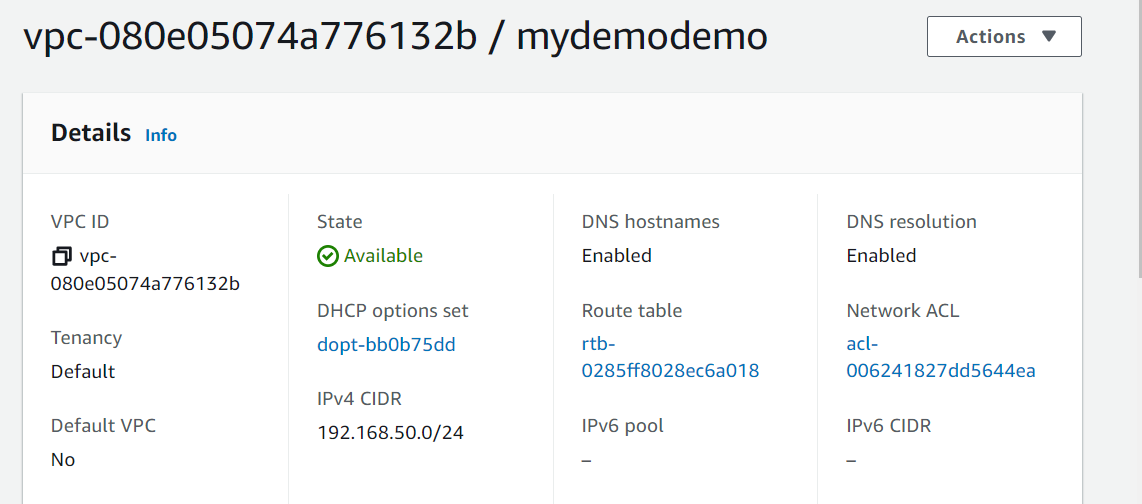
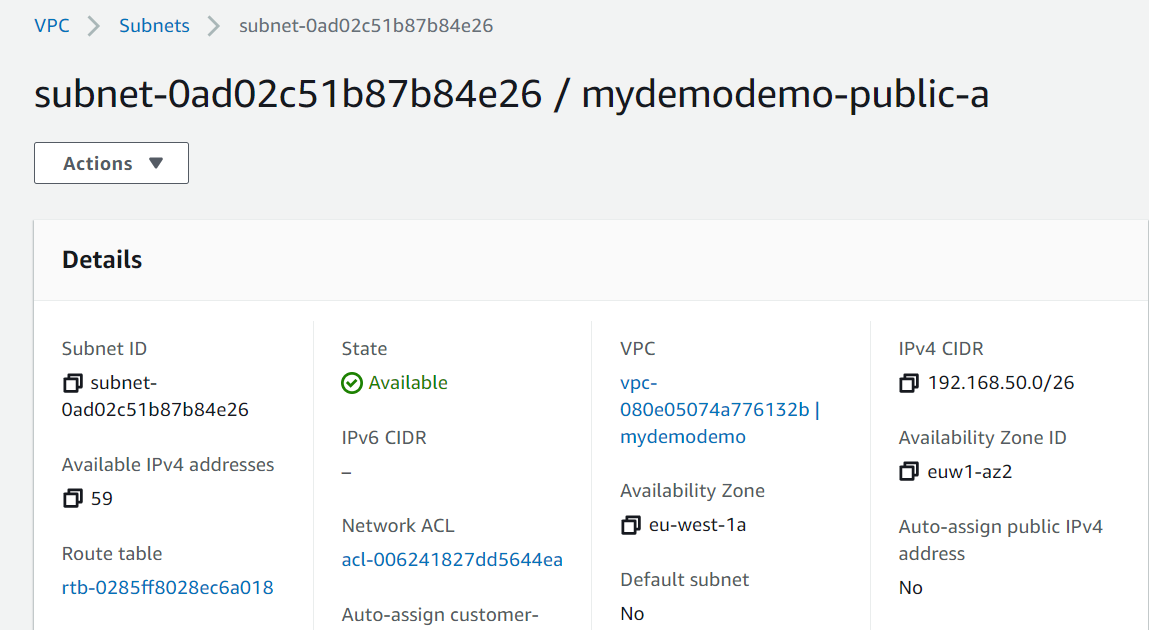
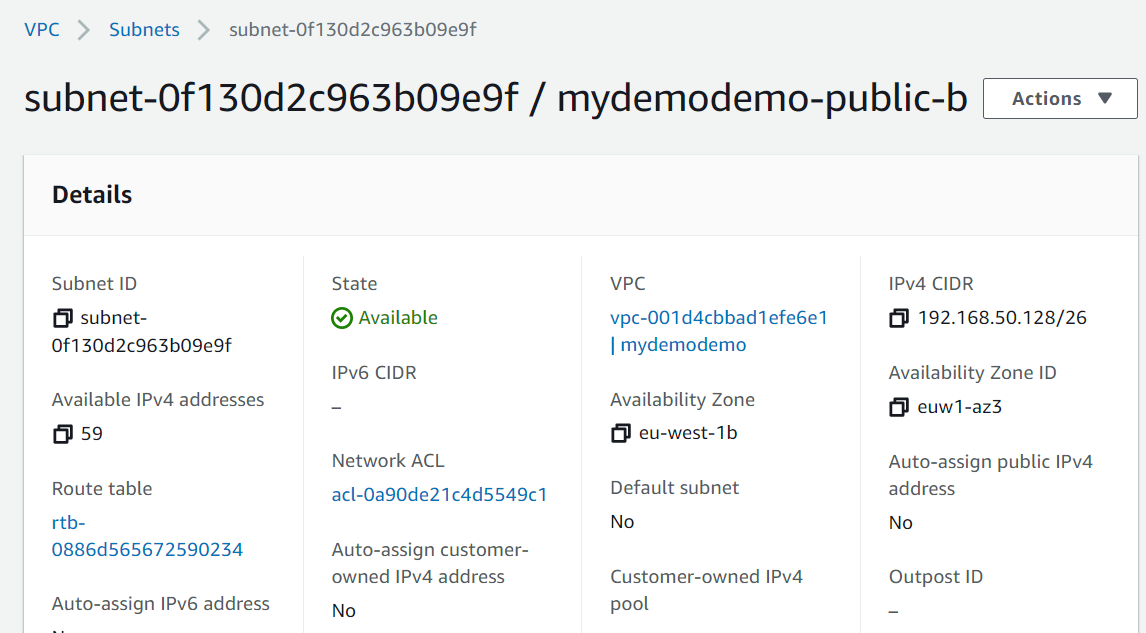

That’s it. you can see that we have created network (VPC, subnets, Internet gateway). I will be creating EC2, RDS in the upcoming articles. Stay tuned.
Hope you enjoyed the post.
Cheers
Ramasankar Molleti
 Ramasankar Molleti Blog
One thought on “How to configure VPC, Network, Internet gateway using terraform”