
One of the requirement was to generate csv file for set of queries from RDS PostgreSQL and upload the csv file to s3 bucket for power bi reporting. Powerbi connects to s3 url and generate report. There is no gateway to connect to PostgreSQL instance from power-bi, hence we need to have a mechanism to upload the data to s3 so that powerbi can import it and generate reports. How can you generate csv file and upload to s3 bucket ?
There are multiple ways we can achieve this, one is to use ssm command send over as shell script and use copy command for postgreSQL to generate csv file and push it to s3. Another approach is use pandas module and dataframe to convert the data to csv and push it to s3.
Both the examples are as below. I retreived username and password from parameter store. For more information about parameter store you may refer here.
import boto3
import time
import sys
import os
ec2 = boto3.client('ec2')
ssm_client = boto3.client('ssm')
def lambda_handler(event, context):
def execute_ssm_command(client, commands, instance_ids):
resp = client.send_command(
DocumentName="AWS-RunShellScript",
Parameters={'commands': commands},
InstanceIds=instance_ids,
)
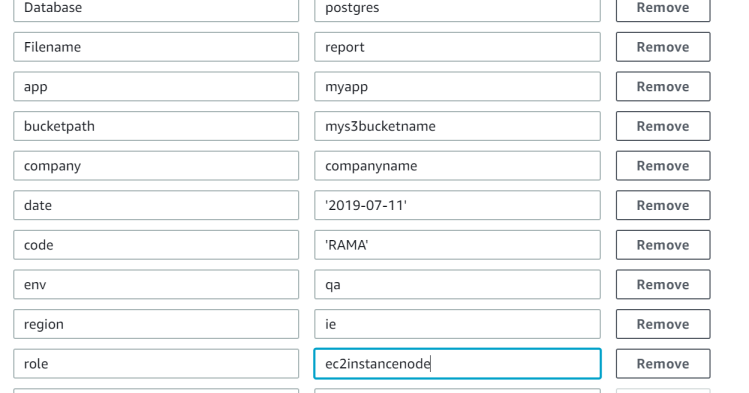
nodename = os.environ['region']+'.'+os.environ['env']+'.'+os.environ['app']+'.'+os.environ['company']+'.'+os.environ['role']
print os.environ['date']
print os.environ['code']
uname = ssm_client.get_parameter(Name='dbusername', WithDecryption=True)
username = uname['Parameter']['Value']
pwd = ssm_client.get_parameter(Name='dbpassword', WithDecryption=True)
password = pwd['Parameter']['Value']
response=ec2.describe_instances()
for reservation in response["Reservations"]:
for instance in reservation["Instances"]:
if(instance.get("Tags")):
for tag in instance['Tags']:
if(tag.get("Key")):
if (tag['Key'] in 'Name'):
if (tag['Value'] in nodename):
print tag['Value']
commands = ['if [ -z "${HOME:-}" ]; then export HOME="$(cd ~ && pwd)"; fi','sudo yum install mail -y', 'sudo yum install postgresql96 -y', '#!/bin/bash ', 'PGPASSWORD='+str(password)+' psql -h postgres -U '+str(username)+' -d dbname -c "\copy (select * from report where date= '+os.environ['date']+' and code= '+os.environ['code']+') to stdout csv header">/$HOME/s3Reportqa.csv', 'aws s3 cp /$HOME/s3Report.csv s3://'+os.environ['bucketpath']+'/', 'printf "Hi All, csv file has been generated successfully. " | mailx -vvv -s "report" -r "noreply@ramasankarmolleti.com" -S smtp="smtp" "sankar276@gmail.com"']
temp = instance["InstanceId"]
instance_ids = [temp]
print os.environ['region']+'.'+os.environ['env']+'.'+os.environ['app']+'.'+os.environ['company']+'.'+os.environ['role']
print instance_ids
execute_ssm_command(ssm_client, commands, instance_ids)
Parameters:
Second Method (Using Pandas module)
import psycopg2
import request
import boto3
import pandas as pd
from pandas import Series, DataFrame
import csv
conn_string = "host='dbinstancename' dbname='databasename' user='username' password='password'"
conn = psycopg2.connect(conn_string)
cursor = conn.cursor()
print ("Connected")
tablename = 'report'
date = '2019-07-11'
code = 'RAMA'
#cursor.execute("SELECT * FROM " + tablename +" Where date ="+ date + " and code = "+code+";")
cursor.execute("SELECT * FROM " + tablename +" limit 100;")
myresult = cursor.fetchall()
item_list = []
for i in myresult:
item = {'col1':i[0],
'col2':i[1],
'col3' :i[2],
'col4' :i[3],
'col5' :i[4],
'col6' :i[5],
'col7' :i[6],
'col8' :i[7],
'col9' :i[8]}
item_list.append(item)
concat = str(i[0]) + str(',') + str(i[1]) + str(',') + str(i[2]) + str(',') + str(i[3]) + str(',') + str(i[4]) + str(',') + str(i[5]) + str(',') + str(i[6]) + str(',') + str(i[7]) + str(',') + str(i[8])
# print (concat)
df = pd.DataFrame(data=item_list,columns=['col1','col2','col3','col4','col5','col6','col7','col8','col9'])
df.head(30)
print (df.head(40))
# importing the result to csv begins
df.to_csv('rama.csv')
print('csv generated')
# to push the datafram results to s3, we can use boto3 s3 resource as below
s3_resource = boto3.resource('s3')
s3_resource.Object(bucket, 'df.csv').put(Body=csv_buffer.getvalue())
You can schedule the lambda using cloudwatch events every 5 minutes to update the data in s3.
Hope you enjoyed the post.
Cheers
Ramasankar Molleti
 Ramasankar Molleti Blog