It’s been long time since i wrote a blog post. In this post i would like to show an example of lambda to connect to PostgreSQL database and execute the query.
- Build a PostgreSQL psycopg module in order to connect to database. I’ve built a custom compiled python library to connect to latest PostgreSQL 9.6 database using this. You may download the package from here
- Write a sample lambda that updates the url in the table. It calls the function to update.
import psycopg2
def lambda_handler(event,context):
conn_string = "dbname='test' port='5432' user='username' password='password' host='RDSEndpoint'"
conn = psycopg2.connect(conn_string)
cursor = conn.cursor()
cursor.execute("select system_env_host('ramasankarmolleti.com')")
conn.commit()
cursor.close()
print("working")
- You may also download python code here
- Now, let’s create a lambda function
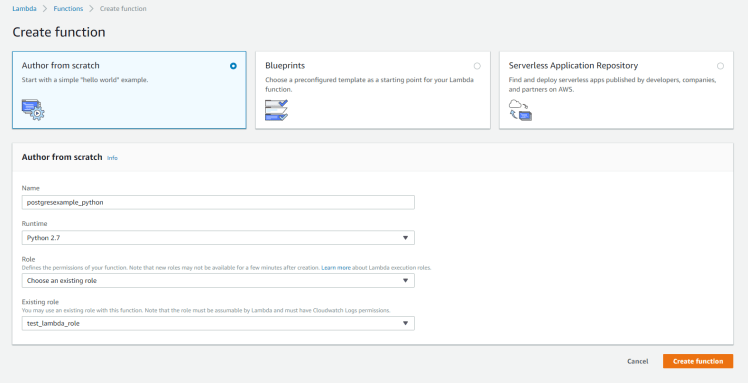
- In the above screenshot I’ve created a test_lambda_role iam role to get access to lambda services. Once you create the lambda, then combine both step1 and step2 as one zip file and upload the zip file in lambda you may download the combined zip file here
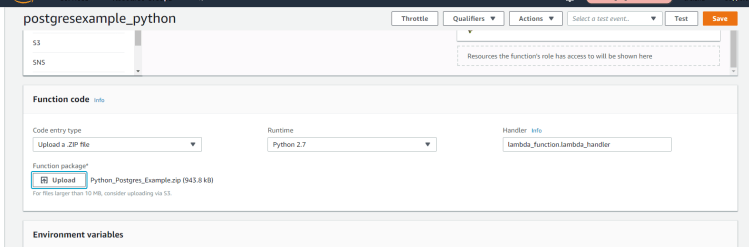
- Next, Here comes to access to Database from lambda. You need to create a security group that have access to PostgreSQL database from the lambda. I’ve created a security group and attached to lambda.
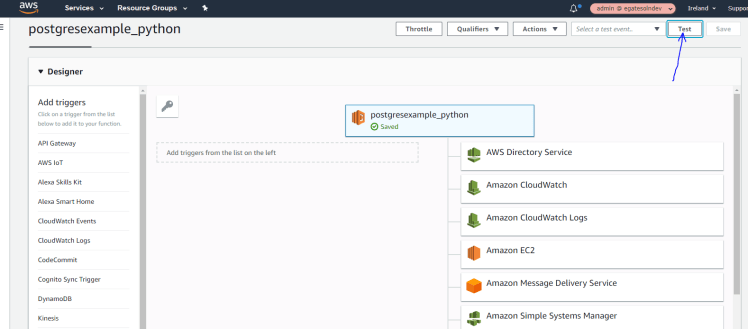
- Now, we have lambda deployed and run the lambda for testing. Click on test to test the lambda. This will prompt you to create test even as below
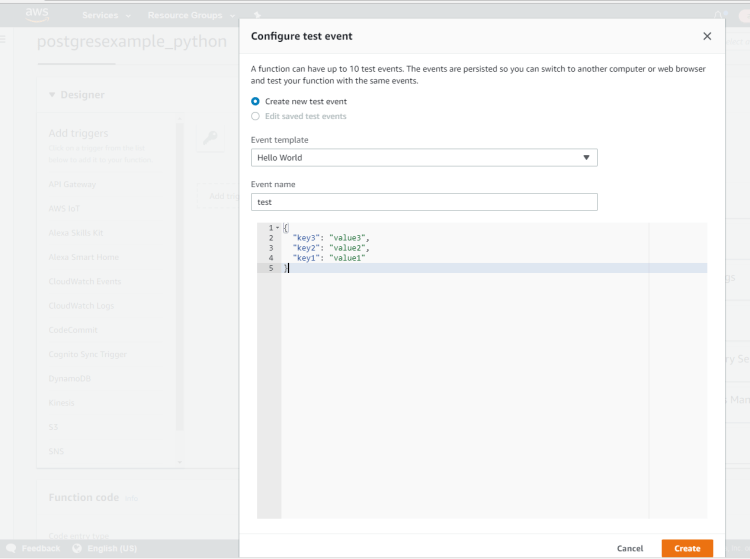
- After creating test even you can run the lambda by clicking test before that make sure lambda function name is updated to function name you created. In this example function name is UpdateHost_Python as shown in below
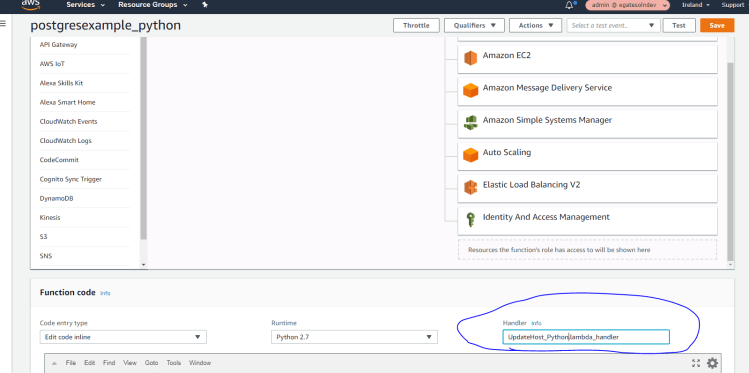
- Now, Click on test to test the lambda.
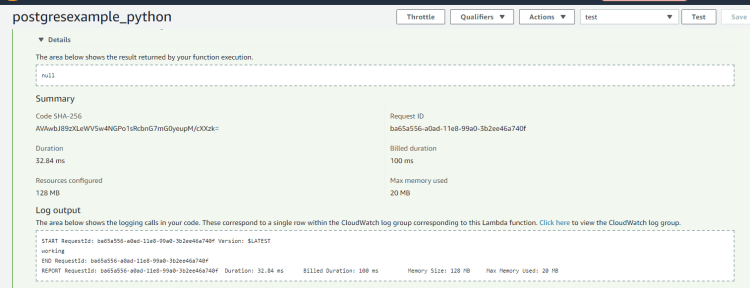
- Here you go lambda is successfully executed
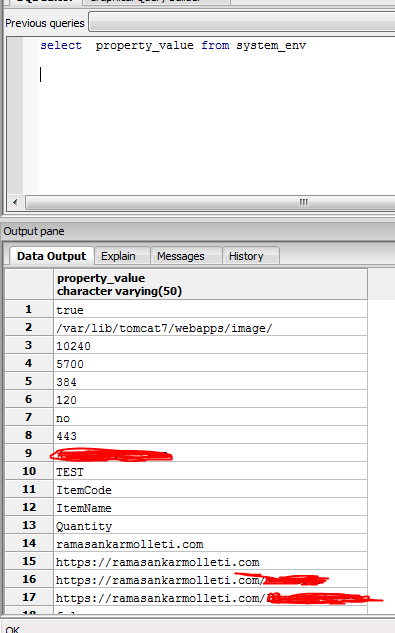
- Let’s see the results in the database. You can see the results that host is updated to ramasankarmolleti.com.
Hope you enjoyed the post!
Cheers
Ramasankar Molleti
LinkedIn
Published by Ramasankar
As a Principal Cloud Architect with over 18 years of experience, I am dedicated to revolutionizing IT landscapes through cutting-edge cloud solutions. My expertise spans Cloud Architecture, Security Architecture, Solution Design, Cloud Migration, Database Transformation, Development, and Big Data Analytics.Currently, I spearhead cloud initiatives with a focus on Infrastructure, Containerization, Security, Big Data, Machine Learning, and Artificial Intelligence. I collaborate closely with development teams to architect, build, and manage robust cloud ecosystems that drive business growth and technological advancement.Core Competencies:
• Cloud Platforms: AWS, Google Cloud Platform, Microsoft Azure
• Technologies: Kubernetes, Serverless Computing, Microservices
• Databases: MS SQL Server, PostgreSQL, Oracle, MongoDB, Amazon Redshift, DynamoDB, Aurora
• Industries: Finance, Retail, Manufacturing.
Throughout my career, I’ve had the privilege of working with industry leaders such as OCC, Gate Gourmet, Walgreens, and Johnson Controls, gaining invaluable insights across diverse sectors.As a lifelong learner and knowledge sharer, I take pride in being the first in my organization to complete all major AWS certifications. I am passionate about mentoring and guiding fellow professionals in their cloud journey, fostering a culture of continuous learning and innovation.Let’s connect and explore how we can leverage cloud technologies to transform your business:
• LinkedIn: https://www.linkedin.com/in/ramasankar-molleti-23b13218/
• Book a mentorship session: [1:1] Together, let’s architect the future of cloud computing and drive technological excellence.
Disclaimer
The views expressed on this website/blog are mine alone and do not reflect the views of my company. All postings on this blog are provided “AS IS” with no warranties, and confers no rights. The owner of https://ramasankarmolleti.com will not be liable for any errors or omissions in this information nor for the availability of this information. The owner will not be liable for any losses, injuries, or damages from the display or use of this information.
View more posts

 Ramasankar Molleti Blog
Where did you get the library, most of them work from local windows , and then give error of “module not found” on aws lambda
You can build the library on any linux machine and zip it and upload to lambda. Here are the below steps you may follow to build. At the time of writing this blog i used python 2.7 version. you can build module on python 3.6 as below
# Download postgres source code
wget -c https://ftp.postgresql.org/pub/source/v11.4/postgresql-11.4.tar.gz
# Download psycopg2 source code
git clone https://github.com/psycopg/psycopg2
# Unzip the module
tar zxfv postgresql-11.4.tar.gz
# Create local install direcotry
mkdir ./pgsql-11.4
#compile and install
cd postgresql-11.4 ; ./configure –prefix=/home/postgres/pgsql-11.4 –without-readline –without-zlib
make ; make install
# Edit psycopg2 setup config
cd psycopg2 ;vim setup.cfg
# Change:
static_libpq=1
pg_config=/home/postgres/pgsql-11.4/bin/pg_config
# Compile psycopg2
python3.6 setup.py build
# Package psycopg2
mv ~/psycopg2 ~/psycopg2_source
cp -r ~/psycopg2_source/build/lib.linux-x86_64-3.6/psycopg2/ ~/
tar cvfz psycopg2.tgz psycopg2/
hope this helps. thanks
Can anyone provide the same example in Powershell ?
Hi,
this is a nice post, it works for me. But I have one small problem that I think it is relate to psycopg2, I am trying to execute cur.execute(“create tablespace ts_data owner my_owner location ‘/data/ts_data’;create tablespace ts_2015 owner my_owner location ‘/data/ts_2015’;”)
And I am getting error back: psycopg2.InternalError: CREATE TABLESPACE cannot run inside a transaction block
I searched a lot in order to get some solutions on this topic, but nothing worked for me.
Any ideas on how to resolve this ?
Thanks.
Hi Ali, That’s the behaviour of POSTGRESQL. You cannot run inside a transaction block. You can do either of these to mitigate issue. 1. Turn on autocommit 2. Put End; at the begging of the statement. Hope this helps.
thanks for the post.Its very helpful..iam working on a website for which backend database is Postgresql (hosted on aws).There are rating and reviews that a user will submit on the site and has and the data has to be entered in to postgresql.Is there any sample code that you can provide for this kind of use case or do you suggest using dynamo db as the database?
Hi Amar, It depends on your requirement of the site whether to use NoSQL or RDBMS. Looking at your requirement based on your comment, i would suggest to use dyanmodb as database. If you are looking for a server-less approach using amazon as cloud provider then i would suggest you refer this (https://aws.amazon.com/getting-started/hands-on/build-serverless-web-app-lambda-apigateway-s3-dynamodb-cognito/).
Thanks for the response Ram.Initially database was decided as postgresql for the application.Can the same architecture implemented with postgresql?
You can but it does not fall under server-less approach.
thank you.So,still i can use lamda and apigateway replacing dynamo db with postgresql?
Yes
Thanks a lot for this blog. It really helped me a lot.
Instead of giving username and password statically can we do it in dynamically. if so, then then how?
Yes, There are multiple ways to do 1. Lambda environment variables 2. Parameter store 3. secret manager.
Environment Variable Example:
You can retrieve the values from lambda as
os.environ[‘username’]
os.environ[‘password’]
Here username and password are two environment variables.
For more information about Lambda environment variables, you may refer (https://docs.aws.amazon.com/lambda/latest/dg/configuration-envvars.html )
I will write a blog post with all three examples soon.
Thanks For the Information