
You or your team or someone has written an SSIS package which is running flawlessly over few days/months/years. One fine day SSIS package is failing continuously and you need to troubleshoot and fix the issue.
Error message is not showing much information about why the package has been failed and until what step the package was successful or failed.
What will you do in this scenario?
Debug! Debug! Debug! Let’s see how this works.
You can debug this using breakpoints and data viewer in SSIS. Let’s explore this.
Data Viewer:
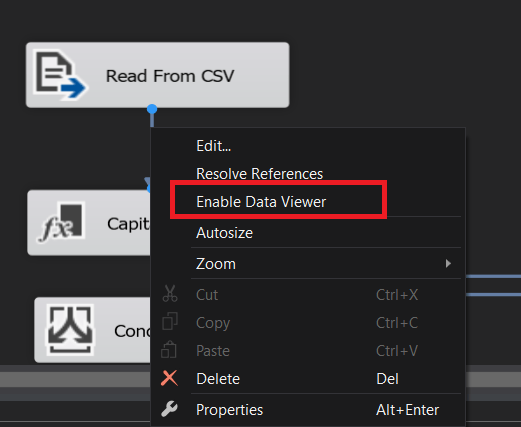
You can view the data while the ssis package is running in each step. This will help you to know what data is processing in each step in data flow task. You can see that in the below screenshot.
After you execute the package then the result can be seen as below

Break Points:
You can also debug a package by setting the breakpoints on a package task/container as below
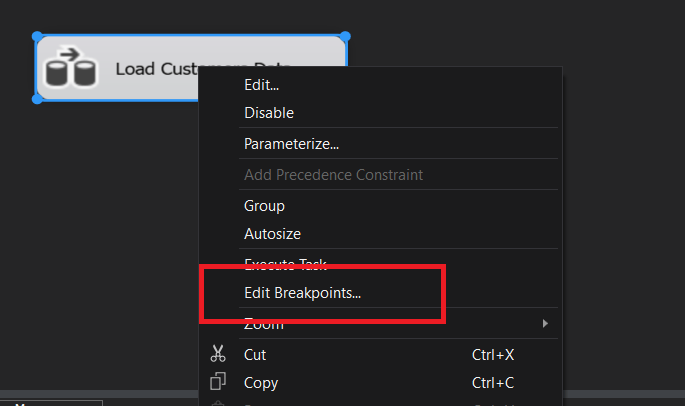
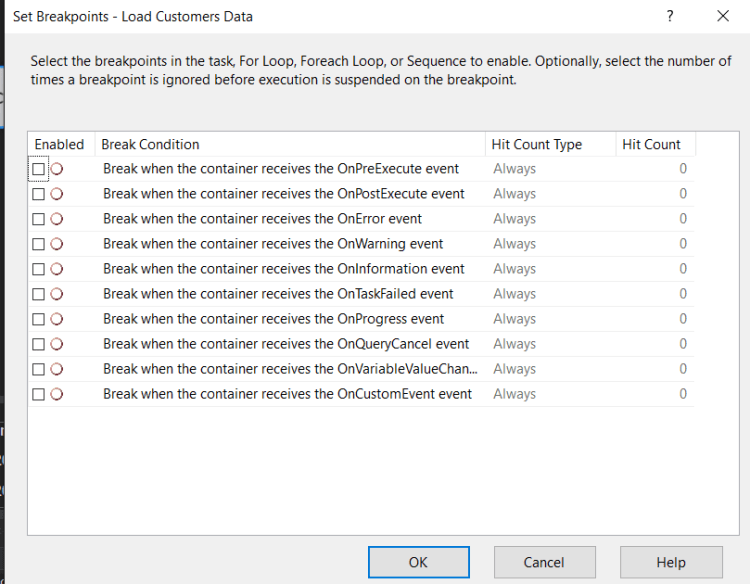
As you can see in the above screenshot that you can enable any of the above options to debug the ssis package. Also can see each option in the below table.
| Break condition | Description |
|---|---|
| When the task or container receives theOnPreExecute event. | Called when a task is about to execute. This event is raised by a task or a container immediately before it runs. |
| When the task or container receives theOnPostExecute event. | Called immediately after the execution logic of the task finishes. This event is raised by a task or container immediately after it runs. |
| When the task or container receives theOnError event. | Called by a task or container when an error occurs. |
| When the task or container receives theOnWarning event. | Called when the task is in a state that does not justify an error, but does warrant a warning. |
| When the task or container receives theOnInformation event. | Called when the task is required to provide information. |
| When the task or container receives theOnTaskFailed event. | Called by the task host when it fails. |
| When the task or container receives theOnProgress event. | Called to update progress about task execution. |
| When the task or container receives theOnQueryCancel event. | Called at any time in task processing when you can cancel execution. |
| When the task or container receives theOnVariableValueChanged event. | Called by the Integration Services runtime when the value of a variable changes. The RaiseChangeEvent of the variable must be set to true to raise this event.
** Warning ** The variable associated with this breakpoint must be defined at the container scope. If the variable is defined at the package scope, the breakpoint does not get hit. |
| When the task or container receives theOnCustomEvent event. | Called by tasks to raise custom task-defined events. |
Both breakpoints and data viewer options are very useful when you troubleshoot/debug/develop complex ssis packages.
Hope you like the post!
Happy Reading!
Cheers
Ramasankar Molleti
 Ramasankar Molleti Blog
good post n really helpful. thanks much