
Every database environment, deadlocks are common problems and it is important for DBA’s to monitor deadlocks and make sure to prevent them from reoccurring.
There are multiple ways to monitor deadlocks
Using Trace Flags
We can enable two trace flags 1204 and 1222 to capture deadlock information in error log. Run the below code, this will enable deadlock trace flags.
DBCC TRACEON (1204,1222);GO
If you would like to enable deadlock trace flags globally, you can use the below
DBCC TRACEON (1204,1222,-1);GO
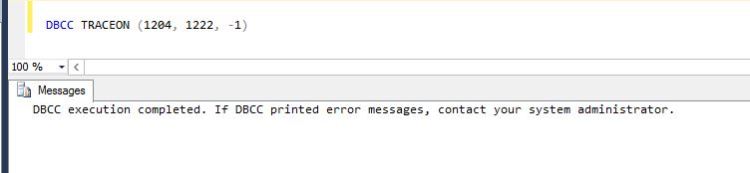
Let’s force deadlock by creating two tables. Please run these queries in the order
--Session 1:
CREATE TABLE tbl_dlck1 (colum1 INT);GO
INSERT INTO tbl_dlck1 VALUES (1);GO
BEGIN TRAN
UPDATE tbl_dlck1 SET colum1 = 2;GO
-- Session 2 :
CREATE TABLE tbl_dlck2 (colum1 INT);
INSERT INTO tbl_dlck2 VALUES (1);GO
BEGIN TRAN
UPDATE tbl_dlck2 SET colum1 = 2;GO
--Session 1:
UPDATE tbl_dlck2 SET colum1 = 2;
--Session 2:
UPDATE tbl_dlck1 SET colum1 = 2;

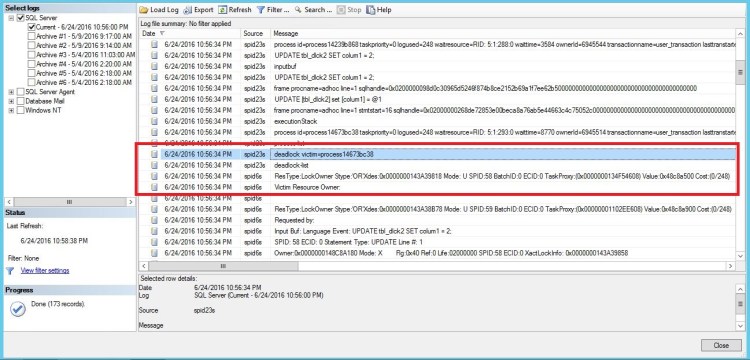
Let’s see the error log. Here’s the deadlock information in the error log.
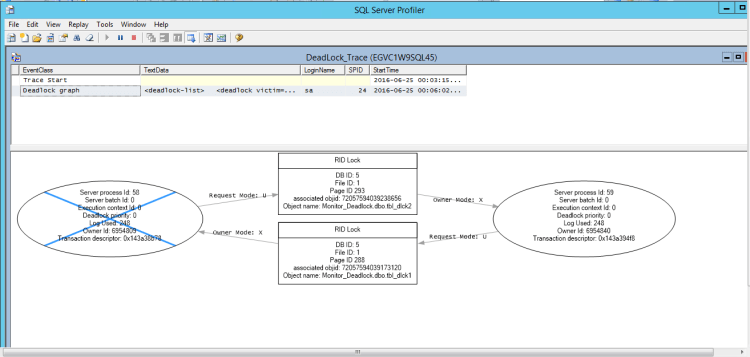
Using Profiler:
I have selected “Deadlock graph”, “Lock:Deadlock” and “Lock:Deadlock Chain” events in the profiler. Here is the result
Using Extended Events:
There are two ways we can capture deadlock information one is with system_health and another one is to create own extended event session. System_Health is default extended event which runs continuously by SQL Server.
Using System_Health extended event. Use the below queries to get the information.
select CAST(target_data as xml) as TargetData
from sys.dm_xe_session_targets st
join sys.dm_xe_sessions s on s.address = st.event_session_address
where name = 'system_health'
Using XPath we can then get just the deadlock graphs from the XML by using a derived table and a CROSS APPLY to get the individual Event Nodes as follows:
select XEventData.XEvent.value('(data/value)[1]', 'varchar(max)') as DeadlockGraph
FROM
(select CAST(target_data as xml) as TargetData
from sys.dm_xe_session_targets st
join sys.dm_xe_sessions s on s.address = st.event_session_address
where name = 'system_health') AS Data
CROSS APPLY TargetData.nodes ('//RingBufferTarget/event') AS XEventData (XEvent)
where XEventData.XEvent.value('@name', 'varchar(4000)') = 'xml_deadlock_report'
This query will take long time to execute, but there is no server performance impact but you would expect this query to take more time.

Using creating own extended session to capture the deadlock. Select xml_deadlock_report event as shown below

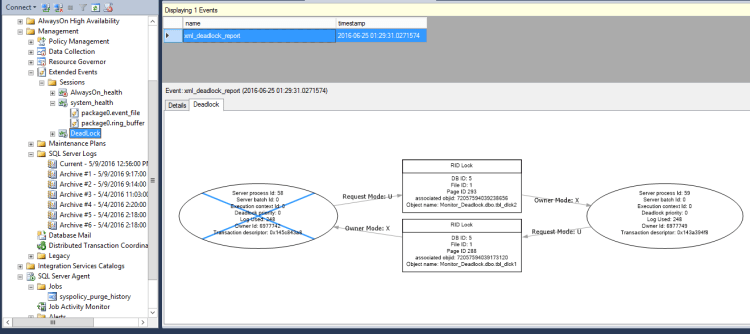
That’s all about deadlocks.
References:
http://www.sqlservercentral.com/articles/deadlocks/65658/
https://technet.microsoft.com/en-us/magazine/2009.01.sql2008.aspx
Cheers
Hope you like the post!
Ramasankar Molleti
LinkedIn: LinkedIn Profile
Twitter: Twitter
 Ramasankar Molleti Blog