
I have a table with different partitions and would like to truncate rows in the particular partitions in a table rather than truncating whole table. How can we do this?
This task is fairly easy in sql server 2016. Microsoft introduced a new clause called “With Partitions” in truncate table command.
Let’s see how it works.
For the demonstration i have created a sample database “SamplePartition” with three Filegroups FG1, FG2 and FG3.
USE Master
GO

CREATE DATABASE SamplePartition
ON PRIMARY
(NAME='SamplePartition_1',
FILENAME=
'E:\PartitionDB\FG1\SamplePartition_1.mdf',
SIZE=2,
MAXSIZE=100,
FILEGROWTH=1 ),
FILEGROUP FG2
(NAME = 'SamplePartition_2',
FILENAME =
'E:\PartitionDB\FG2\SamplePartition_2.ndf',
SIZE = 2,
MAXSIZE=100,
FILEGROWTH=1 ),
FILEGROUP FG3
(NAME = 'SamplePartition_3',
FILENAME =
'E:\PartitionDB\FG3\SamplePartition_3.ndf',
SIZE = 2,
MAXSIZE=100,
FILEGROWTH=1 )
GO
Now, we have a database with three data files on three different file groups.
 Use SamplePartition
GO
-- Confirm Filegroups
SELECT name as [File Group Name]
FROM sys.filegroups
WHERE type = 'FG'
GO
-- Confirm Datafiles
SELECT name as [DB File Name],physical_name as [DB File Path]
FROM sys.database_files
where type_desc = 'ROWS'
GO

Create partition function
Use SamplePartition
GO
CREATE PARTITION FUNCTION salesYearPartitions (datetime)
AS RANGE RIGHT FOR VALUES ( '2015-01-01', '2016-01-01')
GO
Create Partition Scheme:
Use SamplePartition
GO
CREATE PARTITION SCHEME Test_PartitionScheme
AS PARTITION salesYearPartitions
TO ([PRIMARY], FG2, FG3 )
GO
Create Partition Table:
Use SamplePartition
GO
CREATE TABLE SalesArchival
(SaleTime datetime PRIMARY KEY,
ItemName varchar(50))
ON Test_PartitionScheme (SaleTime);
GO
Inserting data to partition table:
Use SamplePartition
GO
INSERT INTO SalesArchival (SaleTime, ItemName)
SELECT '2013-03-25','Item1' UNION ALL
SELECT '2014-10-01','Item2' UNION ALL
SELECT '2015-01-01','Item1' UNION ALL
SELECT '2015-08-09','Item3' UNION ALL
SELECT '2015-12-30','Item2' UNION ALL
SELECT '2016-01-01','Item1' UNION ALL
SELECT '2016-05-24','Item3'
GO
Check the data in different partitions
Use SamplePartition
GO
select partition_id, index_id, partition_number, Rows
FROM sys.partitions
WHERE OBJECT_NAME(OBJECT_ID)='SalesArchival'
GO
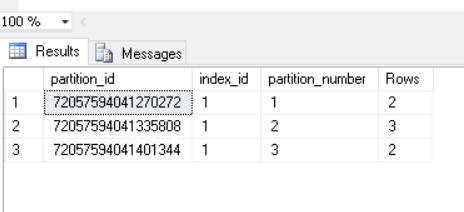
With this we have data spread across different partitions
Let us truncate partition number 2
TRUNCATE TABLE SalesArchival
WITH (PARTITIONS(2));
I have truncated the rows in partition 2. Let’s see the result

There you go! We have truncated the rows in partition 2.
If you would like to truncate the range of partitions you can give the range like this
TRUNCATE TABLE SalesArchival
WITH (PARTITIONS(2 to 3));
You cannot use TRUNCATE TABLE on tables that:
- Are referenced by a FOREIGN KEY constraint. (You can truncate a table that has a foreign key that references itself.)
- Participate in an indexed view.
- Are published by using transactional replication or merge replication.
References:
https://msdn.microsoft.com/en-us/library/ms177570.aspx
How to create quick partition table with example
Hope you like the post!
Ramasankar Molleti
LinkedIn: LinkedIn Profile
Twitter: Twitter
 Ramasankar Molleti Blog