
This example, demonstrate how to perform insert, update and delete on single statement using MERGE. If you are a Database Developer/BI expert, you would need to refresh the target table to match the source tables periodically. Prior to SQL Server 2008, you would need to perform this task by writing separate T-SQL logic for insert, delete and update. Starting from SQL Server 2008, you can perform all three SQL Statements (Insert, Update and Delete) in one statement using MERGE Statement.
What is the use of MERGE statement in SQL Server?
Merge statement introduced in SQL Server 2008 allows us to perform inserts, updates and deletes in one statement, which means we no longer have to use multiple statements to perform insert, update and delete.
Basic Merge syntax:

To try the example , you’ll need to first run the following script to create and populate the tables used in the examples:
 -- CREATE A SOURCE TABLE
CREATE TABLE [DBO].[STUDENT_SOURCE](
[ID] [INT] NOT NULL,
[STUDENTNAME] [NCHAR](50) NOT NULL,
CONSTRAINT [PK_STUDENT_SOURCE] PRIMARY KEY CLUSTERED
(
[ID] ASC
)WITH (PAD_INDEX = OFF, STATISTICS_NORECOMPUTE = OFF, IGNORE_DUP_KEY = OFF, ALLOW_ROW_LOCKS = ON, ALLOW_PAGE_LOCKS = ON) ON [PRIMARY]
) ON [PRIMARY]
 -- CREATE A TARGET TABLE</pre>
CREATE TABLE [DBO].[STUDENT_TARGET](
[ID] [INT] NOT NULL,
[STUDENTNAME] [NCHAR](50) NOT NULL,
CONSTRAINT [PK_STUDENT_TARGET] PRIMARY KEY CLUSTERED
(
[ID] ASC
)WITH (PAD_INDEX = OFF, STATISTICS_NORECOMPUTE = OFF, IGNORE_DUP_KEY = OFF, ALLOW_ROW_LOCKS = ON, ALLOW_PAGE_LOCKS = ON) ON [PRIMARY]
) ON [PRIMARY]
 --- INSERT RECORDS INTO SOURCE TABLE
INSERT INTO [STUDENT_SOURCE] VALUES (1,'RAMA')
INSERT INTO [STUDENT_SOURCE] VALUES (2,'SANKAR')
--- INSERT RECORDS INTO TARGET TABLE
INSERT INTO [STUDENT_TARGET] VALUES (1, 'RAMASANKAR')
INSERT INTO [STUDENT_TARGET] VALUES (3, 'MURTHY')
After you ran the above script, you have two tables(STUDENT_SOURCE and STUDENT_TARGET) created with some sample data as below.
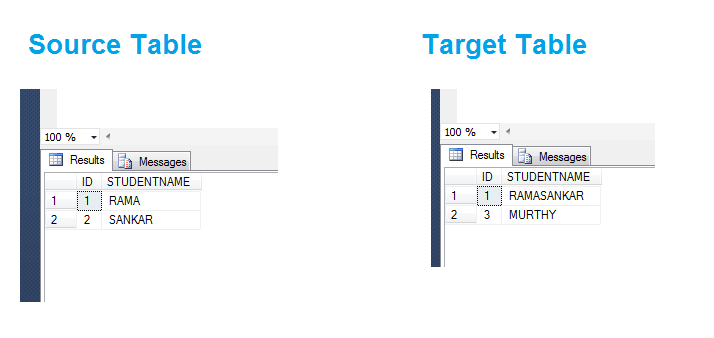
Now, I will use MERGE statement to synchronize target table with source.
 MERGE [STUDENT_TARGET] AS T
USING [STUDENT_SOURCE] AS S
ON T.ID = S.ID
WHEN MATCHED THEN
UPDATE SET T.STUDENTNAME = S.STUDENTNAME
WHEN NOT MATCHED BY TARGET THEN
INSERT (ID, STUDENTNAME) VALUES (S.ID,S.STUDENTNAME)
WHEN NOT MATCHED BY SOURCE THEN
DELETE;
(3 row(s) affected)
There you go, Three rows are modified which means one update, one Insert and one Delete performed in single statement.
After executing the Merge statement we can see that both source and target are identical.
 SELECT * FROM STUDENT_SOURCE;</pre>
SELECT * FROM STUDENT_TARGET;

MERGE statement is very useful improvement to update database tables with complex logic. Better Performance and scalability can be achieved with MERGE statement.
Hope you enjoyed the post!
Cheers
Ramasankar Molleti
LinkedIn: LinkedIn Profile
Twitter: Twitter
 Ramasankar Molleti Blog